AI Guide

What Is ChatGPT? Meaning, How It Works & Uses

Editorial TeamEditorial Team・Aug 26, 2026・20 mins read
What Is ChatGPT? Meaning, How It Works & Uses

Maybe you came to ChatGPT for a quick email rewrite and stayed to figure out a spreadsheet, plan a weekend, or untangle a tricky question. That is what makes it interesting: one chat box can help with surprisingly different tasks.

So, what is ChatGPT? It is a generative AI assistant made by OpenAI. You can talk to it in everyday language, ask it to write or explain something, and refine the answer as you go. And in 2026, ChatGPT is becoming more than a chatbot. Here is what it does, how it works, which models matter, and where Chat Smith fits in.

chat smith pro

What Is ChatGPT?

ChatGPT is a conversational AI assistant developed by OpenAI. People use it to ask questions, write and edit text, learn new topics, brainstorm ideas, and work through problems. You enter a prompt—a question, instruction, or file—and can then ask follow-up questions to refine the response. ChatGPT is the product, while GPT refers to a family of AI models used to power it.

It is worth separating the app from the technology behind it. ChatGPT is the product; GPT models are some of the AI models that power it. Depending on the mode and plan, the product can also use tools for web search, file analysis, images, and longer tasks.

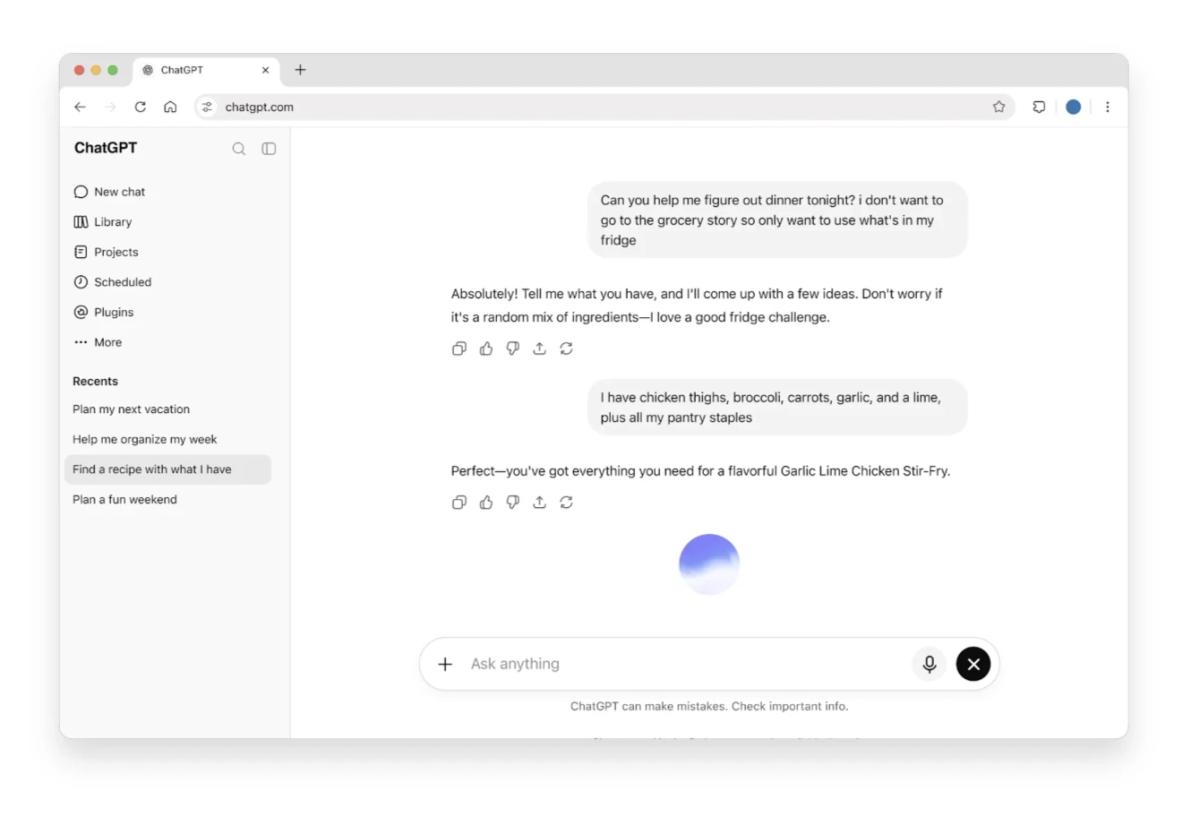
ChatGPT Chat interface showing an example conversation
ChatGPT Chat interface: everyday questions and follow-up conversations.

Who Created ChatGPT?

OpenAI developed ChatGPT and launched it publicly on November 30, 2022. The first release focused on text conversations. Since then, ChatGPT has expanded into voice, visual tasks, research, coding, and agent-based workflows. The exact features you see depend on your account and the experience you are using.

What Does GPT Stand For?

In ChatGPT, GPT stands for Generative Pre-trained Transformer. The three parts of the name describe how the underlying model generates content using patterns learned during training:

  • Generative means the model creates text, summaries, code, and other content.
  • Pre-trained means it learns patterns from large amounts of data before responding to users.
  • Transformer is the neural-network architecture used to process relationships within information.

You will also hear the term large language model (LLM). That is the underlying type of AI system used for many language tasks. ChatGPT is the interface that makes working with these models feel like a conversation.

How Does ChatGPT Work?

ChatGPT works by processing a user's prompt, using a trained AI model to interpret context, and generating a response in small units called tokens. The model has learned statistical patterns from training data; depending on the experience and available tools, ChatGPT can also search the web or work with files to support an answer.

Here is the short version of what happens behind the scenes.

Pre-training: Learning Patterns

A language model is trained on large amounts of information to learn how language, concepts, and relationships work. This is why it can explain a concept in plain English, suggest code, or turn rough notes into a polished paragraph. It does not mean the model has a perfectly accurate database of everything it has encountered.

Post-training: Learning to Follow Instructions

The model is then refined to be more helpful and better at following instructions. Techniques can include supervised examples and reinforcement learning from human feedback (RLHF). This training improves how the assistant responds, but it does not eliminate mistakes or bias.

Responding to Your Prompt

When you type a request, ChatGPT uses the current conversation to generate the next part of its answer. If an appropriate tool is available, it may also search the web, examine an uploaded file, or perform another supported action.

That is why adding context matters. "Write an email" gives the assistant a lot to guess. "Write a warm, 100-word follow-up to a client after a product demo; do not invent a deadline" gives it something useful to work with.

What Are the Latest ChatGPT Models?

ChatGPT has several model and reasoning options depending on the plan and task. Most beginners can start with the default ChatGPT experience rather than choosing a model by its version number.

Latest ChatGPT Models Compared

Here are the main choices at a glance:

ChatGPT optionBest suited for
GPT-6 (Instant and thinking options)Everyday writing, analysis, and more complex questions
GPT-6 ProDemanding professional tasks on eligible plans
Earlier selectable models (where available)Comparing model behavior across workflows

Model names, features, and access can change. Check OpenAI's current plan details for availability; for a deeper explanation of earlier generations, use the model overview linked below.

What Is GPT-5.6 Sol?

GPT-5.6 Sol is an OpenAI reasoning model for complex professional tasks, including coding, research, analysis, and technical problem-solving. It is a model, not a separate ChatGPT app or Work mode. In supported ChatGPT plans, users may select GPT-5.6 Sol separately from newer GPT-6 options. Availability depends on the plan and workspace settings.

Want the longer version, including earlier GPT generations and what they were built for? See our ChatGPT model overview.

Which ChatGPT Models Are Available on Chat Smith?

Chat Smith is a separate AI platform where you can choose from supported GPT models and models from other providers. You do not need a ChatGPT subscription just to use the GPT options offered within Chat Smith; access and limits follow Chat Smith's own plans.

Here are five featured GPT models listed in Chat Smith's English model catalog:

GPT model on Chat SmithGood starting point for
GPT-6 AstraDeeper reasoning, coding, and analysis
GPT-6 SolWriting, problem-solving, and complex tasks
GPT-6 LunaQuick conversations, summaries, and creative ideas
GPT-5.6 SolCoding, research, and longer work
GPT-5.6 LunaFast everyday questions and drafting

You can explore GPT-6 Astra, GPT-6 Sol, or GPT-6 Luna individually. Chat Smith also lists older models, including GPT-5, GPT-4o, GPT-o3, and GPT-5 Mini. Its model catalog is not identical to the choices in the official ChatGPT app, and not every newer OpenAI model is necessarily available in Chat Smith.

What Is ChatGPT Used For? Common Uses and Examples

ChatGPT is useful for writing and editing, learning new topics, researching information, troubleshooting code, analyzing data, and discussing images. The best way to understand what ChatGPT is good for is to try it on a specific task and refine the answer with follow-up questions.

Write and Edit Content

ChatGPT can help turn messy notes into an email, create an article outline, shorten a report, or adjust the tone of a message. For example:

"Write a polite follow-up email after a meeting. Thank the client, recap the three points below, and keep it under 120 words. Do not add commitments I haven't made."

After ChatGPT drafts an email or article, review its tone, grammar, and clarity before sending it. Chat Smith's grammar checker can help refine punctuation and sentence structure without replacing your editorial judgment.

Learn and Understand Difficult Topics

Think of ChatGPT as a study partner that does not mind follow-up questions. Ask it to explain a concept to a beginner, use an analogy, then test your understanding.

Try: "Explain compound interest to someone who has never invested. Use a simple example with numbers, then quiz me with two questions." Check calculations and learning materials rather than treating the explanation as the last word.

Research and Summarize Information

If you have a long report or article, ChatGPT can help identify the main points, pull out unanswered questions, and organize research notes. When web search is available, it may also gather recent information—but you should still open the original sources.

When reviewing a long article, research report, or meeting transcript, ChatGPT can identify key points and unresolved questions. For a focused text workflow, Chat Smith's AI summarizer can condense dense material into a shorter overview. Check figures and conclusions against the original document.

Work With Code and Data

ChatGPT can explain an error message, suggest a spreadsheet formula, help write tests, or talk through a data problem. Give it the actual code or formula and describe what you expected to happen. Then run the suggested fix yourself. AI-generated code can look right and still fail.

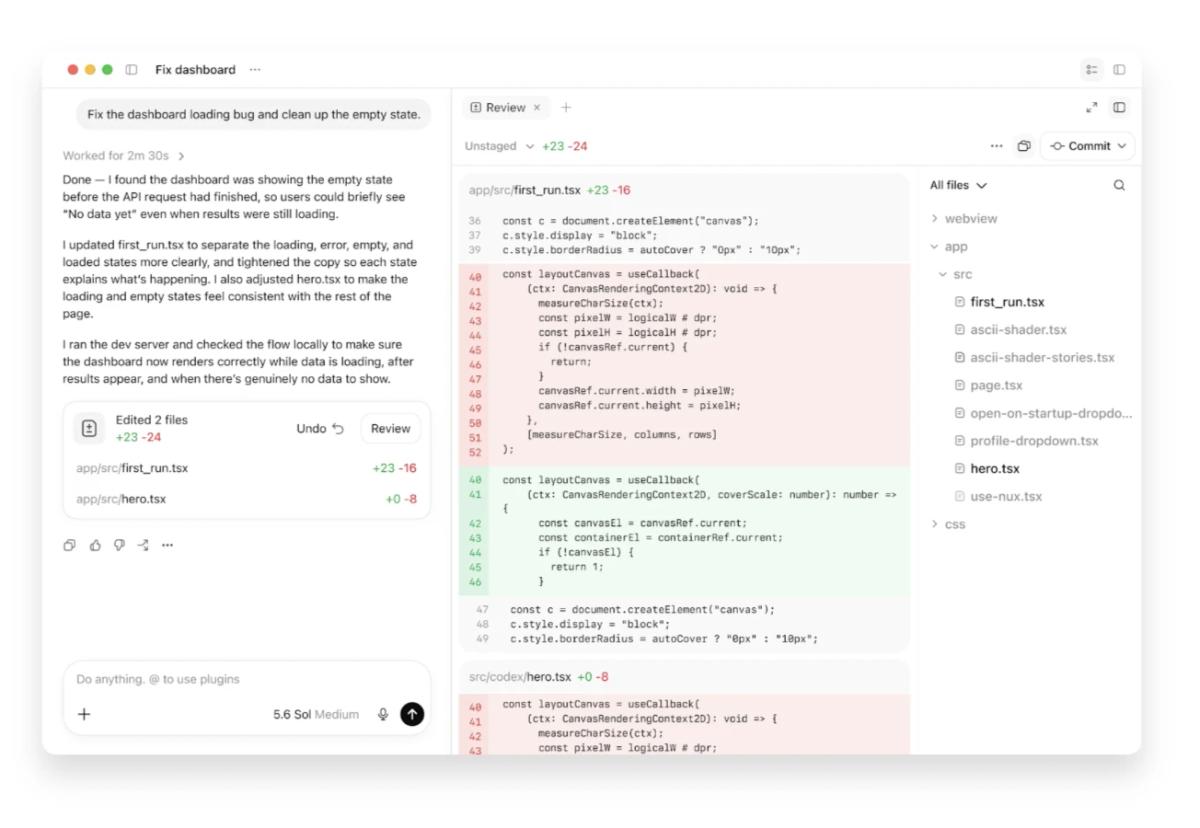
For larger software tasks, OpenAI also offers Codex, a coding agent that can inspect project files, propose edits, and help review changes. It is different from a regular ChatGPT answer that suggests a code snippet: its supported workflows can work directly across files. Always test changes and review the diff before merging.

OpenAI Codex interface reviewing code changes in a project
Codex: a coding agent that can inspect and propose changes to software projects.

Create and Discuss Images

Some ChatGPT experiences can interpret uploaded images, generate new visuals, and work with voice. For example, you might ask for a product-photo concept or upload a chart and request an explanation.

ChatGPT can discuss a visual concept or interpret an uploaded chart. To turn a written prompt into an illustration or marketing asset, Chat Smith's image generator provides a dedicated creation workflow. Inspect generated images for inaccurate text, unexpected objects, and misleading details.

What Is ChatGPT Work Mode? How It Works, Uses & Chat Comparison

ChatGPT Work is OpenAI's agent experience for completing multi-step tasks, not just answering questions. It can research topics, work across supported files and connected apps, analyze information, and create finished documents, spreadsheets, presentations, reports, or Sites. It is designed for projects that require several steps, tools, or sources, with people able to guide and review the process.

Unlike a standard chat reply, Work aims to produce an outcome: for example, reviewing campaign reports, comparing performance, and preparing a presentation with findings and recommendations. Available tools and access vary by plan and workspace.

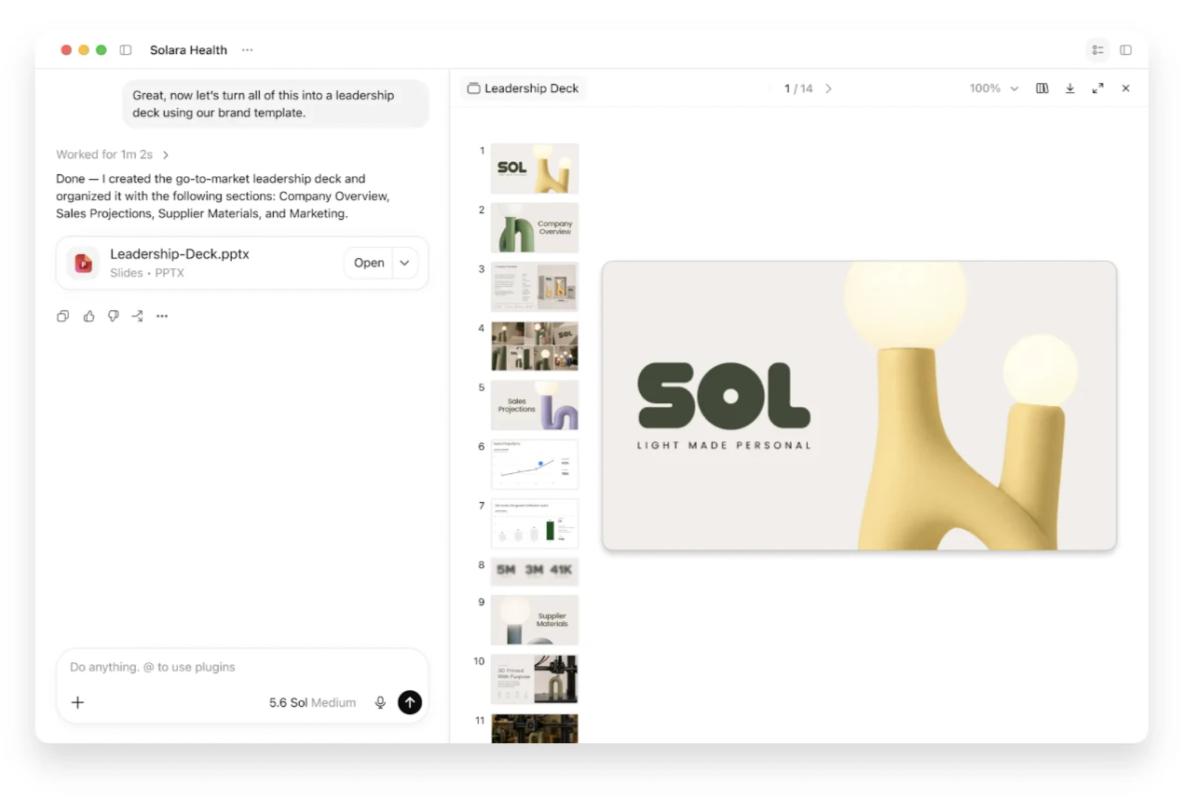
ChatGPT Work interface creating a presentation from a multi-step workflow
ChatGPT Work: a multi-step workflow resulting in a presentation.

How Does ChatGPT Work Mode Work?

You begin by describing the outcome you want, rather than only asking for an answer. ChatGPT Work can then break the project into steps, gather information using supported files, connected apps, and web tools, analyze the findings, and prepare a finished deliverable. You can follow progress, clarify instructions, change direction, and review the result.

For supported website tasks, Work may use a cloud browser that can navigate pages, enter information, and interact with websites, including some signed-in services. It may pause for login, permission, or confirmation. It cannot reliably perform every action on every website, so important outputs and changes still need human review.

What Can You Use ChatGPT Work For?

ChatGPT Work is especially useful when a task has several stages or requires information from different sources. Examples include comparing research findings across documents, analyzing marketing or financial reports, preparing a presentation from an uploaded dataset, and organizing project notes into an action plan.

For example, a marketing team could ask: "Review the attached campaign reports, compare acquisition cost and conversion rates by channel, summarize the biggest changes, and create a five-slide presentation. Flag missing data rather than estimating it." Work can use supported tools to prepare the analysis and deliverable, while the team checks the figures and conclusions.

ChatGPT Work vs Chat: What's the Difference?

Regular Chat is best for quick questions, brainstorming, explanations, and revising a draft through conversation. ChatGPT Work is better suited to longer tasks that involve gathering information, using tools, checking multiple sources, and producing a complete deliverable. For example, Chat might help outline a market research report; Work could analyze source documents and build the report itself.

The difference is the workflow, not simply which AI model gives the answer: Chat emphasizes direct conversational help, while Work can coordinate several actions to reach a result. You can still ask follow-up questions or revise Work's output.

How to Get Started With ChatGPT Work

If Work is available on your plan, select Work in ChatGPT on the web, mobile app, or supported desktop app. Describe the result you need, provide relevant files or authorize supported connections, and specify constraints such as format, audience, and sources. Follow its progress and respond to any requests for access or approval. Review the final output before sharing or using it.

What Are the Limitations of ChatGPT Work?

Work is not a separate GPT model and is not the same as ChatGPT Business, which is a subscription offering. Its capabilities depend on your plan, workspace permissions, available tools, and website support. A browser or connected app may require sign-in or confirmation; some actions may not be supported. Work can also make research, calculation, or interpretation errors, so verify important facts, files, and actions.

ChatGPT vs Search Engines: What's the Difference?

ChatGPT and search engines can both help you find information, but they serve different purposes. A search engine finds and ranks webpages you can inspect. ChatGPT uses AI models to generate explanations, organize ideas, and respond to follow-up questions. When web-search tools are available, it may also retrieve current sources.

For example, use a search engine to find an official product announcement or research paper. Then use ChatGPT to explain unfamiliar terms, compare ideas across documents, or organize notes into a summary. For important facts, check the original sources instead of relying on a generated answer or search snippet.

In short, search engines help locate information; ChatGPT helps explain and work with it.

How to Use ChatGPT: A Beginner's Guide

To use ChatGPT, open the official ChatGPT website, enter a question or task in everyday language, add context, and ask follow-up questions to improve the response. These five steps can help beginners:

  1. Start with a task. For example: "Help me prepare questions for a job interview."
  2. Add useful context. Mention the role, experience level, audience, and relevant details.
  3. Set boundaries. Specify the length, tone, format, and what the assistant should not assume.
  4. Request a revision. Try "Make this shorter" or "Give me a more practical example."
  5. Check the result. Verify important facts, calculations, sources, and anything you plan to share.

How to Write Better ChatGPT Prompts

ChatGPT generates responses token by token using patterns learned during training and the context provided in the conversation. It does not automatically know your goal, audience, or preferred format. If your request is vague, the model has to infer those details, which can lead to generic answers or incorrect assumptions. A better prompt gives it clearer information to work with—not a special command or a guarantee of accuracy.

A practical prompt includes five elements: the task (what to do), context (relevant facts), audience (who the answer is for), output format (how to present it), and constraints (what to include or avoid). You can use this template: “Help me [task] for [audience]. Context: [relevant details]. Return the result as [format]. Use a [tone] tone and keep it [length]. Do not assume [missing information]; ask if a key detail is unclear.”

Compare a vague request—“Give me social media ideas”—with a clearer prompt: “Plan seven Instagram posts for a small coffee shop near a university. Our audience is local students, and we want to highlight affordable drinks and a quiet study space. Return a table with the post concept, caption, and suggested visual. Use a friendly tone; do not invent prices or discounts.” The improved version identifies the task, target audience, business context, output structure, and limits, making the response easier to evaluate and revise.

For example, asking for “a marketing plan” leaves the topic, budget, channel, and time frame open to interpretation. Supplying those details narrows the possible responses. Specifying a table or bullet list guides the output structure, while “do not invent statistics” encourages the assistant to flag missing information instead of filling gaps.

Clear prompts can improve relevance, but they cannot eliminate hallucinations. If the answer depends on current facts, ask ChatGPT to use available search tools and cite primary sources; then verify those sources yourself. For a complex task, refine the prompt through follow-up questions rather than trying to perfect everything in one message.

Two Practical ChatGPT Prompts to Try

For learning: "Explain compound interest to a beginner using a $1,000 example. Show the calculation step by step, then quiz me with two questions. If you make assumptions, label them clearly."

For productivity: "Turn the meeting notes below into a table with decisions, action items, owners, and deadlines. Mark missing owners or dates as ‘Not specified’ rather than inventing details. Notes: [paste notes]."

Clear prompts improve ChatGPT results for studying, writing, and planning. To explore templates across these tasks, see our ChatGPT prompts guide, then adapt each example to your own audience and constraints.

Is ChatGPT Free? Plans and Pricing

Yes, ChatGPT has a free plan. OpenAI also offers paid subscriptions for people who need different reasoning options, higher allowances, or additional tools. Plans for individuals and organizations are separate, and the features attached to each can change.

You can do plenty with free access, especially if you mainly ask questions, brainstorm, or draft short pieces of writing. A paid plan may be worth considering if you frequently work with larger files, advanced reasoning, or longer projects. Check the official ChatGPT pricing page for current details rather than relying on an old pricing screenshot.

One easy thing to mix up: a ChatGPT subscription, OpenAI API usage, and a Chat Smith subscription are different products with different billing and usage limits.

What Are ChatGPT's Limitations?

ChatGPT can be useful, but its answers are not guaranteed to be accurate, current, or complete. Keep these limitations in mind:

  • Accuracy: ChatGPT can produce incorrect facts, calculations, invented citations, or flawed code. Verify important claims and test outputs.
  • Freshness: Without access to up-to-date sources, it may miss recent changes. Even retrieved sources may be incomplete.
  • Context: Vague prompts can lead to generic advice or incorrect assumptions. Share the relevant goal, audience, and constraints.
  • Bias and uneven performance: Responses can reflect limitations in training data and vary across languages, subjects, and tasks.
  • Privacy and judgment: Avoid sharing confidential data without permission, and consult qualified professionals for consequential decisions.

Treat AI responses as starting points, and keep original sources and human review in the workflow.

Is ChatGPT Accurate and Safe to Use?

ChatGPT can save you time, but it cannot guarantee that every answer is correct. It can sound confident while getting a date wrong, making up a citation, or misunderstanding a document. These errors are often called AI hallucinations.

The safest habit is simple: use ChatGPT to help you think and draft, but verify what matters.

How to Spot AI Hallucinations

Be cautious when an answer gives a precise statistic without a source, quotes a document you cannot find, or skips over uncertainty. Ask for evidence, check the original source, and recalculate important numbers. For coding tasks, run tests. For school or professional research, distinguish the assistant's explanation from primary evidence.

Privacy and Personal Information

ChatGPT is an online service that processes what you enter. Avoid pasting passwords, confidential client information, or sensitive records unless you understand the applicable terms and have permission to share them. Review the account's Data Controls and your workplace policies before uploading documents.

What About Children and Teenagers?

OpenAI's individual terms generally require users to be at least 13, or the minimum age allowed in their country. People under 18 need permission from a parent or legal guardian. Families and educators should also discuss misinformation, oversharing, age-appropriate use, and responsible schoolwork.

For health, legal, financial, or safety-critical choices, AI output should support—not replace—reliable sources and qualified professional judgment.

ChatGPT vs Chat Smith: What's the Difference?

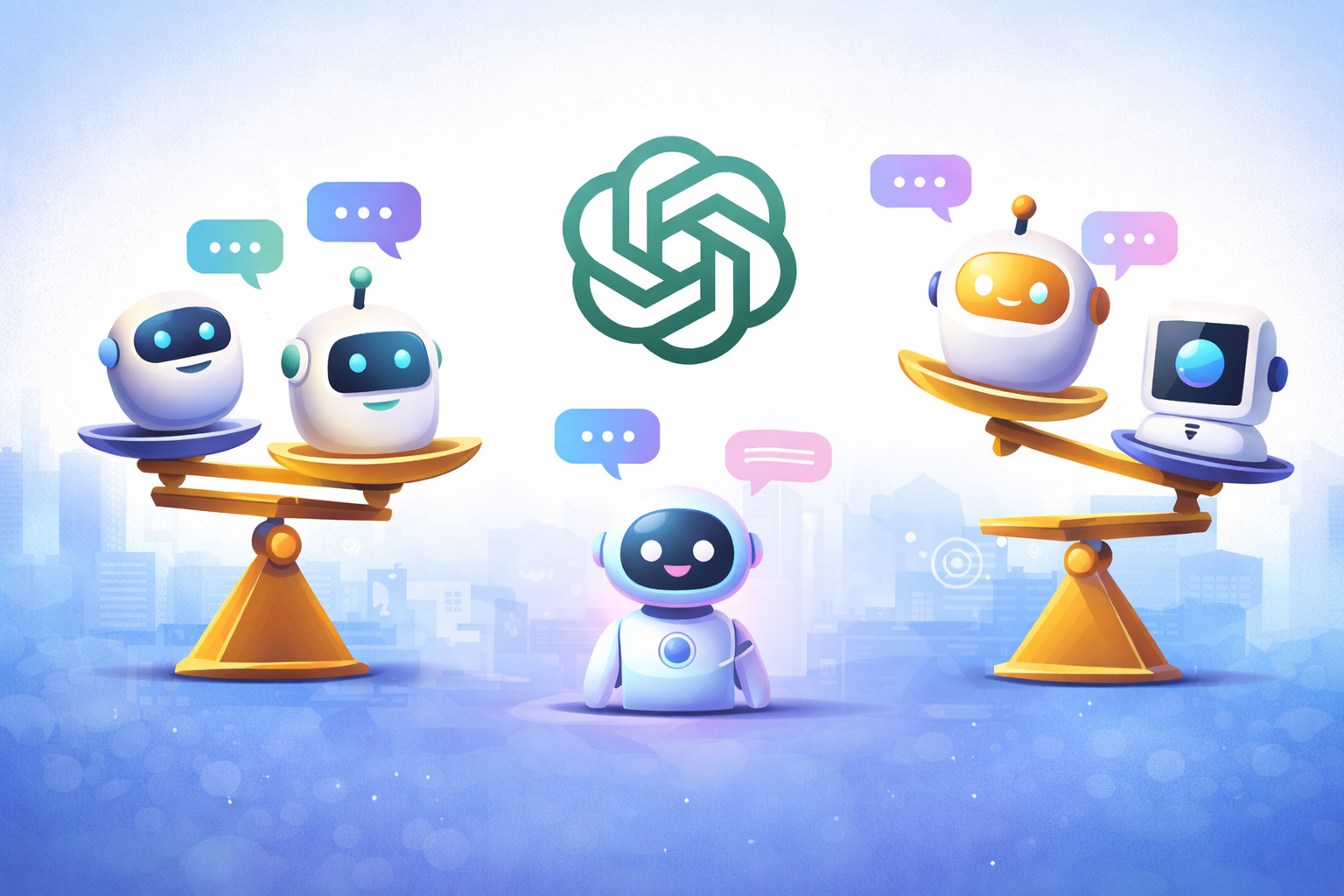
They are not the same app. ChatGPT is OpenAI's own assistant, while Chat Smith is an independent multi-model AI platform that offers supported GPT models alongside options from other AI providers.

Here is the practical difference:

FeatureChatGPTChat Smith
ProductOfficial OpenAI assistantSeparate AI platform
Model choiceOpenAI models and product-specific modesSupported GPT and other model families
Main experienceChat, Work, Codex, and native toolsMulti-model conversations and specialized tools
SubscriptionOpenAI plans and limitsSeparate Chat Smith plans and limits

If you want OpenAI's official account features or a particular ChatGPT Work tool, use ChatGPT. If you like trying more than one model family and choosing tools for different projects, Chat Smith is worth exploring.

For a closer look at OpenAI's official assistant versus a multi-model platform—including subscription differences, model choice, and workflow tools—read the Chat Smith vs ChatGPT comparison.

What Can You Do With Chat Smith?

Chat Smith is designed for people who would rather choose a tool for the task than stay with a single AI model. It brings supported options from GPT, Gemini, Claude, Grok, DeepSeek, and others into one place, alongside features for writing, research, and creative work.

Try Different Models for Different Tasks

There is no universal best AI model. One may be more useful for an outline; another may handle a tricky coding question or a long document better. Chat Smith lets you explore supported models without having to juggle several separate AI apps.

Make Writing and Editing Easier

You can start with Chat Smith's AI Writing Tool for a first draft, then use its AI Humanizer to improve awkward or repetitive phrasing. You are still the editor: add your own examples, check claims, and keep the parts that actually sound like you.

Go From an Idea to a Useful Output

Chat Smith also includes focused tools for summarizing information and creating visuals. Instead of treating every task as an open-ended chat, you can choose a workflow suited to what you want to produce.

If you are curious about the broader toolset, here is a beginner-friendly guide to what Chat Smith AI can do. Features and model access can vary by plan.

What Is the Future of ChatGPT?

The next step for ChatGPT is not simply giving longer or smarter answers. The bigger shift is from answering a question to helping complete the job. That is already happening, although how far an AI assistant can act on its own still depends on its tools, permissions, and safeguards.

From AI Chatbot to AI Agent

An AI chatbot responds to what you ask. An AI agent can work through a sequence of steps, use tools, and return a finished result. ChatGPT Work is an example: in supported experiences, it can research across files and apps and help produce documents or other deliverables. The important distinction is that useful automation should still give people control over consequential actions.

A Bigger Role in Everyday Productivity

Writing a draft is helpful. Turning meeting notes into a project plan, organizing information from several documents, or preparing a presentation is closer to a complete workflow. ChatGPT and other AI productivity apps are moving toward that second kind of work.

More Personal AI Assistants

AI assistants are also becoming more context-aware. Memory, connected tools, and personal preferences can reduce repetitive instructions and help an assistant understand an ongoing project. But personalization needs clear controls: users should know what is remembered, which sources are connected, and how to change those settings.

More Rules Around Safety and Transparency

As assistants gain access to more data and tools, privacy, oversight, and transparency become harder to ignore. In the EU, transparency requirements under the AI Act began applying on August 2, 2026 to certain AI systems, including obligations around disclosing AI interactions and generated content. Rules differ by region and continue to evolve.

The direction is promising, but the sensible question remains the same: What can this assistant reliably do, and what should a person still review?

Final Thoughts: Choosing the Right AI Assistant

ChatGPT has grown from a question-and-answer chatbot into a useful way to write, learn, research, code, and work through everyday tasks. You do not need to understand transformer architecture or memorize every model name to benefit from it. Start with a real problem, give clear instructions, and check the parts that matter.

And remember, ChatGPT is not your only way to use AI. If you want to compare supported GPT models with other AI assistants or use more focused writing and creative tools, Chat Smith offers another approach. The best choice is the one that makes your actual work easier—not the one with the longest feature list.

Frequently Asked Questions

ChatGPT is an AI assistant developed by OpenAI. It can explain ideas, answer questions, help write content, and assist with everyday tasks through a natural-language conversation.

logo chat smith

Editorial Team

Managing Editor

The Chat Smith Editorial Team brings together AI enthusiasts, researchers, and creators to make AI accessible and practical. We share trends, tool reviews, and actionable guides that help individuals and businesses stay informed, boost productivity, and get more from AI.

Share this article

Related Articles