Comparison

Chat Smith vs DeepSeek: Which AI Assistant Fits Your Work?

Editorial TeamEditorial Team・Nov 13, 2026・15 mins read
Chat Smith vs DeepSeek: Which AI Assistant Fits Your Work?

When you think about DeepSeek, coding, math and reasoning probably come to mind. But what if you need AI to write an email, research a topic, summarize a file and create a poster too? That's where Chat Smith serves a different purpose.

DeepSeek develops its own AI models and tools, with a focus on coding, technical reasoning and developer efficiency. Chat Smith is a multi-model AI productivity assistant built around everyday tasks, with supported GPT, Claude, Gemini, Grok and DeepSeek models. Chat Smith can help with basic coding questions, but advanced coding isn't its main strength.

So which should you pick? We'll compare real use cases, available model options, research and creative tools, pricing and privacy. We'll also show what to test yourself instead of claiming a benchmark winner we haven't measured.

chat smith pro

Chat Smith vs DeepSeek at a Glance

ComparisonChat SmithDeepSeek
Main purposeMulti-model AI productivity for everyday workAI models, native chat and developer platform
Advanced codingNot a core focus; basic coding help onlyMajor strength: coding, agents and developer tools
Math and reasoningExplanations with supported chat modelsProminent focus in thinking models
ModelsGPT, Claude, Gemini, Grok, DeepSeek and supported optionsDeepSeek's own models and modes
Writing and emailDedicated writing and productivity toolsGeneral-purpose chat writing
Web researchWeb Search and Deep Research workflowsNative web search and Search/Fetch APIs
Documents and PDFsFile Q&A and summarizationFile uploads and text extraction
Images and postersSupported image models and Design StudioImage understanding in API; no equivalent design studio confirmed
Slides and presentationsAI Slides: editable outline, generated deck, style optionsCan draft slide text; a comparable native slide editor is not demonstrated here
PricingFree tier and optional PROOfficial chat advertised as free; API pay-per-token

Our quick take: Try DeepSeek for serious coding, algorithms, math and the API ecosystem. Consider Chat Smith for a day that moves from writing to research, files, images and design. If DeepSeek's free chat covers everything you need, that's a perfectly reasonable choice too.

What Is DeepSeek Best Known For?

DeepSeek is an AI model developer rather than merely a chatbot app. Its R1 and V3 generations became known for reasoning and efficiency, while V4 and V4.1 focus on coding, long context and agent workflows. Here's why those strengths matter in practice.

Coding and Developer Workflows

Coding is one of DeepSeek's standout strengths. It can help investigate an error, generate tests, refactor code, reason about algorithms or work through a more complex development task. DeepSeek's V4 releases highlight agentic coding, and the company offers a separate desktop Harness for developer workflows.

For example, a developer might ask an agent to inspect several project files, trace a failing test and propose a patch. That involves tools and a development environment; it's a different job from asking an ordinary assistant what a Python function means.

Where Chat Smith fits: With supported models, it can explain a short snippet, help a beginner understand a syntax error or suggest a simple script. Think of this as basic coding assistance, not a replacement for DeepSeek's coding-focused ecosystem or a professional IDE agent.

Math and Logical Reasoning

DeepSeek is worth testing for mathematical reasoning, algorithms and multi-step logic. Thinking modes are designed for problems that benefit from more deliberation than a quick reply. Students and technical users may appreciate worked explanations.

But there's an important caveat: a detailed solution can still be wrong. Check equations independently, run code, and verify the final result. Chat Smith can help explain a concept through another supported model, but that's a learning convenience rather than proof of superior reasoning.

Low-Cost API and Open Weights

DeepSeek also appeals to developers through its API, token-based pricing and published model weights for eligible releases. If you're building a high-volume application, the price per million tokens, throughput and deployment options can matter significantly.

A Chat Smith PRO subscription is a consumer productivity product, not a DeepSeek developer API key or a license to deploy its model weights. That distinction is essential when comparing costs.

DeepSeek V4.1, Long Context and Search

DeepSeek's official developer documentation lists DeepSeek-V4.1-Flash-1017 and DeepSeek-V4-Pro-0813, with supported configurations providing a one-million-token context. V4.1 Flash adds visual input understanding, and DeepSeek has introduced Search and Fetch APIs.

Two things not to confuse: Understanding an uploaded photo doesn't automatically mean generating a brand poster. And a context limit advertised for an API doesn't necessarily apply to every consumer or third-party app.

What Is Chat Smith Best Known For?

Chat Smith's main value is AI productivity across different everyday tasks. Instead of focusing on one model family or a specialist developer workflow, it combines supported model choices with writing, research, document and creative features.

Picture your morning: you need a short competitor summary, a client email, three social captions and an image for a promotion. Those jobs are quite different. In Chat Smith's AI workspace, you can choose supported models and move to tools made for particular outputs.

That doesn't mean Chat Smith automatically gives better answers. Quality depends on the exact model, prompt and feature limits. It's also important not to treat Chat Smith's DeepSeek model option as the complete native DeepSeek developer platform.

Model Access: DeepSeek Models vs Multiple Providers

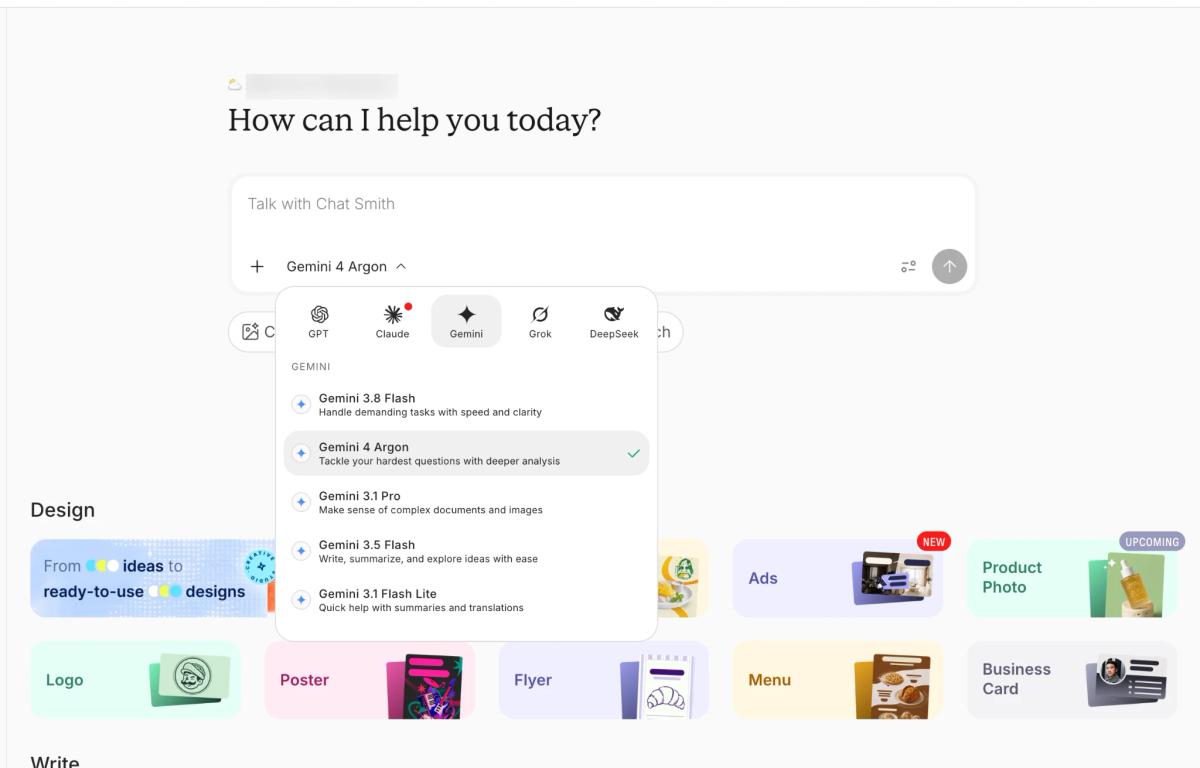
DeepSeek develops and serves its own models. Chat Smith lets you select models from several providers, including DeepSeek V4 Pro, inside a broader productivity workspace. The choice isn't just about counting logos; it's about whether you want one model ecosystem or flexibility for different kinds of work.

Chat Smith multi-model picker showing GPT Claude Gemini Grok and DeepSeek provider tabs with Gemini 4 Argon selected
Chat Smith's model picker offers several AI providers in one productivity workspace.
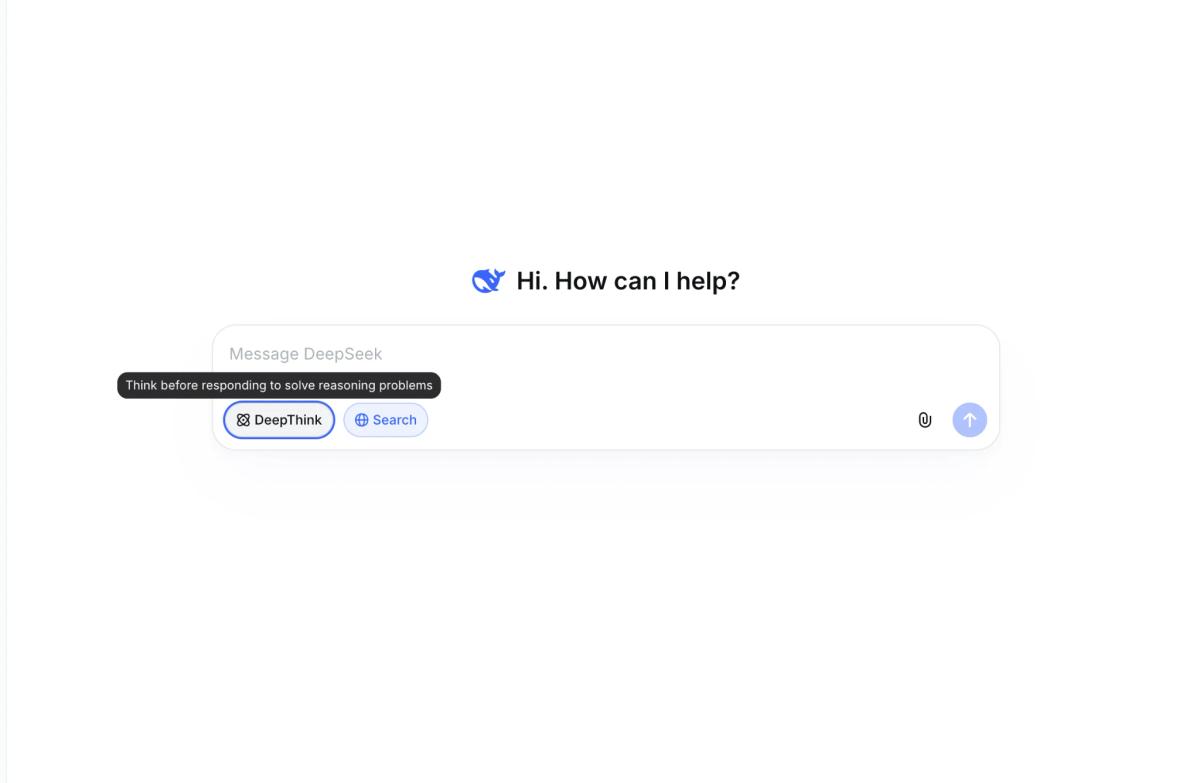
DeepSeek official chat home screen with DeepThink reasoning and web Search controls
DeepSeek's native interface highlights DeepThink and Search; it is not a multi-provider model menu.

What the screenshots show: Chat Smith lets you browse multiple providers, while DeepSeek's native screen presents DeepThink and Search controls. They illustrate different product experiences—not a benchmark of which model is smarter.

QuestionDeepSeek directlyChat Smith
Use native DeepSeek model and developer toolsYesSupported model access, not every native tool
Choose GPT, Claude or Gemini insteadUse another serviceSupported model selection
Get a second opinion on a writing draftRequires another providerAsk another supported model
Build with an API and model weightsOfficial developer offeringNot part of consumer PRO
Understand beginner codeYesBasic coding help
Create a branded flyer or posterNo dedicated comparable studio confirmedDesign Studio and image tools

A practical example: perhaps DeepSeek gives you a solution to a small programming problem. In Chat Smith, another supported model might explain the answer in simpler language. That's helpful for learning, but not the same as a coding agent editing files and running tests.

Check the exact DeepSeek model version before comparing: a Chat Smith selector may show DeepSeek V4 or V4 Flash while the native developer API advertises V4.1 Flash. Similar names don't guarantee identical model snapshots or tool access.

Chat Smith vs DeepSeek: Features That Matter Day to Day

1. Advanced Coding vs Basic Coding Help

DeepSeek: Its developer ecosystem, coding focus and tool-assisted workflows are more relevant to serious debugging, algorithms, code refactoring and software projects. Validate changes with real tests and human review.

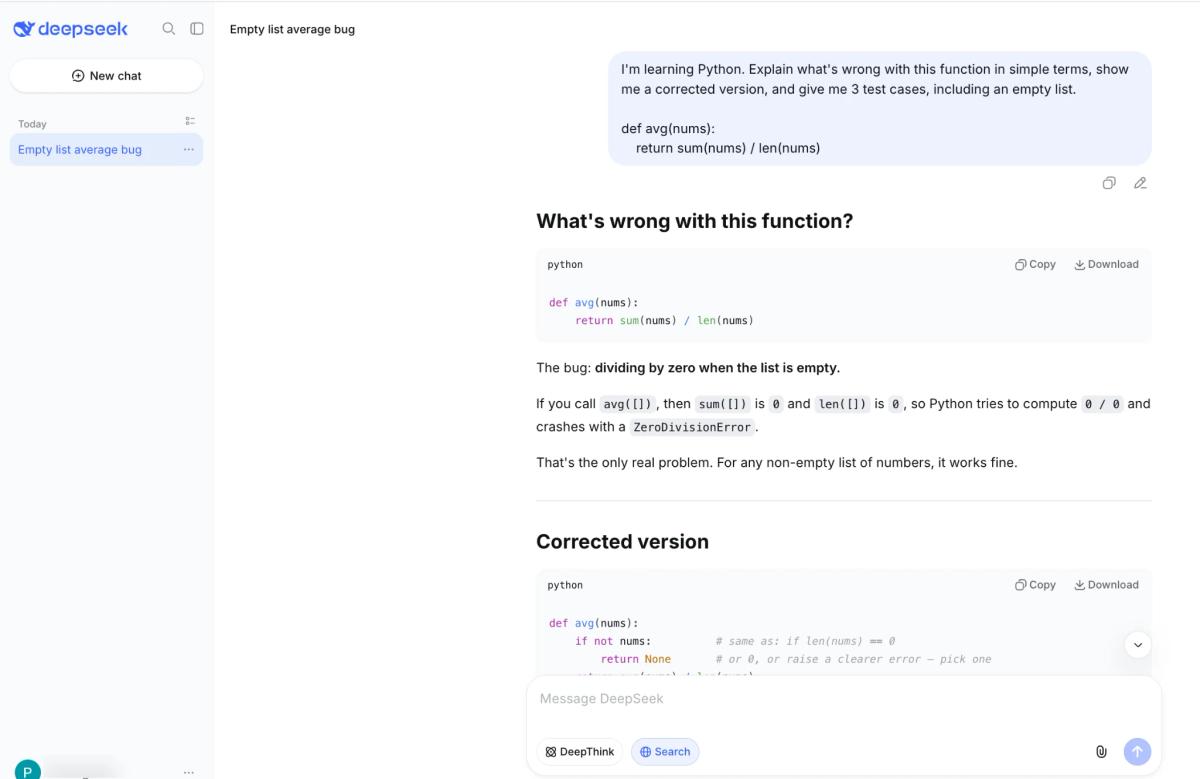
DeepSeek response identifying ZeroDivisionError in a Python average function and proposing a corrected version
DeepSeek identifies the empty-list division-by-zero error in the supplied Python example.

Chat Smith: Can assist with basic tasks such as explaining a short code example, suggesting a spreadsheet formula or clarifying a simple error. Advanced coding should not be presented as one of its core strengths.

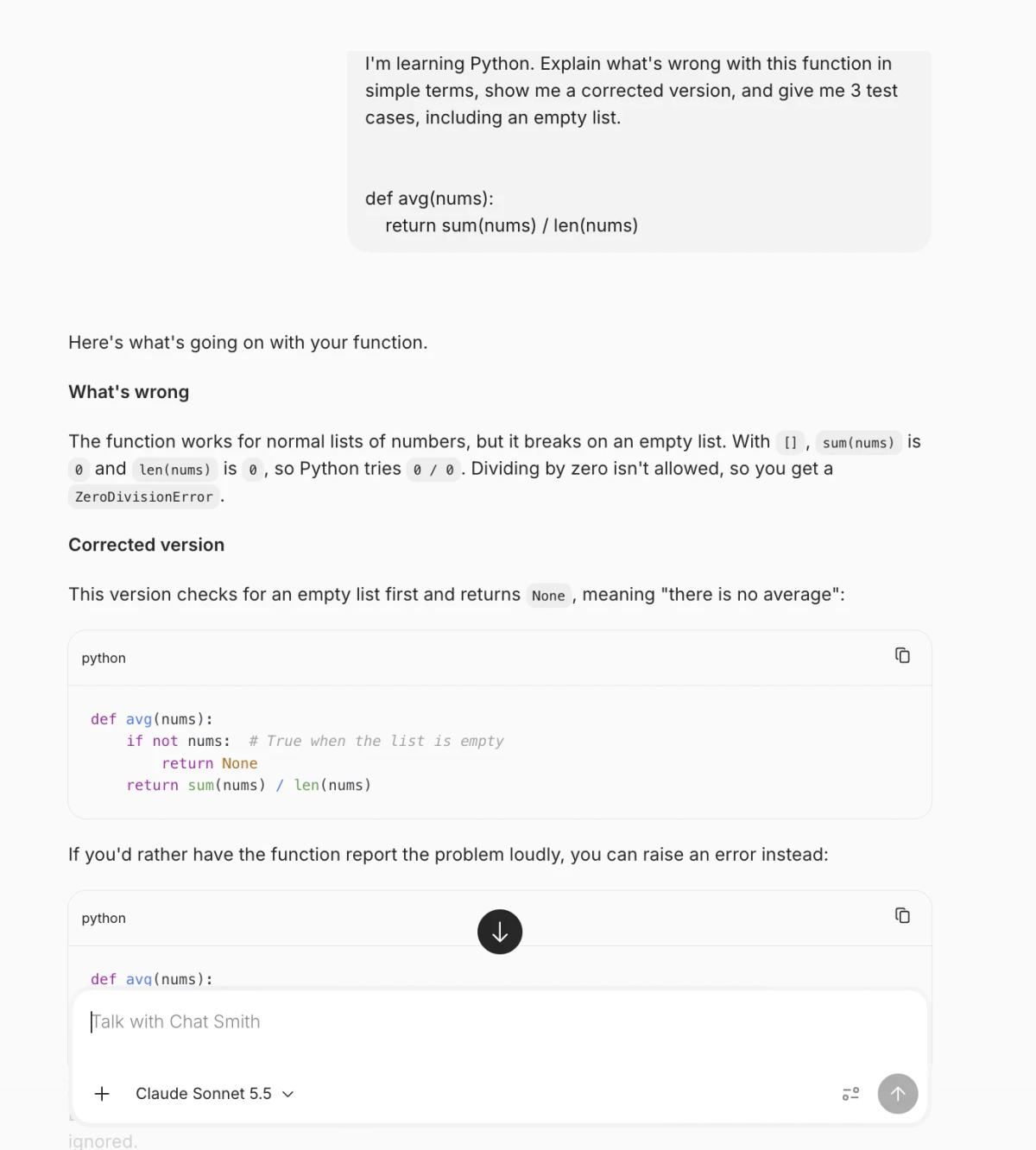
Chat Smith using Claude Sonnet 5.5 to explain a basic Python average function bug and safe empty-list handling
Chat Smith explains the same simple code bug using Claude Sonnet 5.5.

What happened in this coding test? Both screenshots identify the empty-list division-by-zero problem and offer a simple correction. Chat Smith used Claude Sonnet 5.5 in the example. This is useful beginner-level assistance; it doesn't demonstrate that Chat Smith matches DeepSeek's specialized coding-agent workflows.

Verdict: DeepSeek is the more natural starting point for someone who codes professionally. For occasional beginner coding questions mixed into office work, Chat Smith may be convenient.

2. Math and Reasoning: The Same Business Problem

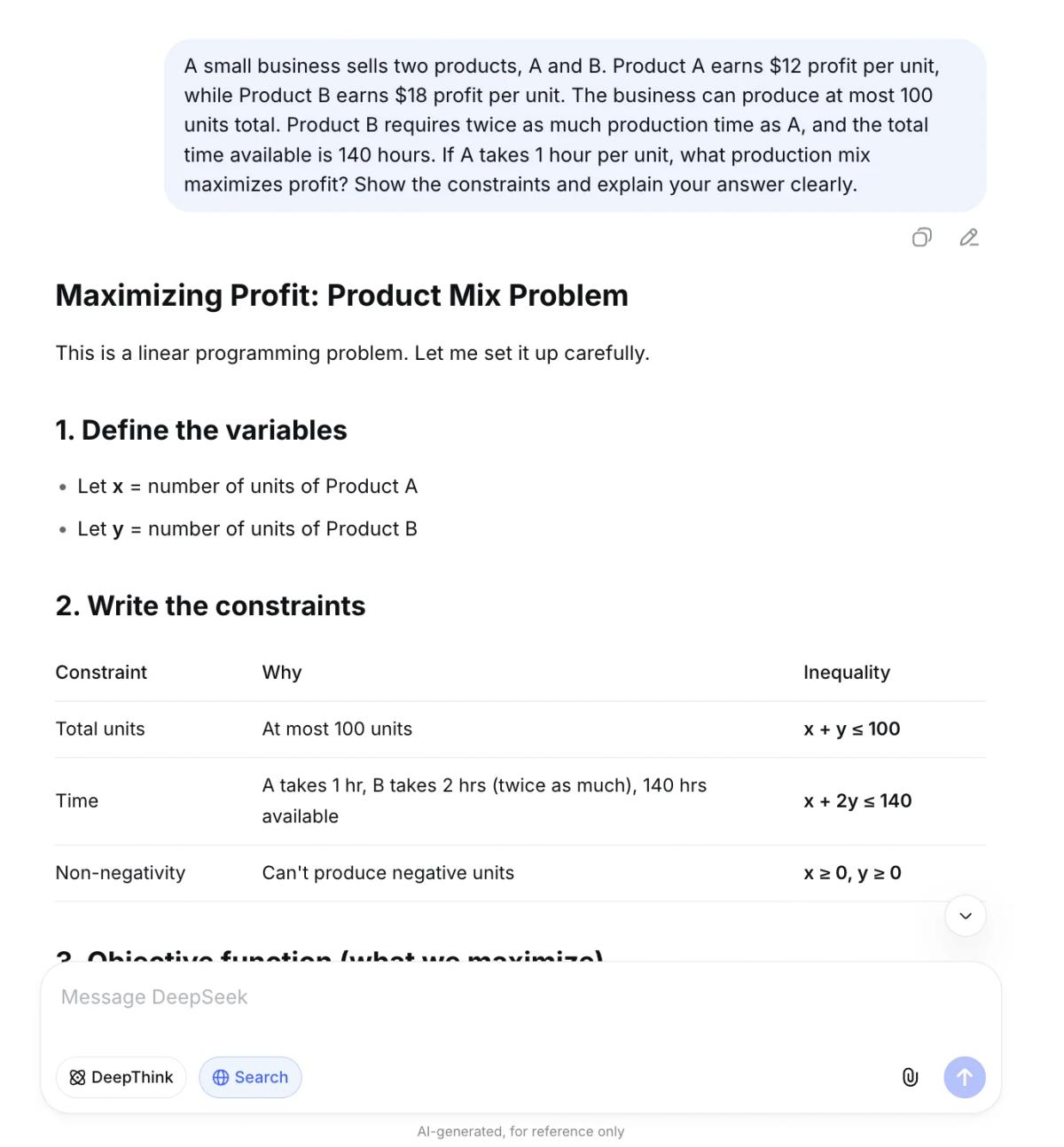
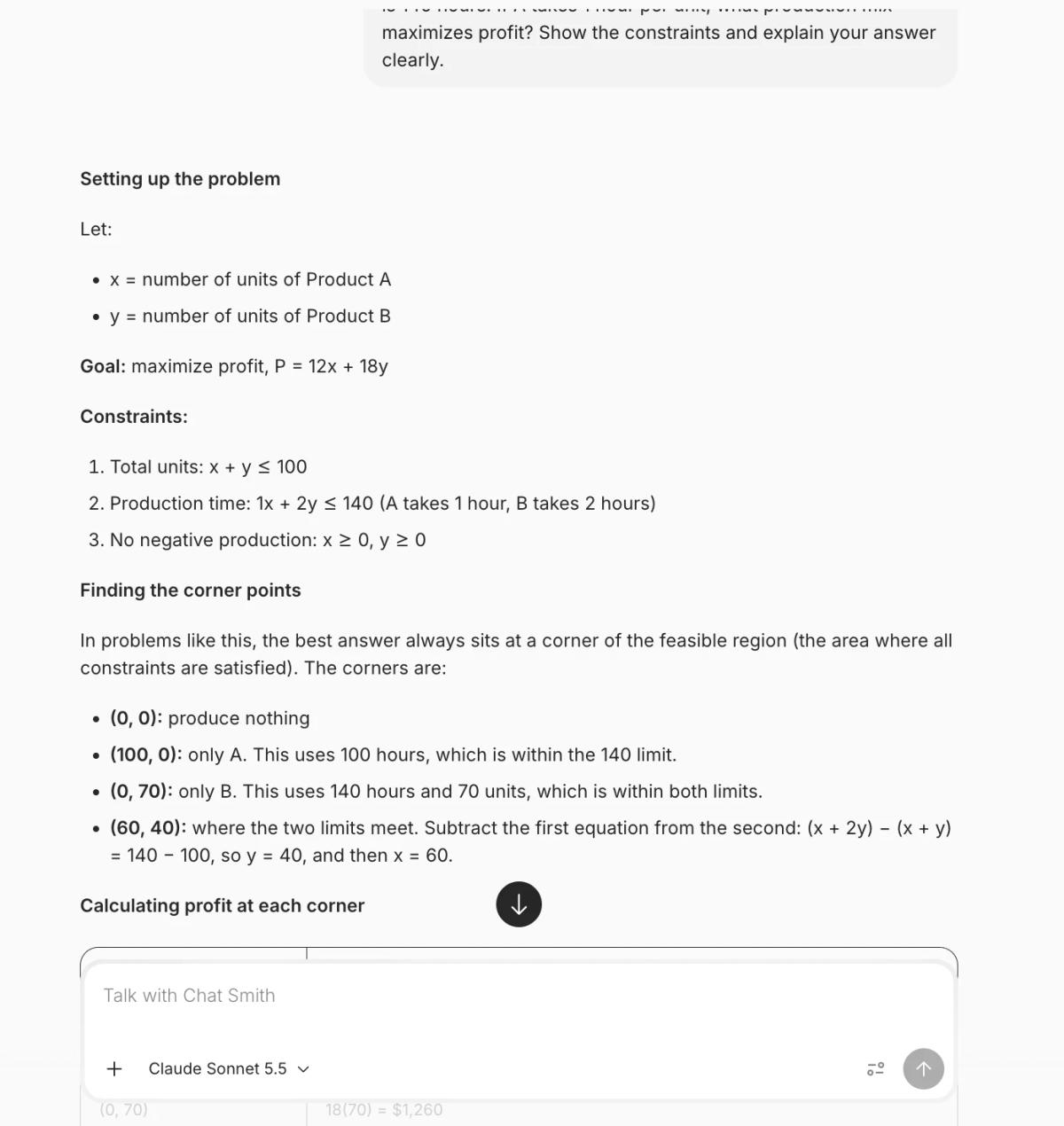
Next, we asked both assistants to solve a small production-planning problem: Product A earns $12 per unit and takes one hour, while Product B earns $18 and takes two hours. The business can make up to 100 units with 140 production hours. This is a useful way to see how each assistant organizes a multi-step explanation.

DeepSeek sets up a small-business profit optimization problem with production and time constraints
DeepSeek lays out the product-mix objective and its key production constraints.
Chat Smith using Claude Sonnet 5.5 to explain the same product mix math problem with feasible corner points
Chat Smith explains the same optimization problem using the feasible corner points.

What do we learn? Both displayed the key constraints, x + y ≤ 100 and x + 2y ≤ 140. The maximum-profit feasible mix is 60 units of A and 40 of B, for $1,440 profit. These screenshots show parts of each explanation, not an independent accuracy benchmark. They are better evidence of explanation style than of a universal winner.

3. Writing, Emails and Communication

DeepSeek: It can write an email, brainstorm messages and summarize text. It's not a coding-only chatbot, and its free consumer chat may be enough for occasional writing.

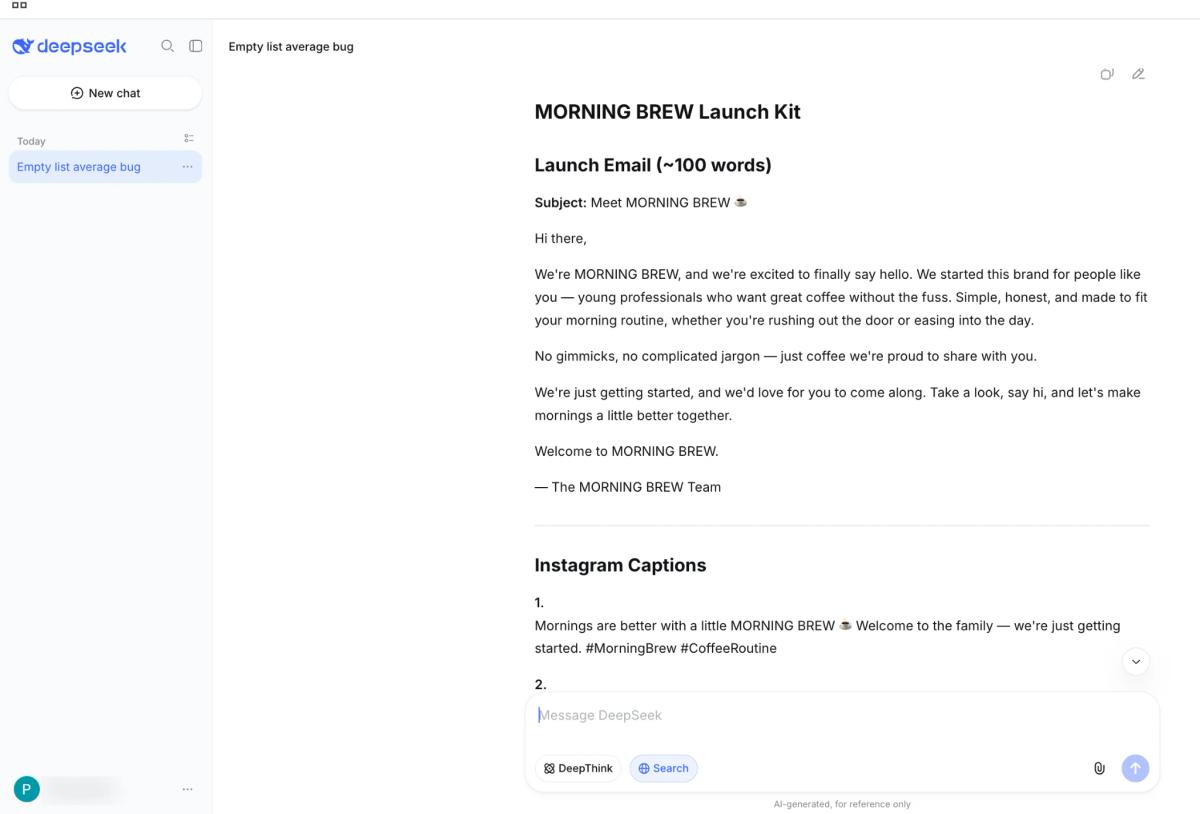
DeepSeek response generating a MORNING BREW coffee launch email and Instagram marketing captions
DeepSeek writes the MORNING BREW launch email and Instagram captions from the provided brief.

This DeepSeek example is a helpful reminder that it isn't only a coding tool. It produced a launch email and Instagram captions for the fictional MORNING BREW brand. You can assess tone and instructions directly; we're not treating the separate Chat Smith slide screenshots below as an identical email-writing output.

Chat Smith: Its AI Writing Tool works alongside email and content workflows. If you regularly draft messages, rewrite paragraphs, or create social content, multiple supported models and task-specific tools may save you from switching between apps.

Verdict: Give both the same writing brief. Judge the tone, instruction-following and editing work left to do, not just the length of the response.

4. Web Search and Research

DeepSeek: Its official app includes web search, and its newer Search and Fetch APIs support developer retrieval workflows. It wouldn't be accurate to say DeepSeek only uses static training knowledge.

Chat Smith: Web Search and Deep Research tools can help gather information for a brief, email or other productivity task. The advantage to examine is how easily that information leads to the next deliverable.

Verdict: Both should be tested with a current, source-dependent question. Check the dates and credibility of actual sources instead of trusting a confident summary.

5. Documents, PDFs and File Questions

DeepSeek: Its app offers file upload and text extraction; its API's long-context features are a distinct developer capability. File and model limits vary by environment.

Chat Smith: Supports file Q&A and summaries for everyday document tasks. The user might read a report, ask for its important points and then turn the findings into an email.

Verdict: Use the same public document and inspect the accuracy of figures, quotations and conclusions. A fast answer with wrong numbers isn't productive.

6. AI Images and Design Studio

DeepSeek: Certain API models can understand image inputs such as screenshots or charts. That is not the same as a dedicated image generator for marketing graphics.

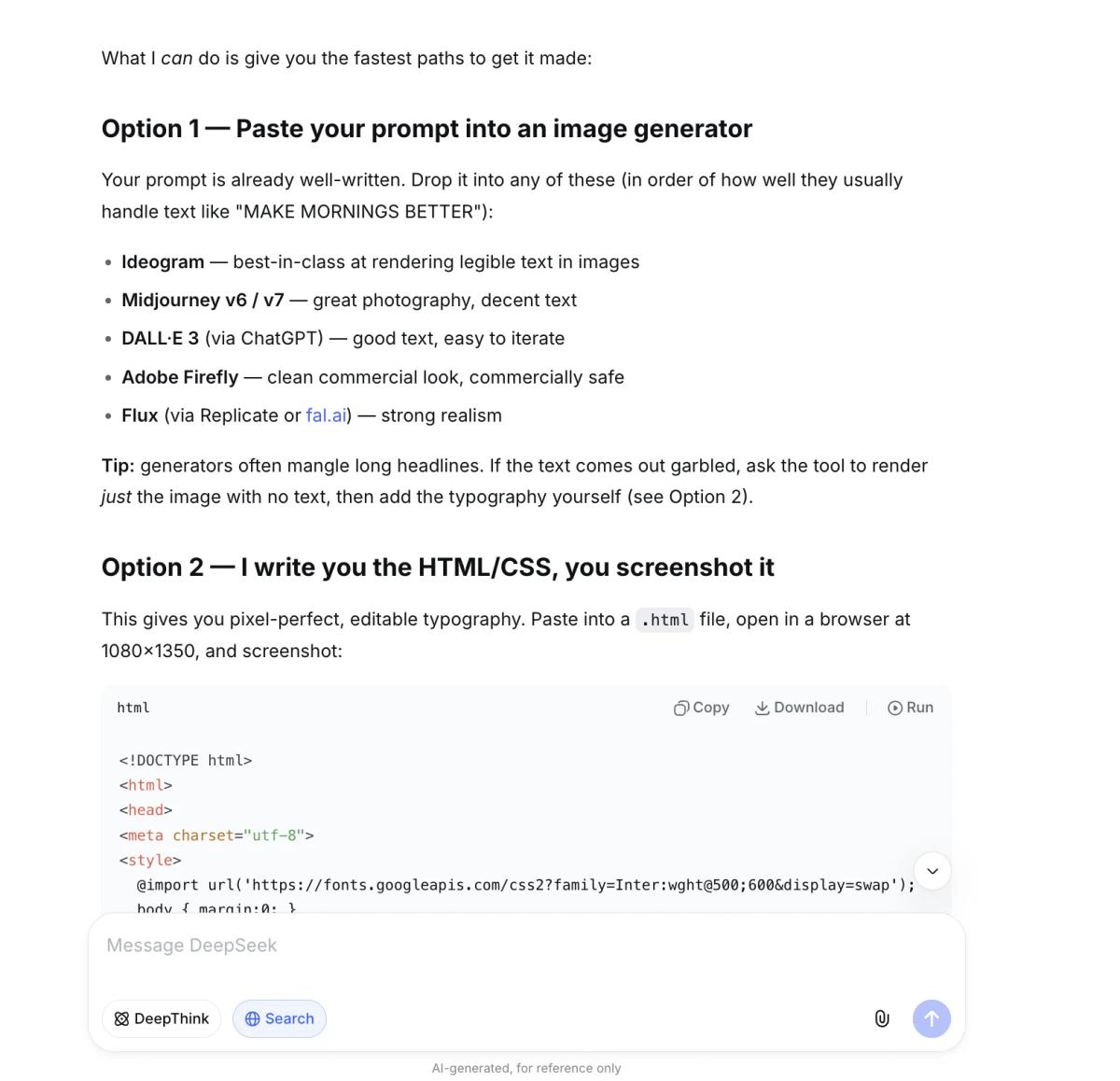
DeepSeek chat response recommending external image generators and HTML CSS for an advertisement rather than rendering the image in this session
In this particular session, DeepSeek suggested other ways to create the requested image instead of generating a poster.

A real workflow difference: When asked for a MORNING BREW promotional image in the supplied session, DeepSeek suggested external image generators or an HTML/CSS route instead of showing a finished image. That's what happened in this particular test—not proof that every DeepSeek model or integration is incapable of image creation.

Chat Smith: Its AI Image Generator includes supported image models, and Design Studio offers workflows for logos, posters, flyers, menus and social visuals.

Verdict: Chat Smith has a more directly relevant workflow when your goal is a promotional image or flyer. DeepSeek's strengths are more technical; don't confuse image analysis with image creation.

7. AI Slide Generation: From Brief to Presentation

What if that coffee-brand brief needs to become a presentation for your team, not just a paragraph? This is where Chat Smith's Slide feature adds a different kind of AI productivity workflow. In the MORNING BREW example, a marketing brief becomes an outline, then a visual deck that can be edited and exported.

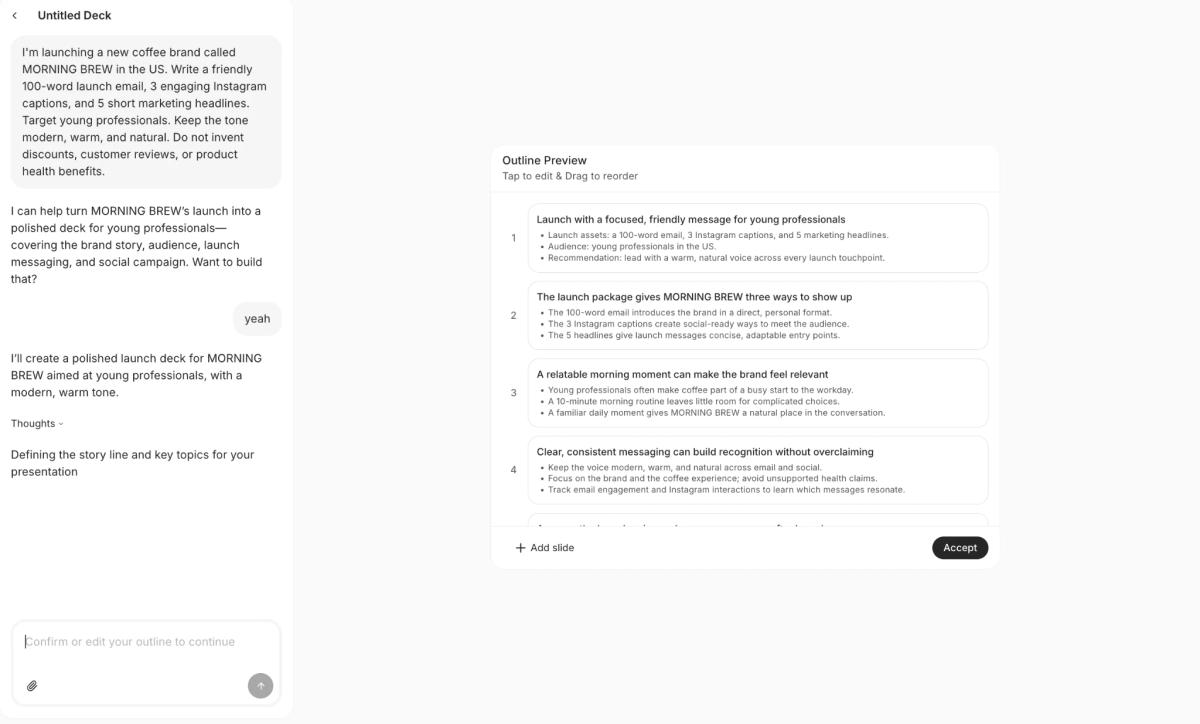
Chat Smith AI Slide Generation MORNING BREW launch presentation editable Outline Preview before slide creation
Step 1: Chat Smith proposes an editable slide outline from the MORNING BREW campaign brief.

Step 1 — Review the outline. Chat Smith displays the proposed story, key points and slide order before generating the finished deck. The outline preview lets the user edit or rearrange sections rather than accepting a layout blindly.

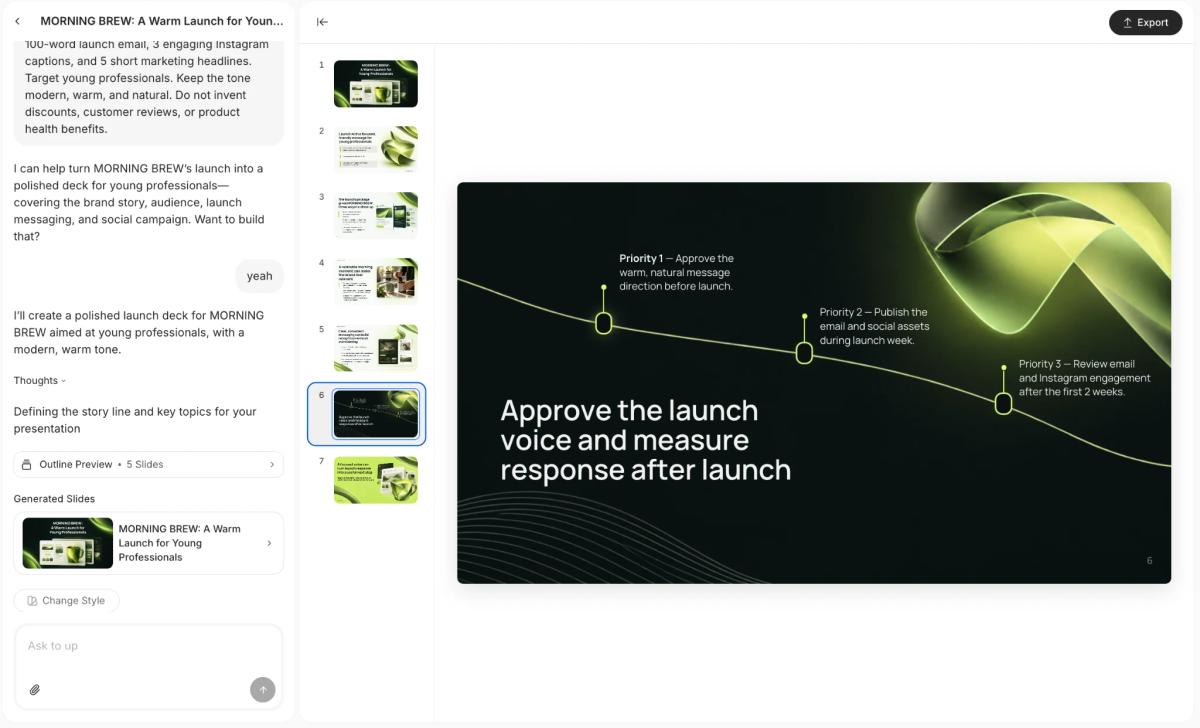
Chat Smith AI Slide Generation completed MORNING BREW slide deck with preview thumbnails slide editor and Export control
Step 2: Chat Smith displays the generated slide deck, slide thumbnails, and editing/export controls.

Step 2 — Generate the slides. After confirming the outline, the interface shows a MORNING BREW presentation with individual slide thumbnails, a larger preview and an Export control. This is a visible presentation workflow—not simply a plain-text list of slide ideas.

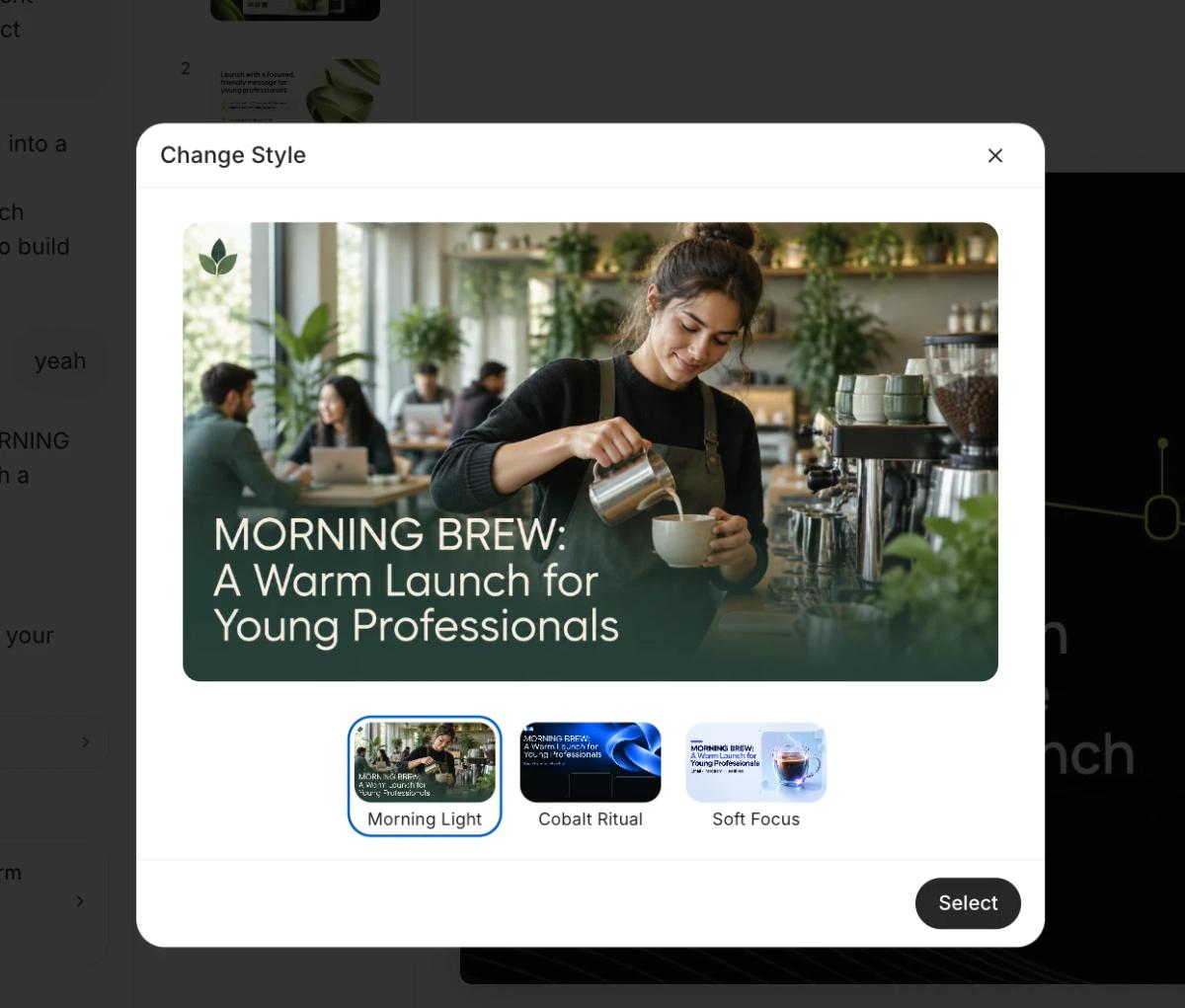
Chat Smith AI Slide Generation Change Style panel with Morning Light Cobalt Ritual and Soft Focus presentation themes
Step 3: Chat Smith lets the user explore alternative presentation styles, including Morning Light, Cobalt Ritual, and Soft Focus.

Step 3 — Change the visual style. The example also shows a style picker with Morning Light, Cobalt Ritual and Soft Focus. Being able to preview another look can help with client presentations or internal pitches, although the design and every factual claim should still be reviewed before export.

How does this compare with DeepSeek? DeepSeek can help write slide outlines, speaker notes or presentation copy in chat. But the DeepSeek screenshots supplied for this article don't show an equivalent native slide editor or style-selection workflow. The point here is Chat Smith's slide-making convenience, not a claim that its underlying language models are always better.

Who benefits? If you often turn research or campaign notes into decks, an outline-to-slides workflow may save some manual assembly. If you mainly need to code or reason through a technical problem, DeepSeek's developer strengths will likely matter more.


8. API, Agents and Automation

DeepSeek: API integrations, open-weight options, tool use and native coding-focused workflows matter to people building software. The official V4 release discusses agent-focused programming capabilities.

Chat Smith: A multi-model productivity app for consumers. Its model picker and basic coding explanations aren't equivalent to a native API, self-hosting or full coding agent.

Verdict: If you're developing software, look at DeepSeek's docs and supported tools. If you're using AI to get through everyday work, compare the consumer experiences instead.

Chat Smith vs DeepSeek Pricing

Pricing is where this comparison can become misleading. DeepSeek's free chat app, DeepSeek's token-priced API, and Chat Smith's optional PRO subscription are different offerings. Let's separate them.

Free Chat and Consumer Plans

DeepSeek advertises its official consumer app as free, with search and file features. That's genuinely attractive if you only want native DeepSeek chat. Access can still be subject to availability or service limits.

Chat Smith has limited free access and optional PRO. Its pricing page describes the available subscription options. Example U.S. offers include $9.99 per month or $39.99 per year, but the final price, model access, and feature quotas depend on platform, region, and promotion. Those charges aren't separate subscriptions to each underlying model provider.

OfferReference priceWhat you pay for
Chat Smith Free$0Limited supported models and tools
Chat Smith PRO monthlyExample $9.99/monthMulti-model productivity and creative tools
Chat Smith PRO annualExample $39.99/yearAnnual access; current checkout may differ
DeepSeek consumer chatOfficially advertised as freeDeepSeek chat, search and file features
DeepSeek APIPay per usageDeveloper model calls and separate tool charges

DeepSeek API Costs Are Not Monthly Subscription Prices

DeepSeek prices developer API usage by one million tokens, with different rates for cached input and other usage categories. Review the current API terms separately from the consumer app; token-based charges are not equivalent to a Chat Smith monthly subscription.

ModelOff-peak input/1MOff-peak output/1MPeak input/1MPeak output/1M
V4.1 Flash$0.15$0.60$0.30$1.20
V4 Pro$0.66$1.98$1.32$3.96

Search and Fetch API requests have separate per-request charges, and total application cost includes development, testing and maintenance. Don't compare a small token bill to a monthly creative app subscription as if the same features were included.

Which is better value? DeepSeek's free chat is a sensible option if it already solves your needs. Chat Smith PRO may be useful when different model providers, writing, research, files and visuals save you time each week. Judge the completed work, not the number of model names.

Privacy and Data Handling for Work

DeepSeek's official privacy policy states that its hosted platform directly processes and stores personal data in the People's Republic of China. That matters for organizations with data-residency, client-data or regulated-information requirements.

But this fact does not make Chat Smith automatically private or enterprise-approved. Read both services' policies, review any model-provider data sharing, and check the actual retention and contractual terms before uploading confidential material.

Teams may also explore self-hosted deployments of eligible DeepSeek open-weight models, subject to license, hardware and security requirements. A self-hosted deployment is not equivalent to using DeepSeek's hosted consumer app.

Which AI Should You Use? Practical Scenarios

Your goalGood starting pointReason
Repair a complex codebaseDeepSeek or dedicated coding toolsDeveloper-focused strengths
Explain a short Python scriptEitherChat Smith offers basic coding help
Solve a difficult math exerciseDeepSeekReasoning is a major focus; verify answer
Write a client email and social captionsEither; compare Chat Smith workflowsDifferent task tools and model choices
Review a PDF and draft a summaryEitherCheck source fidelity
Generate a poster or product photoChat SmithDedicated image and design tools
Turn a launch brief into presentation slidesChat Smith SlideEditable outline, generated slide deck and visual style options
Choose between GPT, Claude, Gemini and DeepSeekChat SmithSupported multi-provider model selector
Build an app using an AI APIDeepSeekDeveloper API and tool ecosystem
Use free general chatDeepSeekConsumer app advertised as free

Choose DeepSeek if coding, math, technical reasoning or API integration dominates your day. Choose Chat Smith if your routine spans emails, research, files, images and design. If all you need is a free model for straightforward questions, you may not need a paid multi-model assistant at all.

Three Practical Tests You Can Try Yourself

Test 1: Basic Coding Explanation

Prompt: 'Explain this Python function in plain English, identify the edge case and propose a simple fix: def avg(nums): return sum(nums) / len(nums). Keep the explanation beginner-friendly.'

In Chat Smith, treat this as a basic coding help test. In DeepSeek, you can extend the task into unit tests and a developer workflow. Evaluate whether the explanation is correct, whether the empty-list case is handled and whether code tests pass; don't call it a comprehensive benchmark.

Test 2: Everyday AI Productivity

Prompt: 'I'm opening a small café in Chicago. Create a one-week launch checklist, write a friendly 100-word announcement email and give me three Instagram post ideas. Don't invent discounts, reviews or an address.'

Compare how quickly you get usable results, the editing required, and whether the next step—like designing a flyer—is straightforward. Record the exact model, plan, enabled tools and first output in both products.

Test 3: Turn a Brief into Slides

Prompt: 'Build a concise six-slide launch presentation for a fictional coffee brand called MORNING BREW. Explain the target customer, value proposition, three marketing messages, launch-week activities and the next steps. Use a warm, professional tone and do not invent sales results or reviews.'

In Chat Smith, evaluate the editable outline, generated slides, style options and export. In DeepSeek, ask for the same slide-by-slide content and note whether you would need another tool to design the final deck. This tests workflow and time saved, not which underlying model has the highest reasoning score.

Final Verdict: DeepSeek or Chat Smith?

DeepSeek stands out for coding, reasoning and developer economics. Chat Smith is designed for everyday multi-model AI productivity. Both can answer questions and write text, but they're optimized for different priorities.

If you live in a code editor, DeepSeek is a logical place to start. If you regularly move from research to writing, documents and visuals, Chat Smith may fit your workflow better. The right tool is the one that helps you finish the work accurately, without unnecessary steps or subscription costs.

Frequently Asked Questions

DeepSeek develops AI models and provides its own chat and developer API products. Chat Smith is an independent multi-model platform that offers supported DeepSeek options alongside GPT, Claude, Gemini and other models, plus dedicated writing, image and design tools.

logo chat smith

Editorial Team

Managing Editor

The Chat Smith Editorial Team brings together AI enthusiasts, researchers, and creators to make AI accessible and practical. We share trends, tool reviews, and actionable guides that help individuals and businesses stay informed, boost productivity, and get more from AI.

Share this article