Comparison

Chat Smith vs Perplexity: Which Multi-Model AI Assistant Is Better?

Editorial TeamEditorial Team・Apr 6, 2026・21 mins read
Chat Smith vs Perplexity: Which Multi-Model AI Assistant Is Better?

Have you ever opened one AI app to write an email, another to check a fact, and a third to create an image? That's the problem Chat Smith and Perplexity are both trying to solve. Each brings several AI models into one place—but the experience after you choose a model can be surprisingly different.

Chat Smith is built around choosing a supported model and jumping into everyday tasks such as writing, file questions, images, or design. Perplexity puts more emphasis on searching with sources, selecting models automatically, and working through larger tasks with Computer. So even if their model lists look similar, they don't always replace each other.

So which multi-model AI assistant makes more sense for you? Let's look at the model pickers, the actual work each product can do, some real screenshots, and what you're getting for the subscription price. Rather than declaring one universal winner, we'll focus on where each saves you steps—and where it may fall short.

chat smith pro

Chat Smith vs Perplexity at a Glance

FeatureChat SmithPerplexity
Main experienceMulti-model chat plus dedicated task toolsMulti-model answers, search and Computer workflows
Model providersGPT, Claude, Gemini, Grok, DeepSeek and supported optionsGPT, Claude, Gemini, Grok, Kimi, GLM and other supported models
Choose a model yourself✓ Supported model selector✓ Preferred model on eligible paid plans
Automatic model selectionSelect task and model in supported workflows✓ Best Mode and Computer routing
Compare model opinionsSwitch supported models; compare outputs yourself✓ Model Council synthesizes multiple model views in eligible Computer access
Real-time web researchWeb Search and Deep ResearchSearch-first answers, Pro Search and Research
Citations and source linksAvailable through applicable research/search workflowsInline source citations are central to the experience
Writing and emailsWriting, rewriting, email and other dedicated toolsChat-based writing, research-informed drafting and Computer
PDF and file analysisSupported document Q&A and summariesFile uploads, analysis, Projects and Computer
AI image generationGPT Image / Nano Banana optionsImage generation on eligible paid plans
Posters, flyers and logosDedicated Design Studio categoriesImage generation and Computer-created visual assets
AI video generationNo comparable native video experience established hereVideo generation on eligible Perplexity plans and workflows
Multi-step work and appsDedicated tools within Chat SmithComputer, connectors, file/app creation and automations
Free planLimited supported tools and modelsStandard Search and limited uploads; no advanced model selection
Paid individual planChat Smith PRO, with platform-specific offersPerplexity Pro and Max

The short version: If your day is mostly emails, brainstorming, document questions, and creative assets, Chat Smith is worth a look. If you spend more time tracking down sources, checking claims, or coordinating a multi-step research project, Perplexity may feel more natural. The difference isn't just how many AI models you see in the menu; it's what happens after you select one.

What Is a Multi-Model AI Assistant?

Think of a multi-model assistant as a single workspace with access to several AI specialists. You might use one model to draft a campaign email, a different one to challenge your strategy, and an image model to visualize the ad. You shouldn't need a separate app for every little step. That's the appeal—but the way each service connects those steps matters.

Here's where things get interesting. One assistant may let you pick a model yourself. Another may choose a model automatically for your question. A third workflow may ask several models at once and summarize where they agree or disagree. These sound similar in a feature list, but they solve different problems in practice.

A model inside Chat Smith or Perplexity is also not automatically the complete native subscription for that provider. Choosing a Claude, GPT, Gemini or Grok model does not guarantee access to every separate coding agent, workspace connector, native search mode or media-generation product.

What to Compare in a Multi-Model AI Assistant Beyond Model Count

A long model list looks impressive, but before subscribing, ask a more useful question: what can I actually do with those models? Check the versions available on your plan, whether you can switch manually, how web research is handled, and which image, file, or agent tools are included. Seeing a provider's logo doesn't mean you're getting every feature in that provider's own app.

Decision factorChat SmithPerplexity
Manual model choiceChoose from supported GPT, Claude, Gemini, Grok and DeepSeek modelsPreferred model selection with eligible paid plans
Automatic routingModel choice and task-specific tool workflowsBest Mode and Computer orchestrate models
Parallel model opinionsCompare selected model responses yourselfModel Council synthesizes independent model outputs
Search and citationsWeb Search and Deep Research in supported workflowsSearch-first experience and inline citations
Media and designSupported image models and dedicated Design Studio categoriesImage/video generation and Computer-created assets
Work over timeFile Q&A and task-based toolsProjects, persistent files, connectors and Computer
Usage rulesModel and image-tool limits depend on planSearch, file, model and Computer limits differ by tier

Model version matters: Access to a provider does not promise its newest model, full native context window, media tools or coding agent. Before paying, open the model picker on your platform, check the exact version and ask whether you can use the feature at your expected daily volume.

Here's a simple way to test the difference. Give both assistants a real task you do each week—perhaps writing an email, checking a competitor claim, or designing an ad. Count the steps from prompt to finished result. The better choice may be the assistant that saves you the most editing and tab switching, not the one with the longest feature table.

Which AI Models Do Chat Smith and Perplexity Offer?

Chat Smith: Direct Access to Supported Model Families

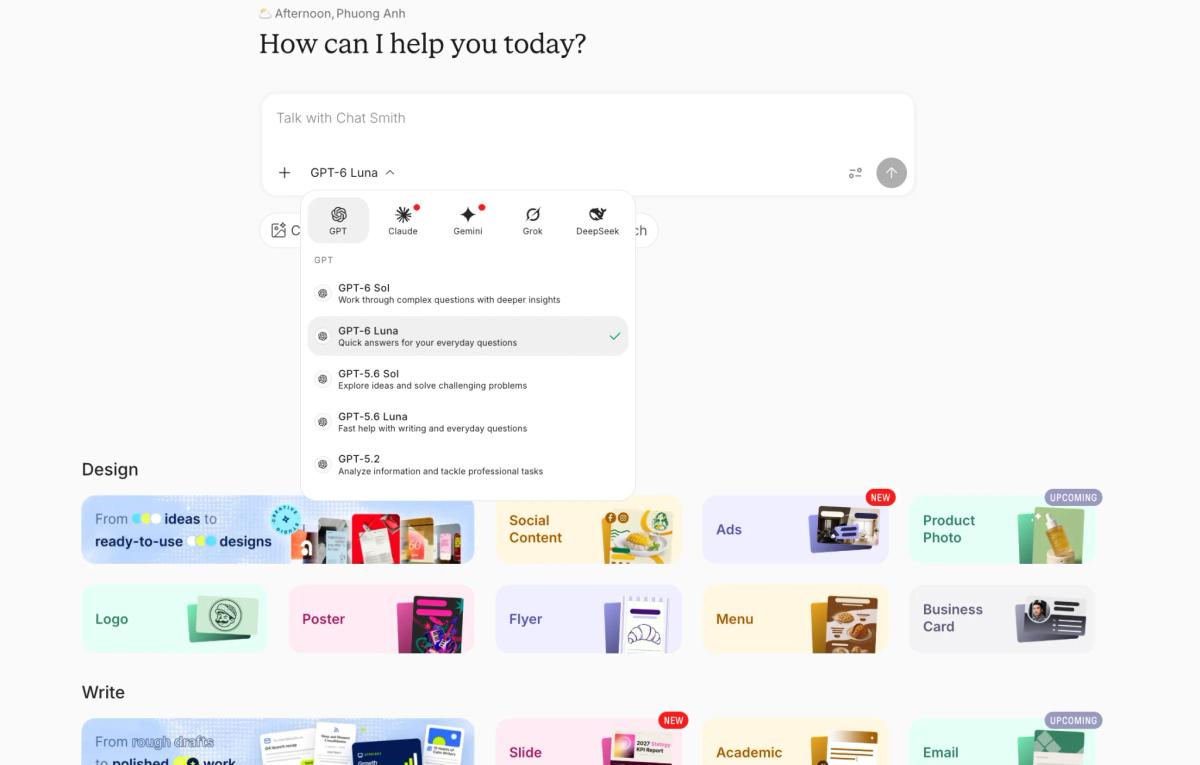
In Chat Smith's AI workspace, you can browse supported GPT, Claude, Gemini, Grok, and DeepSeek models. That direct model picker is handy when you already know what you want to try. For instance, you might ask one model for campaign ideas, then switch providers to get a second opinion on the tone or structure.

Chat Smith model picker with GPT-6 Sol and GPT-6 Luna plus Claude, Gemini, Grok and DeepSeek provider tabs
Chat Smith lets users browse supported model families in its assistant model selector.

Its image-model options are separate from the text-chat list. Chat Smith offers supported GPT Image and Nano Banana variants for visual creation. Model names, versions and quotas change, so the options you can actually select in the app and the plan shown at checkout are the reliable references.

Perplexity: Multiple Providers Plus Its Own Search and Orchestration

Perplexity's current Pro page highlights GPT-6.1 Sol, Gemini 3.8 Flash, Claude Sonnet 5.5, Grok 4.7, Kimi K3 and GLM 5.3, among other models. Its Help Center also describes Sonar, Perplexity's own search-oriented model family. These names are examples of its published lineup, not a guarantee that every plan or interface exposes every version.

Perplexity combines web search and inline citations with model selection and advanced workflows. Its Projects and Model Council bring more persistent research context and multi-model comparison to supported plans, while Computer can coordinate multiple tools for larger tasks.

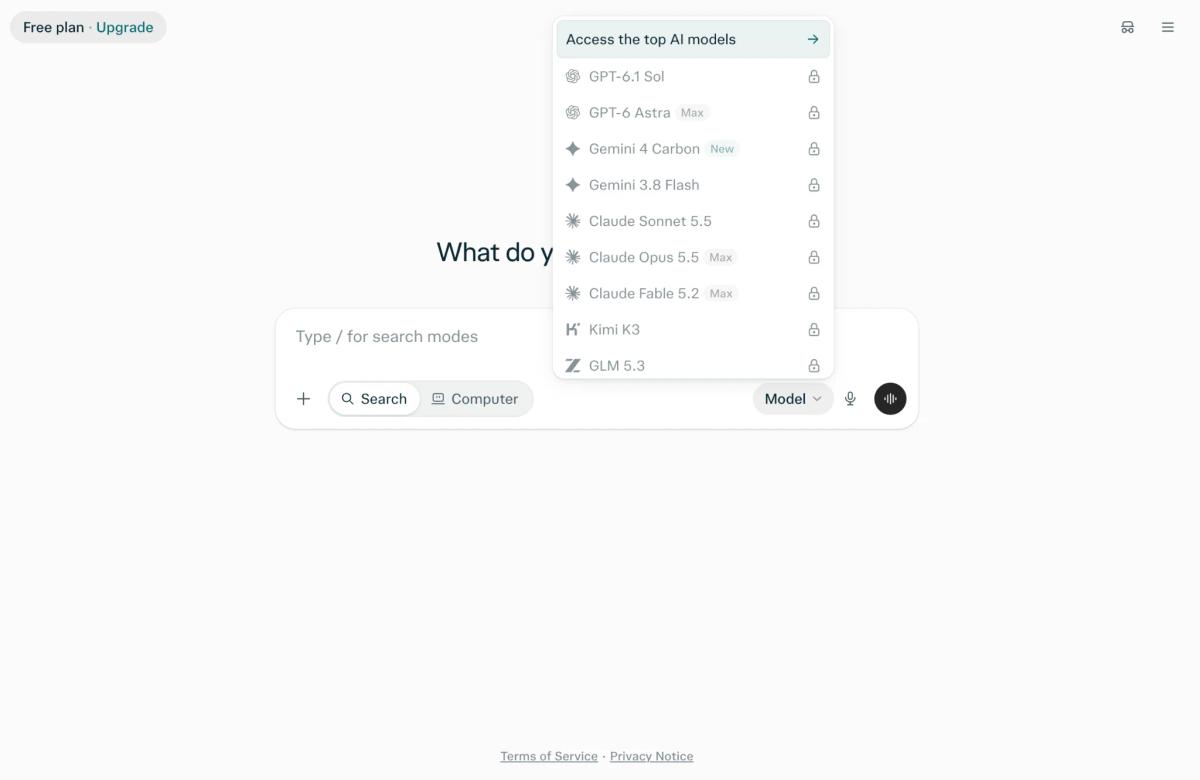
Perplexity Free plan model selector showing locked GPT, Gemini, Claude, Kimi and GLM model options
Perplexity model menu on a Free account; the premium model options shown are locked.

Notice the locks in the Perplexity screenshot? That's the Free plan view. Several advanced models are listed, but choosing them requires an eligible upgrade. It's a useful reminder that "supports many models" and "includes those models for free" are two very different claims.

Model familyChat SmithPerplexity
OpenAI GPTSupported GPT chat modelsGPT models, including currently advertised GPT-6.1 Sol
Anthropic ClaudeSupported Claude chat modelsClaude models, including currently advertised Sonnet 5.5
Google GeminiSupported Gemini chat modelsGemini models, including currently advertised 3.8 Flash
xAI GrokSupported Grok chat modelsGrok models, including currently advertised Grok 4.7
DeepSeekSupported chat-model familyAvailability depends on the current Perplexity model list
Other model familiesDepends on the Chat Smith selectorKimi, GLM, Sonar and other advertised options
Image modelsGPT Image and Nano Banana optionsImage models and tools available in eligible Perplexity plans

One detail worth checking before you compare prices: the same provider isn't necessarily the same model version or set of tools. A GPT or Claude option in either app may have different search access, limits, and instructions. Always note the exact version you're using; otherwise, a comparison can look fair while testing two different setups.

How Do Model Switching and Automatic Routing Work?

1. Choose a Preferred AI Model

Chat Smith: The model picker is useful when you want to make an intentional choice: use GPT for one draft, Claude for another, or DeepSeek for a technical explanation. The value is being able to try supported providers without switching the entire product.

Perplexity: Pro and Max offer preferred model selection in supported search modes. The chosen model operates within Perplexity's search and answer system, which can substantially influence its responses. Perplexity can also switch or select models depending on mode and task.

What to watch for: Can you find the model you want quickly? Can you carry the same question or uploaded file into the next step? And are the most interesting models actually available on your plan? Those small interactions can matter more than an extra name in the dropdown.

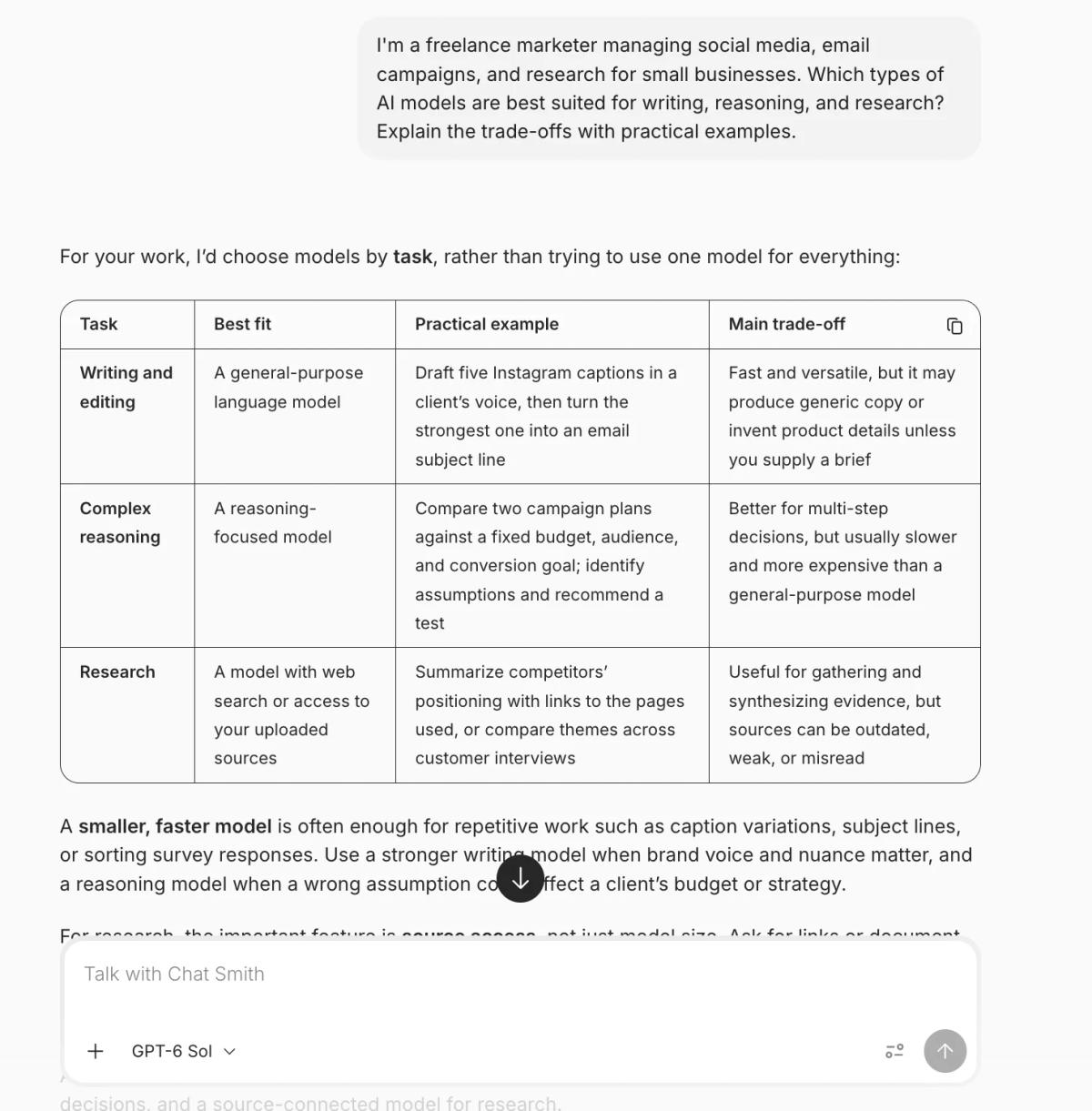
Chat Smith response comparing language, reasoning and research models for freelance marketing tasks
Chat Smith offers task-based guidance for selecting models for writing, reasoning and research.
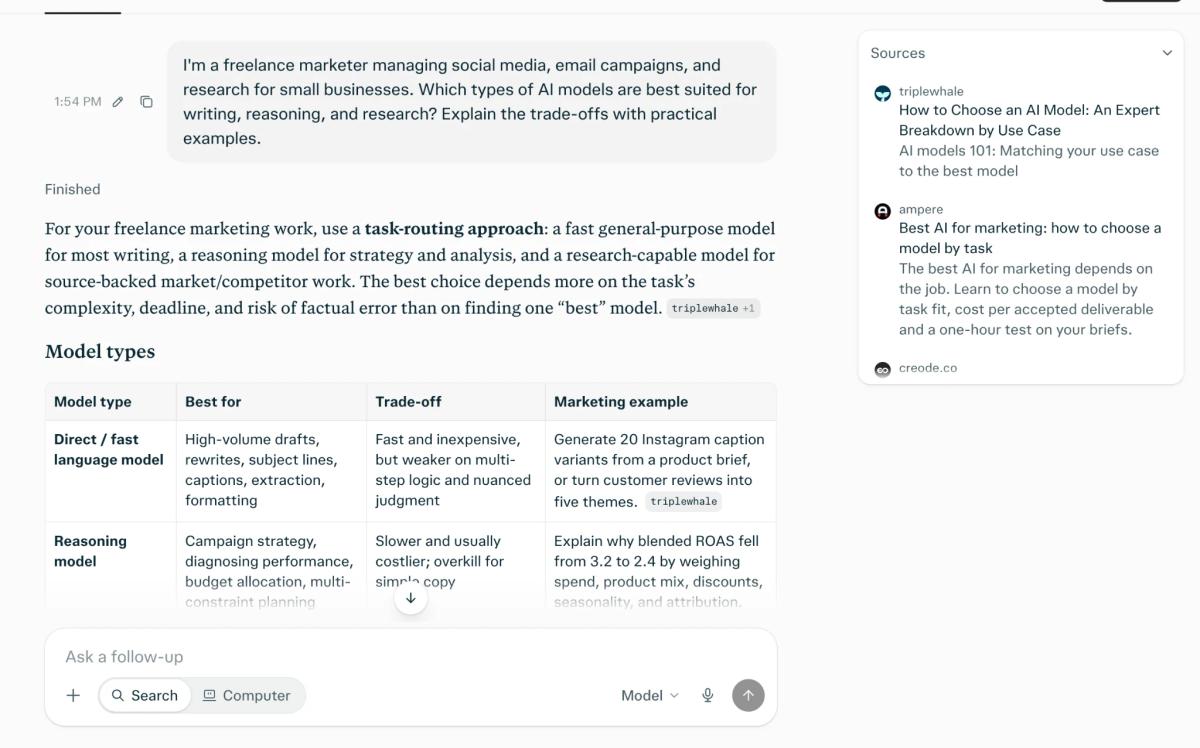
Perplexity answer on model selection for freelance marketers, with sources and model trade-offs
Perplexity model recommendations include a comparison table and cited online sources.

In the model-advice examples above, both assistants suggest choosing a model based on the job rather than using one for everything. Chat Smith presents the trade-offs as a task-focused table; Perplexity adds a source panel you can inspect. That extra context can be helpful for research, although the links still need to be checked for quality.

2. Let the Assistant Select a Model Automatically

Perplexity's Best Mode can select a suitable model for the query. Its Research Mode can use a combination of models for a more extensive investigation, and Computer can orchestrate models and tools for projects. This is more than a static list of model names.

This comes down to personal preference. If you like deciding, "I'll use Claude for this draft and GPT for that question," Chat Smith's explicit selection makes sense. If you'd rather describe a problem and let the system decide how to handle it, Perplexity's automatic modes may be more appealing—especially for research-heavy tasks.

3. Compare Several Models with Model Council

Perplexity's Model Council is a genuinely different multi-model feature. In eligible Computer access, users can pick multiple models for one question, see independent approaches, and receive a synthesis that highlights agreements and disagreements. Its expanded implementation supports selecting two to eight models, with access and limits depending on plan and mode.

In Chat Smith, you can ask supported models to tackle a similar prompt and compare what they say. That is useful for alternative perspectives, but the presence of a model selector alone should not be described as equivalent to an automatically synthesized Model Council.

Imagine you're deciding where to spend a marketing budget. Two models might recommend different channels because they make different assumptions about costs or timelines. Seeing those differences is valuable: it gives you a reason to ask why, rather than accepting the first confident recommendation.

Projects vs Everyday Task Tools: Where Does Your Work Live?

Perplexity's Spaces evolved into Projects in August 2026. Projects support persistent files, shared context, project-scoped connectors and optional Brain memory. For a researcher updating a competitive report over several weeks, this means future work can build on the same source files and prior findings.

Chat Smith emphasizes an approachable workflow: select a model, ask a question, upload a supported file, or open writing, email, research and design tools. For quick deliverables such as a product poster, social caption or PDF explanation, a named task can be more direct than configuring a long-running project.

Here's the practical difference. If you're updating a competitor report every month, Perplexity Projects may help keep the supporting files and research together. If you just need a poster, a follow-up email, or a quick PDF summary, opening a dedicated Chat Smith tool could be simpler. Neither approach wins every time; the right one depends on whether your work is a one-off task or an ongoing project.

For team use, also check sharing, permissions, connected accounts, data handling and whether the subscription is individual or enterprise. Never treat a personal multi-model subscription as identical to an organization-managed shared workspace.

Chat Smith vs Perplexity: Feature-by-Feature Comparison

The biggest differences tend to appear when you stop comparing model names and try to finish an actual task. Here's how the two assistants handle the work people come back for most often: research, writing, files, images, and larger projects.

1. AI Search, Real-Time Research and Citations

Perplexity: Searching and citing sources remain central. Standard Search answers quick questions, while Pro Search and Research support deeper investigations with web sources. Inline citations make it easier to open the original page and check the date, context or exact evidence. A citation is not an automatic accuracy guarantee; sources can be weak or misinterpreted.

Chat Smith: Web Search and Deep Research offer pathways to up-to-date information and longer research outputs. A user can prepare an industry overview, ask follow-up questions, then move into writing or image tasks. Do not describe Chat Smith as an offline-only chatbot or claim its citations are identical across every chat model and mode.

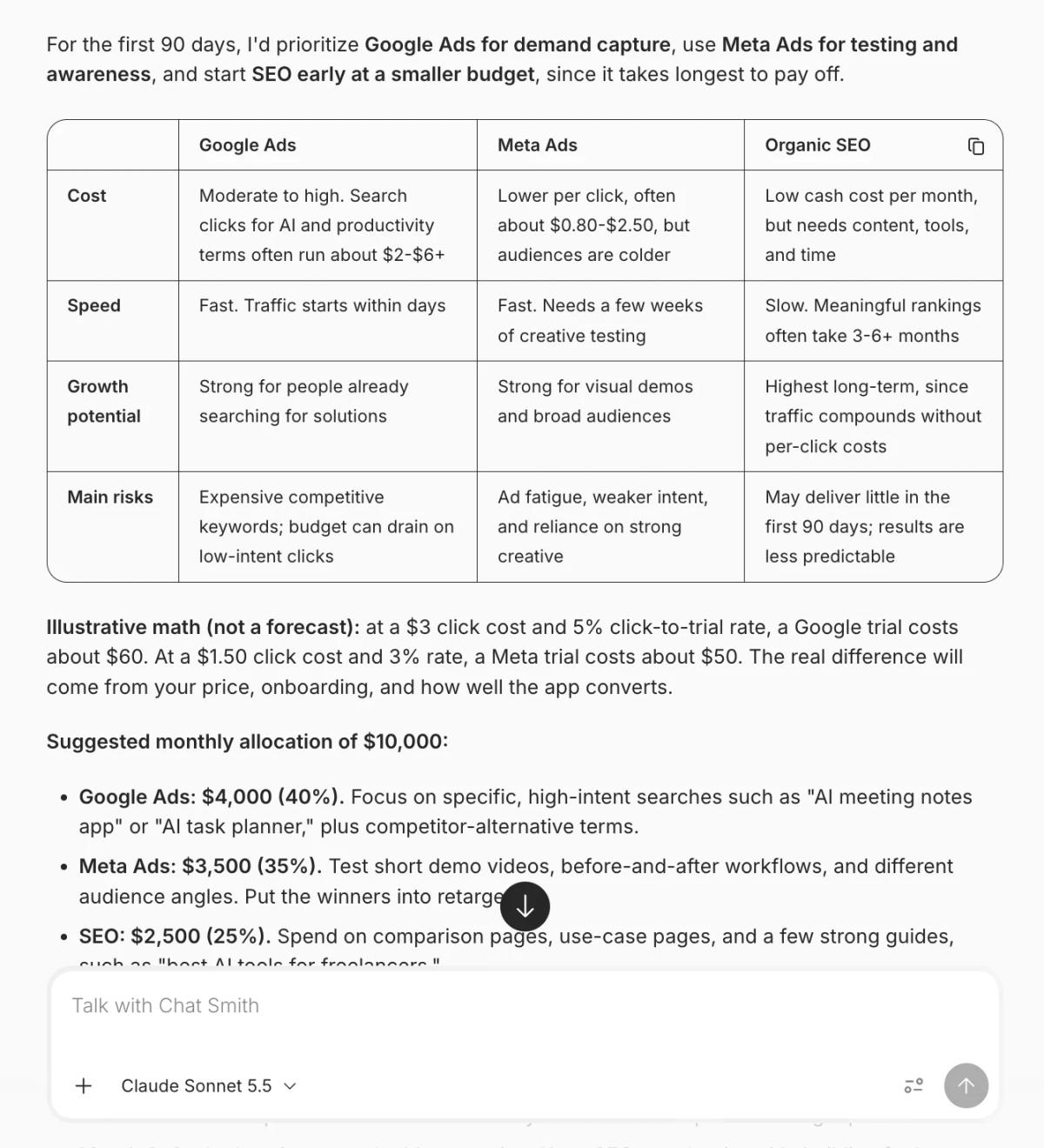
Chat Smith response comparing Google Ads, Meta Ads and SEO for a 90-day marketing budget
Chat Smith provides a budget allocation example with a channel comparison and assumptions.
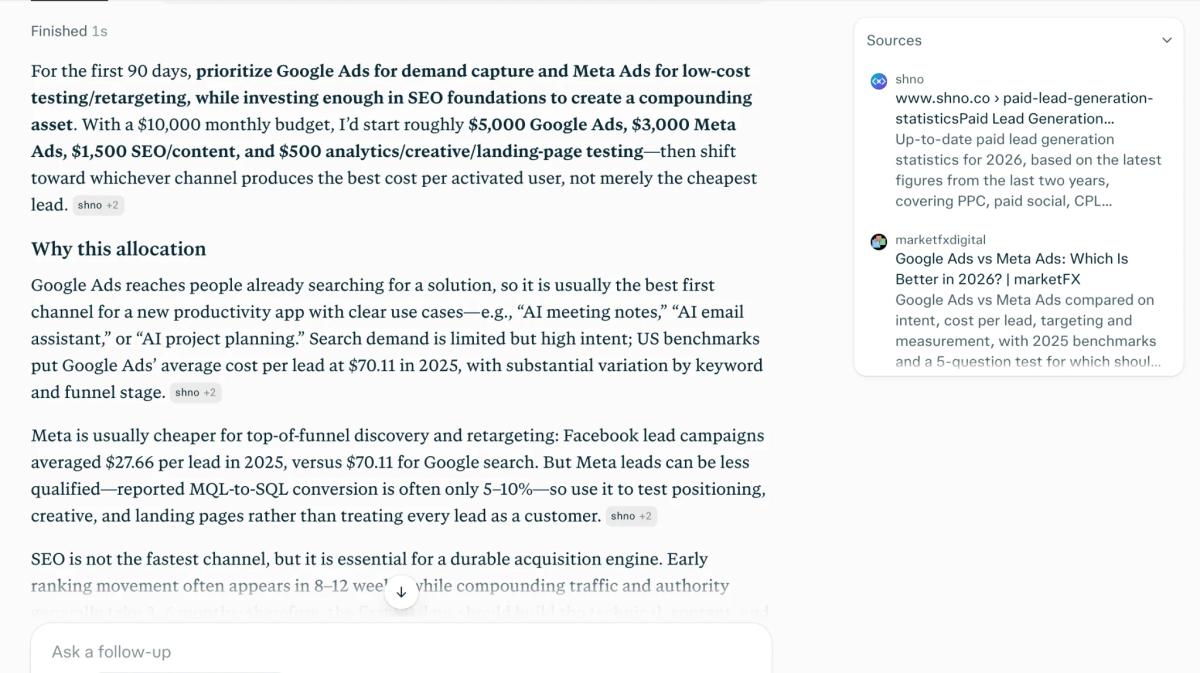
Perplexity sourced comparison of Google Ads, Meta Ads and SEO for a 90-day campaign
Perplexity presents a marketing-channel recommendation with citations and source links.

Here's an interesting difference from the marketing-budget screenshots: Chat Smith suggests $4,000 for Google Ads, $3,500 for Meta, and $2,500 for SEO. Perplexity suggests $5,000 for Google Ads, $3,000 for Meta, $1,500 for SEO, and $500 for testing/analytics. Neither is a forecast. These are starting assumptions to question and refine, not budget recommendations to copy without your own data.

Our take: Perplexity feels like a natural starting point when the hardest part is finding and checking information. Chat Smith becomes interesting when the research is only one stage of the task—for example, when you want to turn your findings into copy or a visual. Either way, open the original sources before using an AI-generated claim in a client report.

2. Writing, Emails and Creative Brainstorming

Chat Smith: Dedicated AI writing, email, rewriting and other task tools can help turn a rough idea into an email, social media caption, ad concept or polished message. A multi-model selector adds flexibility if you want several tones or a different reasoning style.

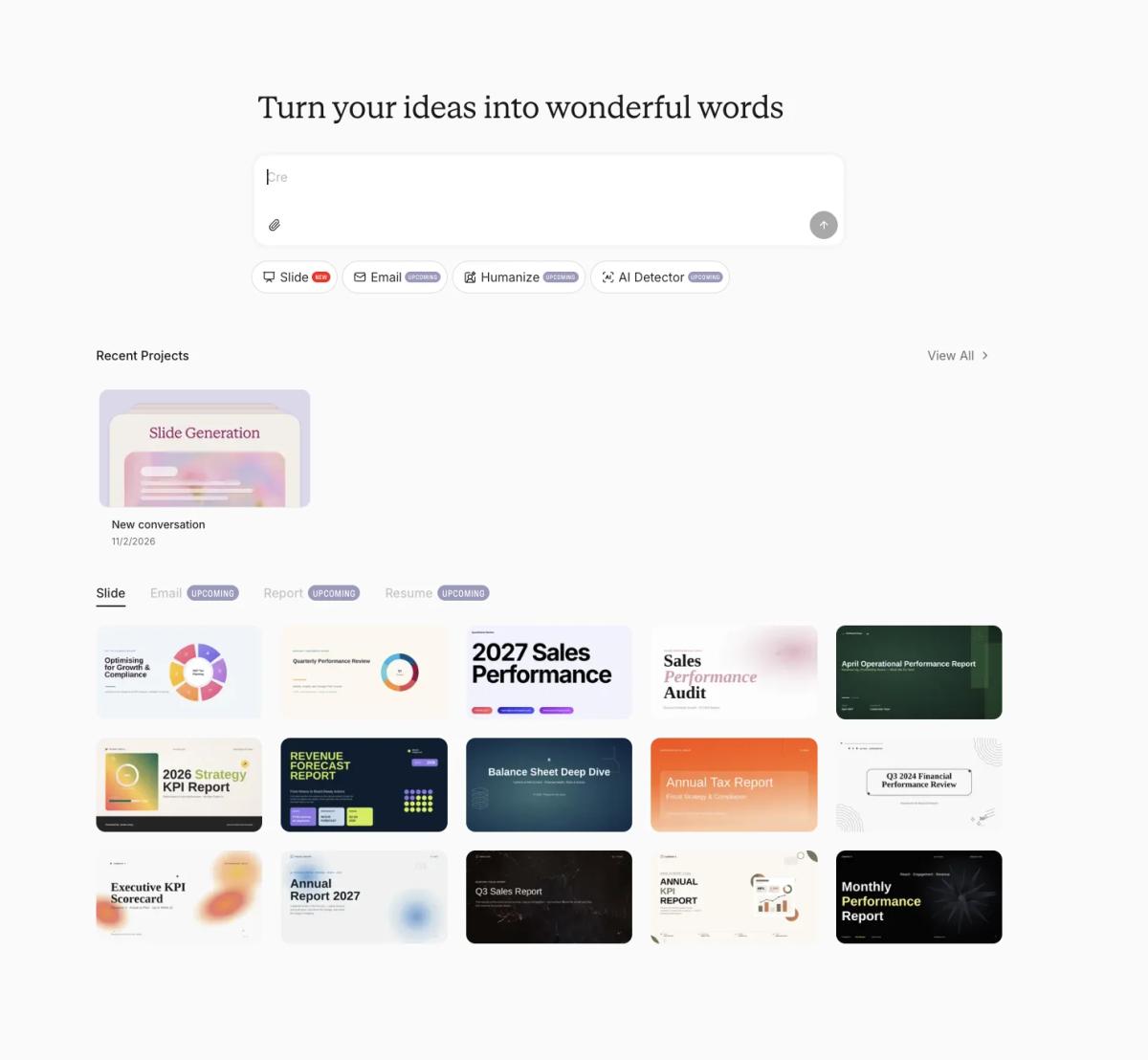
Chat Smith writing workspace showing slide templates, email and other AI writing tools
Chat Smith writing tools and slide creation templates in the app workspace.

Perplexity: It also supports long-form writing, planning and brainstorming. A user can ask a preferred model to draft messaging, then use web research to verify facts. Computer can go further by creating documents and coordinating multi-step work. It would be inaccurate to call Perplexity “only a search engine” or incapable of creative work.

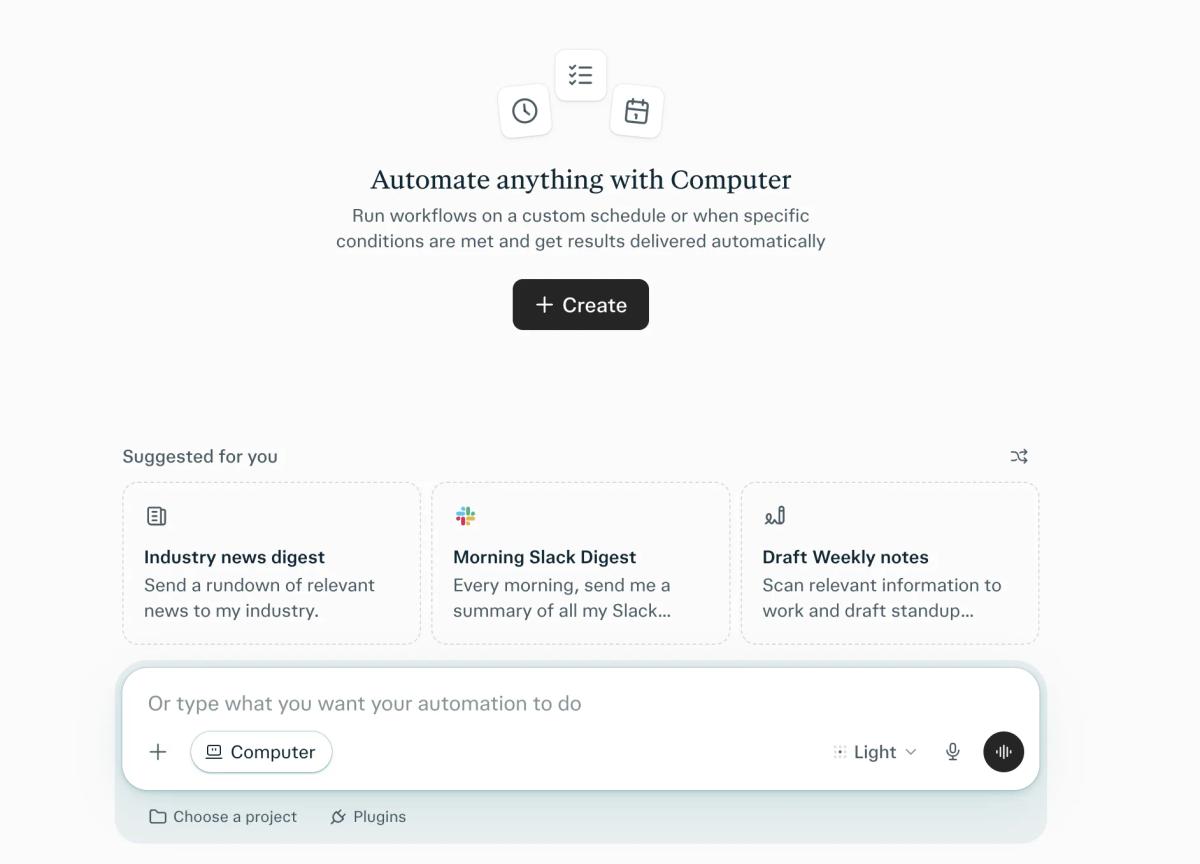
Perplexity Computer interface for scheduling industry news, Slack digests and weekly notes
Perplexity Computer suggests recurring automations and connected-workflow ideas.

Where the difference shows up: Need five subject lines and a quick rewrite? Either assistant can help, and Chat Smith's writing shortcuts may make the process feel direct. Need to research an industry change and build a sourced document from it? Perplexity's research and Computer tools are worth evaluating. Try both with the same brief and see which needs fewer edits.

3. PDF, CSV, Document and File Questions

Chat Smith: Supported file-analysis tools allow document Q&A, summarization and explanations. This is useful for a brief, class material, presentation notes, uploaded reports or spreadsheet questions.

Perplexity: Pro expands file upload and analysis, while Projects and Computer can keep files in a broader workspace, assemble outputs and use supported connectors. File type, maximum upload, document handling and access to external apps vary by plan.

For a single PDF question, you may not notice a huge workflow difference. But imagine comparing several reports and keeping the findings together for next month—that's where Perplexity Projects and Computer can become useful. Whichever app you choose, check numbers and quotations against the original file, especially when the output will inform a business decision.

4. AI Images, Design Studio and Video

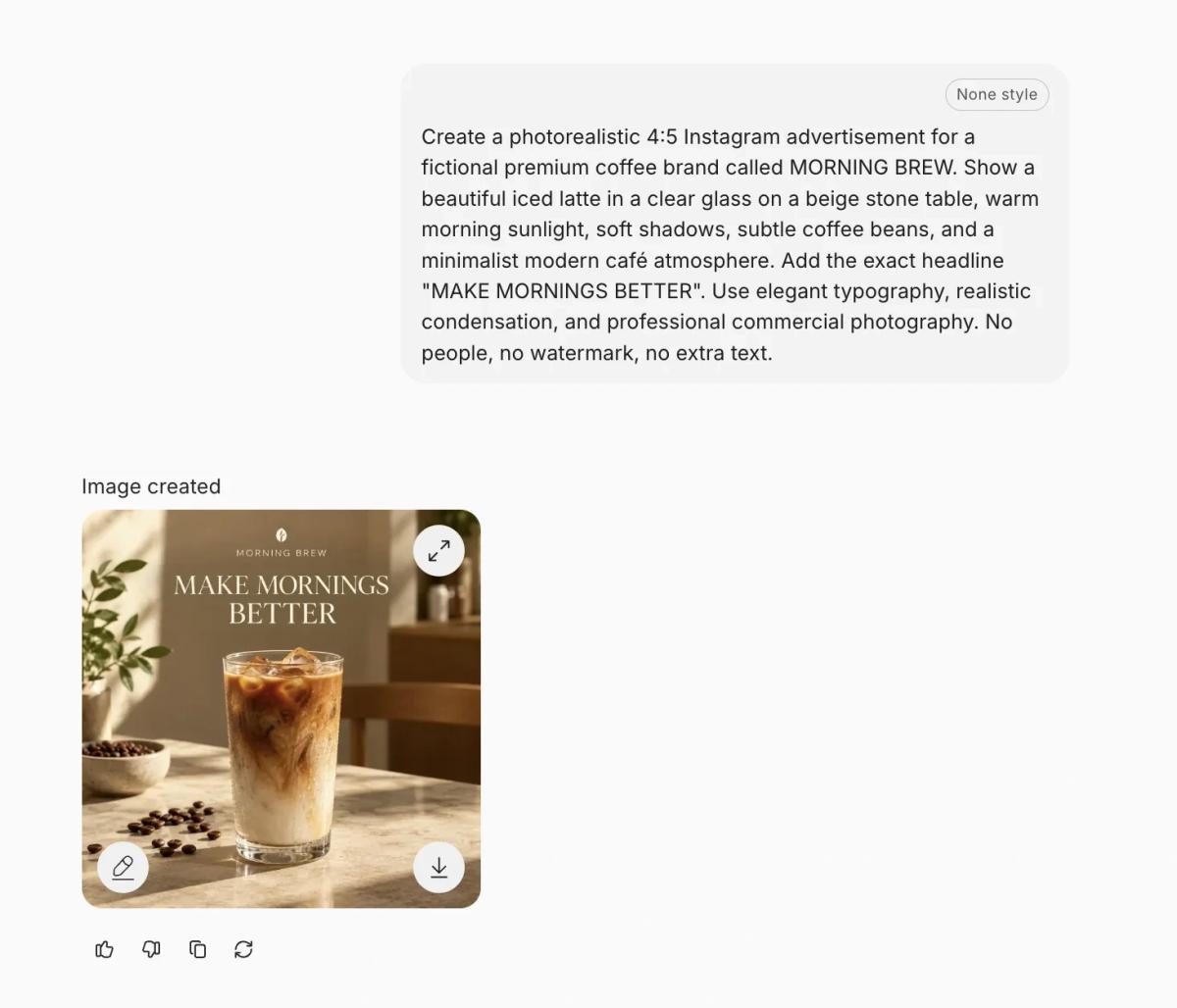
Need a product photo, Instagram ad, or event flyer? Chat Smith offers an AI Image Generator with supported GPT Image and Nano Banana options, plus Design Studio categories for posters, flyers, logos, menus, and social content. Those named starting points can make a creative task feel less like writing a complicated prompt from scratch.

Chat Smith AI image generator showing the Morning Brew iced latte advertisement with brand name and Make Mornings Better headline
Chat Smith: an iced-latte ad with MORNING BREW branding and the requested headline, generated from the shared prompt.

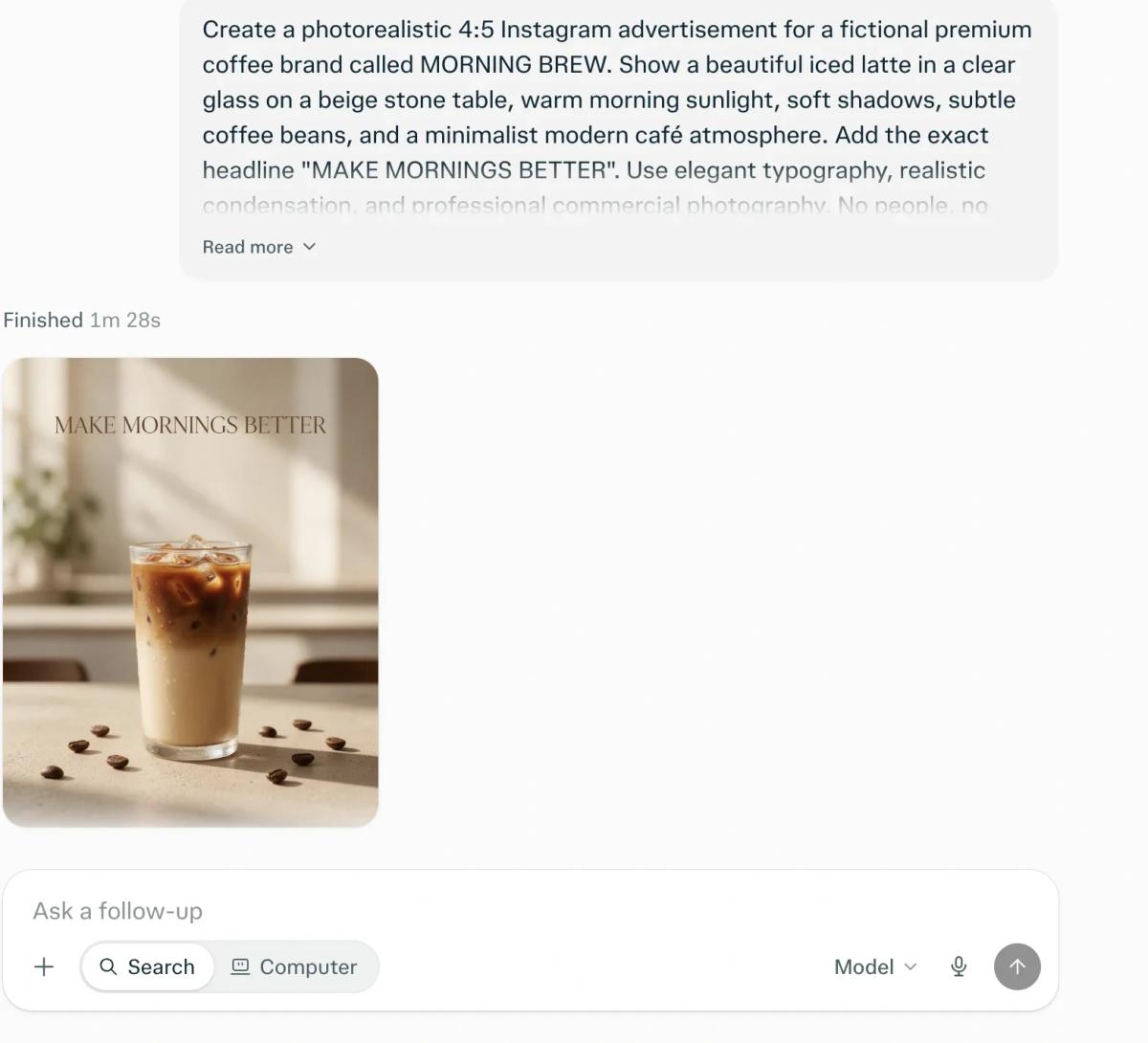
Perplexity can also create images, so it would be misleading to call it research-only. Its eligible paid plans offer image-generation tools, while Computer can support larger projects that also involve documents or other creative outputs. The question is whether you prefer a straightforward design task or a workflow that combines research and creation.

Perplexity AI image generator showing the Morning Brew iced latte advertisement with the Make Mornings Better headline
Perplexity: a minimalist iced-latte product ad with the requested headline, created from the same prompt.

What do the MORNING BREW screenshots show? Both produced an iced-latte ad from the same brief, but the compositions aren't identical. Chat Smith's example includes the café brand treatment and a richer lifestyle setting; Perplexity's is more restrained and product-focused. That's useful to see, but one pair of images doesn't prove either model is consistently better. Look closely at text accuracy, product details, and how much editing you would need before posting.

5. Deep Research vs Multi-Step Agent Work

Perplexity: Research helps investigate a topic and synthesize evidence. Computer can take on a larger project by orchestrating models, tools, connectors and subagents to create files, presentations, apps or other work products. Its newer releases add workflows such as automations, voice and team hand-offs, with availability determined by plan and product.

Chat Smith: Deep Research and task-specific tools support researching, analyzing and creating outputs inside the app. For a user who primarily wants to ask a question and immediately turn the result into writing or a design, the direct tool categories can be convenient. This is not evidence of matching Perplexity Computer's entire agent system.

If you need an assistant to gather information, use connected tools, and assemble a larger deliverable, Perplexity Computer is worth exploring. If you mostly want to research something and immediately write or design the next asset, Chat Smith's task-specific workflow may be enough. Make sure you compare the actual feature limits, not just the word "agent" in a marketing description.

6. Coding, Data Analysis and Everyday Productivity

Both products provide supported language models capable of explaining code, drafting formulas, analyzing reasoning problems and helping with technical writing. Perplexity also offers Computer and file/app creation for more involved outputs, subject to the available execution environment and credits.

Chat Smith may suit users who want coding explanations alongside translation, study help, writing and creative tools. Perplexity can be useful for technical research tied to source retrieval or automated work. Neither ordinary chat interface should be assumed to execute code or modify a repository unless the specific tool supports it.

Which Multi-Model AI Assistant Fits Your Workflow?

Your main taskGood starting pointWhy
Ask different GPT, Claude or Gemini models for helpEitherBoth support multiple providers
Pick an AI provider manually for daily writingChat SmithModel selector alongside dedicated writing tools
Automatically choose a model for a sourced questionPerplexityBest Mode and search routing
Compare several model opinions in one synthesisPerplexity Model CouncilMulti-model parallel analysis in eligible Computer access
Research current information with clickable sourcesPerplexitySource-first research workflow
Write emails, captions, resumes or everyday copyChat Smith or PerplexityCompare tone, output and editing steps
Summarize and discuss uploaded PDFsEitherFile tools exist in both; limits differ
Make posters, flyers, logos or menusChat Smith Design StudioNamed business design workflows
Create AI imagesEitherDifferent model choices and creative workflows
Build files/apps across connected servicesPerplexity ComputerAgent, connector and project capabilities
Compare price for routine multi-model chatCompare current checkoutModel limits and included tools differ

Here's a useful rule of thumb: choose around your most frequent task, not the most impressive demo. If you ask the same few questions every day, a simple model picker may be enough. If your work depends on sources, connected files, or long-running projects, the workflow behind the model becomes much more important.

Chat Smith vs Perplexity Pricing in 2026

Subscription prices are only part of the comparison: model access, research allowances, uploads and Computer credits can matter more for everyday tasks. Perplexity's official plan comparison describes the main tiers; compare that with the current Chat Smith checkout before choosing.

PlanU.S. listed pricingTypical value
Chat Smith Free$0Limited supported models and everyday tools
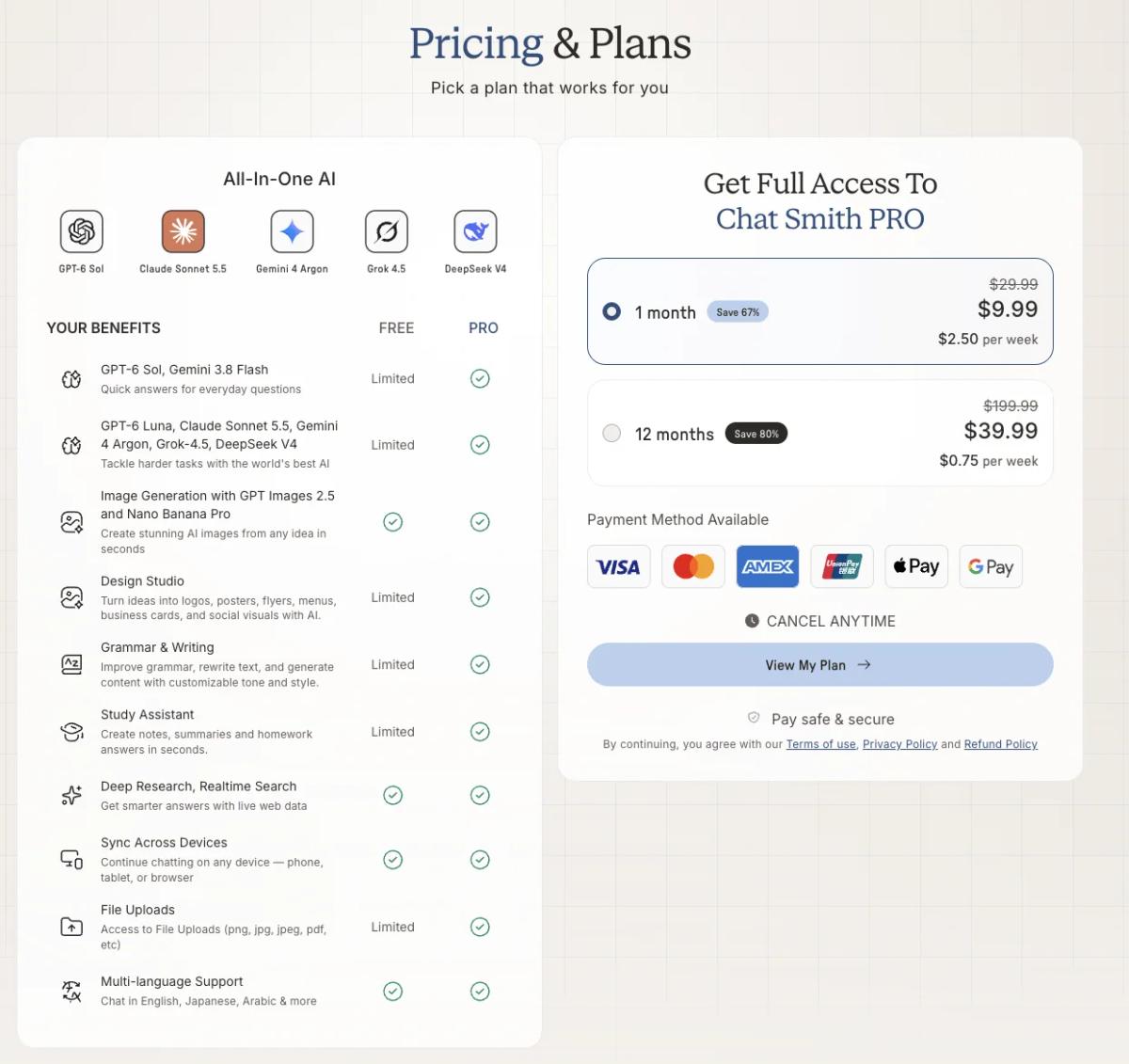
Chat Smith PRO monthly$9.99/month exampleMulti-model chat, supported image and design features
Chat Smith PRO annualFrom $39.99/year exampleLower effective price; check active offer and limits
Perplexity Free$0Standard web search and limited files; no advanced model selection
Perplexity Pro monthly$20/monthPreferred models, deeper research, files, image tools and Computer access
Perplexity Pro annual$200/year ($16.67/month equivalent)Lower price than monthly billing, with annual commitment
Perplexity Education Pro$10/month for eligible verified usersDiscounted Pro features and Learn Mode for students/educators
Perplexity Max monthly$200/monthHigher model and Computer allowances, premium features
Perplexity Max annual$2,000/year (about $167/month equivalent)Annual web checkout; higher models and Computer allowances
Chat Smith pricing page comparing Free and PRO features with monthly and yearly subscription options
Chat Smith pricing screenshot shows $9.99 monthly and $39.99 yearly example offers.

Pricing sources (November 2026): Perplexity's official help pages list Pro at $20/month or $200/year, Max at $200/month or $2,000/year, and Education Pro at $10/month after eligibility verification. Chat Smith PRO examples are $9.99/month and annual offers from $39.99; final prices may differ by platform and region. Check model quotas, Computer credits, promotions, taxes and billing terms before purchasing.

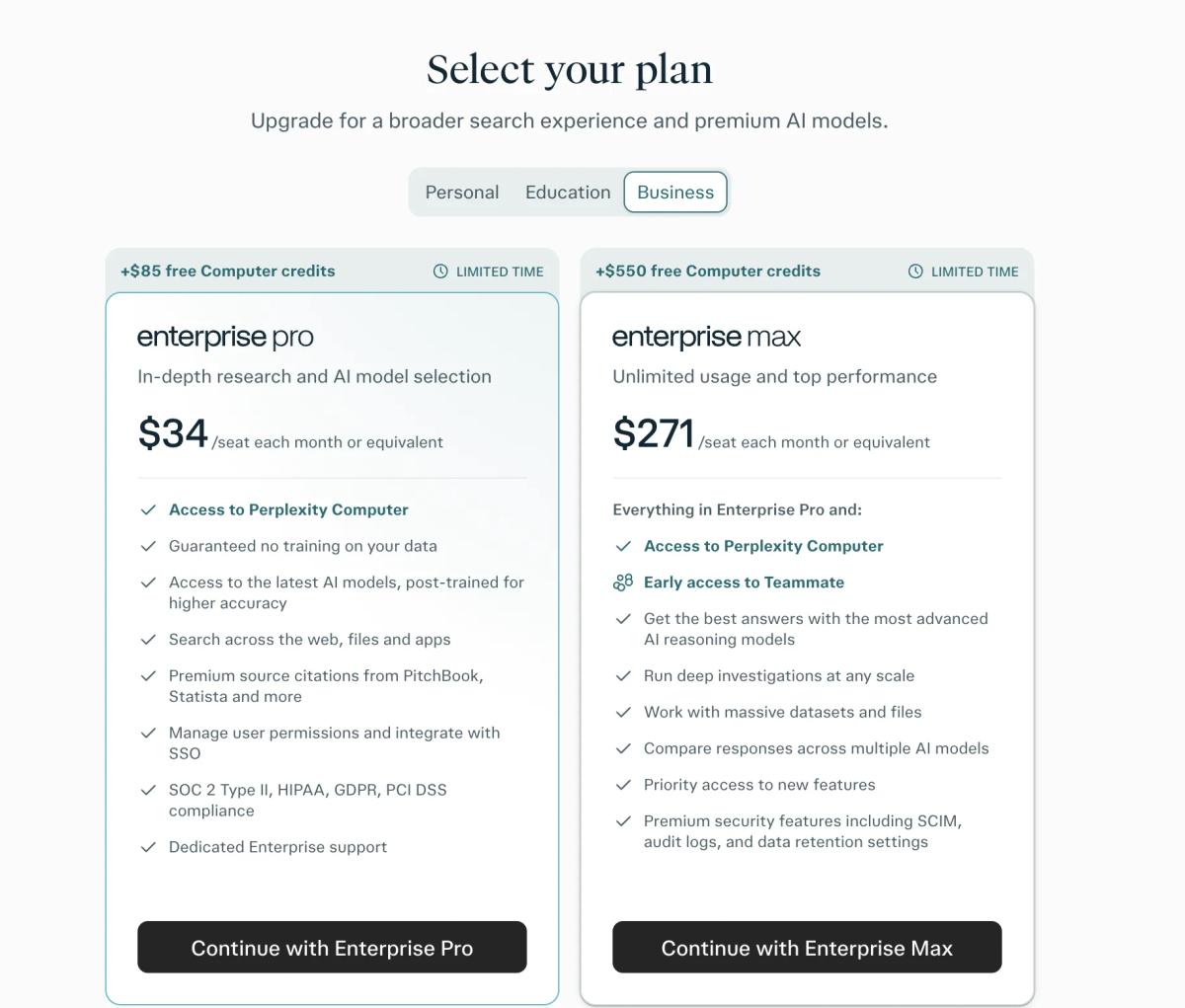
Perplexity Enterprise Pricing (Separate from Personal Plans)

The screenshot below shows the Perplexity Business tab, not an individual subscription. Enterprise Pro is shown at $34 per seat per month or equivalent, and Enterprise Max at $271 per seat per month or equivalent in this example. Business pricing, permissions and promotional Computer credits should not be compared directly with the personal Pro/Max plans above; verify the live region and checkout details.

Perplexity Business pricing screenshot showing Enterprise Pro and Enterprise Max per-seat plans
Perplexity Enterprise Pro and Enterprise Max are business plans priced per seat, not personal Pro and Max subscriptions.

What Are You Paying For Beyond the Model Name?

Chat Smith: One paid plan may cover supported chat-model choices and task-specific tools for everyday writing, images and design. It does not include every native feature or subscription from each AI model provider.

Perplexity: The paid subscription also buys access to its citation-based research system, routing modes, and varying levels of Computer, file/app creation, model council and connected tasks. Credits and usage allowances matter when a project includes long-running agents, images or video.

Think about what you actually finish in a week. If you mostly draft copy, ask questions, and create still images, a lower-priced multi-model plan may cover your needs. If you regularly run research projects that pull from several sources and connected tools, paying more for Perplexity could make sense. A useful comparison is cost per finished task, not simply cost per model name.

Free vs Paid: Compare Usage Limits, Research and Computer Credits

A small pricing detail can make a big difference. Two plans may both show GPT, Claude, and Gemini, yet give you very different limits on premium requests, uploads, image generations, or agent work. So before upgrading, picture a normal week: how often will you use each feature, and what happens when you hit its limit?

Feature or allowanceChat SmithPerplexity
Free accessLimited supported AI models and selected toolsBasic search and limited file uploads; automatic model choice
Premium model choiceSupported model selection and quotas depend on PROPro/Max offer preferred advanced-model selection
Search and researchWeb Search/Deep Research tools; check plan limitsFree has very limited Pro Search; paid tiers have higher quotas
Document uploadsSupported document Q&A; limits varyFree limited; Pro/Max expand file analysis and Projects
Images and creative workGPT Image/Nano Banana choices and dedicated design workflowsImage generation on eligible paid plans
Multi-step agentsTask-specific tools; full Computer parity not assumedComputer access with plan-dependent credits and limits
Video creationNo equivalent native video tool confirmed hereVideo generation in eligible Perplexity plans; usage limits apply

Perplexity Computer: Bonus Credits vs Recurring Allowance

Perplexity Computer coordinates models, browsing, files and connected apps for multi-step tasks. Its public pricing page currently advertises 4,000 bonus Computer credits with Pro, while Max advertises 10,000 monthly Computer credits plus an additional promotional bonus. Bonus credits should not be described as a permanent monthly allotment: offers and eligibility can change.

A lengthy Computer task can consume more allowance than a short search answer. Check the current credit balance, limits, and any additional charges before launching a large project. Chat Smith's supported chat, image, writing and design tasks have their own usage limits instead of an identical Computer-credit system; these allowances are not directly comparable.

The official Perplexity plan guide positions Free for simple questions, Pro for advanced model selection and regular research/file/image work, Max for power users with heavy Research and Computer needs, and Education Pro for verified eligible students or educators. Separate developer API usage is billed independently of consumer subscriptions.

Which Subscription Fits Your Everyday Work?

User or taskWhat matters mostSuggested comparison
Casual questions and emailFast answers, writing and monthly costStart with both free plans; compare ease and premium-model limits
Freelancer or marketerCampaign copy, AI images, posters and product visualsCompare Chat Smith Design Studio with Perplexity Pro media tools
Student or teacherStudy tools, research and verified educational pricingCompare Chat Smith with eligible Perplexity Education Pro
Researcher or analystRecent sources, citations, Projects and filesTest Perplexity Research/Projects against Chat Smith Deep Research
Agent-heavy power userLong investigations, apps, connectors and creditsEvaluate Perplexity Max/Computer and actual credit consumption
Small business teamPermissions, sharing and app accessEvaluate team/enterprise offerings separately from personal PRO

Value verdict: Chat Smith may be a better fit when you want supported model choice plus everyday writing and business-design tools at its current checkout price. Perplexity Pro may justify its cost through source-heavy research, preferred models and Computer access. Max is aimed at sustained, high-limit work. None of these differences prove that one model is more accurate or that the subscriptions include equivalent quotas.

Annual billing: Perplexity Pro is listed at $200/year and Max at $2,000/year. The lower monthly equivalent assumes an annual commitment; it is not the monthly-billed price. Compare the actual renewal terms, supported platform, regional taxes, promotional expiry, and whether you will use the features often enough to justify the subscription.

Two Practical Tests: Same Task, Different Model Workflows

Want to see how these differences play out? You can start with the two prompts below. They're designed to make the comparison repeatable: use the same brief, record the model and settings, and keep the first answer. The screenshots elsewhere in this article are real examples, but they aren't a controlled benchmark of every model or plan.

Test 1. Compare Model Choice and Writing Quality

Prompt: "You're helping a small US café launch a new iced matcha drink. Draft a friendly 100-word launch email, three Instagram captions, and a two-sentence creative brief for a 4:5 product advertisement. Keep the message accurate; do not invent discounts, reviews or health benefits."

Run it first with one identified GPT model in Chat Smith and one identified GPT model in Perplexity. If exact versions are not available on both services, say so in the results. Repeat with a Claude option if the goal is to study model-family differences.

Evaluate: Prompt following, tone, factual restraint, clarity, editing effort and whether the tools make it easy to move into an image or document task. Different underlying models and retrieval settings mean the test does not isolate the app interface alone.

Test 2. Compare Research Sources and Multi-Model Reasoning

Prompt: "Research three recent changes in AI image generation that matter for small-business marketers. Give the announcement dates, link to original sources, distinguish verified facts from speculation, and finish with a 120-word recommendation. Identify any uncertainty."

Run it using the available research workflows. In Perplexity, optionally test Best Mode or Model Council as separate conditions, noting that automatic routing and parallel synthesis are not the same as selecting one chat model. In Chat Smith, try a supported model and research tool, and record the source quality.

Evaluate: Freshness, source relevance, dates, unsupported claims, synthesis and how easily you can audit the answer. A confident reply with weak citations should not win the comparison.

Strengths, Trade-Offs and Limitations

ProductStrengthsTrade-offs
Chat SmithSupported multi-provider model selector; everyday writing and file tools; dedicated image and Design Studio workflowsNewest model releases and native provider-specific tools may not match the original apps; quotas vary
PerplexitySearch and citations; manual or automatic model choice; Model Council; Computer and connectors; supported media generationMore modes and credit limits to understand; model or Computer features depend on the subscription

There isn't a perfect AI assistant here. Even a response with clickable citations can misunderstand a source, and a beautifully written answer can invent a product detail. Before relying on either tool for a client report, financial decision, or public ad, check the claims and inspect the final asset yourself.

Who Should Choose Chat Smith?

Chat Smith makes sense if your typical day jumps between tasks: a quick research question, an email draft, a PDF explanation, then an image or flyer. You can choose among supported models while keeping those everyday creative tools close by. If that sounds like your workflow, test how many steps it takes to finish a real deliverable.

If your priority is creating a poster, menu, flyer or branded social asset after a chat, those task-specific starting points may matter more than advanced source orchestration.

Who Should Choose Perplexity?

Perplexity may be the better fit if you spend a lot of time asking, "Where did that information come from?" or if one research question turns into a multi-file project. Its search citations, model modes, Projects, and Computer tools are designed for that kind of follow-through. Just remember that the more advanced workflows can bring their own quotas and credit limits.

It is especially relevant to analysts, researchers and knowledge workers who want linked evidence, coordinated models and work across supported files or apps.

Final Verdict: Which Multi-Model AI Assistant Is Better?

So, which one would we pick? It depends on the work waiting for you. Chat Smith puts supported model choices next to everyday writing, image, and business-design tools. Perplexity pairs multiple models with source-based research, automatic routing, and more involved Computer workflows. The overlap is real, but the experience isn't the same.

If you're still unsure, don't start by paying for the most expensive plan. Pick two tasks you do regularly, try them in both apps, and note the model, output quality, time spent editing, and limits you encounter. That will tell you far more than a long list of AI logos.

Frequently Asked Questions

Both offer access to multiple AI model families, but their workflows differ. Perplexity emphasizes source-based web research, citations and advanced research tools. Chat Smith combines supported model choices with writing, documents, image generation and design tasks.

logo chat smith

Editorial Team

Managing Editor

The Chat Smith Editorial Team brings together AI enthusiasts, researchers, and creators to make AI accessible and practical. We share trends, tool reviews, and actionable guides that help individuals and businesses stay informed, boost productivity, and get more from AI.

Share this article

Related Articles