Comparison

Chat Smith vs Claude: Which AI Assistant Is Better for Daily Tasks?

Editorial TeamEditorial Team・Nov 12, 2026・13 mins read
Chat Smith vs Claude: Which AI Assistant Is Better for Daily Tasks?

An ad image, a 20-page report, and a broken piece of code may all start with an AI prompt. But they are not the same job. That is why the Chat Smith vs Claude decision gets interesting once you stop comparing chatbot answers and start looking at what each tool helps you finish.

Chat Smith puts several AI model families and practical creative tools in one place. Claude goes deeper into Anthropic's own work environment, with coding, editable documents, connected apps, and longer tasks. Both can help you get things done. They just take different routes.

We will compare their models, eight key features, Free and paid plans, and the types of work each makes easier. No invented head-to-head benchmark—just a clear look at the tools and trade-offs.

chat smith pro

Chat Smith vs Claude: Quick Verdict

Pick Chat Smith when you need different AI model perspectives, generated images, posters, ads, and quick everyday tools. It is especially useful when your day jumps between several types of creative work.

Pick Claude when your main work lives in codebases, long documents, spreadsheets, or connected business software. Claude Code and the native document tools give it a different kind of depth.

There is overlap, of course. Both can research, summarize, and draft text. But writing a report and producing an editable report are different things. That distinction will come up throughout this comparison.

Chat Smith vs Claude at a Glance

CategoryChat SmithClaude
DeveloperChat Smith, an independent AI productivity platformAnthropic
Main approachMultiple model providers plus task-specific toolsNative Claude models and connected work tools
AI providersOpenAI, Anthropic, Google, xAI and DeepSeekAnthropic
Model examplesGPT-6 Sol, GPT-6 Astra, GPT-5.6 Luna, Claude Sonnet 5, Claude Haiku 4.5, Gemini 3.8 Flash, Grok 4.5, DeepSeek V4Claude Fable 5.2, Opus 5.5, Sonnet 5.5, Haiku 5.5
Multi-provider selection✓—
AI writing and emails✓ Writing Suite and Email Writer✓ Chat, Docs and connectors
Web research✓ Web Search and Deep Research✓ Search, research and connected sources
PDFs and files✓ PDF Q&A and summaries✓ File analysis and downloadable files
AI image generation✓ Dedicated image models— No native photographic image-generation model
Graphic design✓ Design Studio for posters, flyers, logos, ads and menus✓ Claude Design and Artifacts
Slide creation✓ Slide-related tools✓ Claude Slides and exports
Spreadsheet workflowsSupported file capabilities vary✓ Claude Sheets and file creation
Coding assistance✓ Supported AI models✓ Claude Code on eligible plans
Connected agent workEveryday assistance and supported tools✓ Cowork and connectors
Career preparation✓ Resume Builder and Interview Practice✓ Chat-based career assistance
Best fitMulti-model flexibility, imagery and everyday creative outputNative coding, office documents and complex work

The checkmarks describe what the products offer, not an unlimited entitlement on every plan. A dash means the same native feature is missing; it does not mean you cannot accomplish a similar result through chat or another tool.

AI Models: Multiple Providers vs Claude's Native Models

Chat Smith: GPT, Claude, Gemini, Grok and DeepSeek

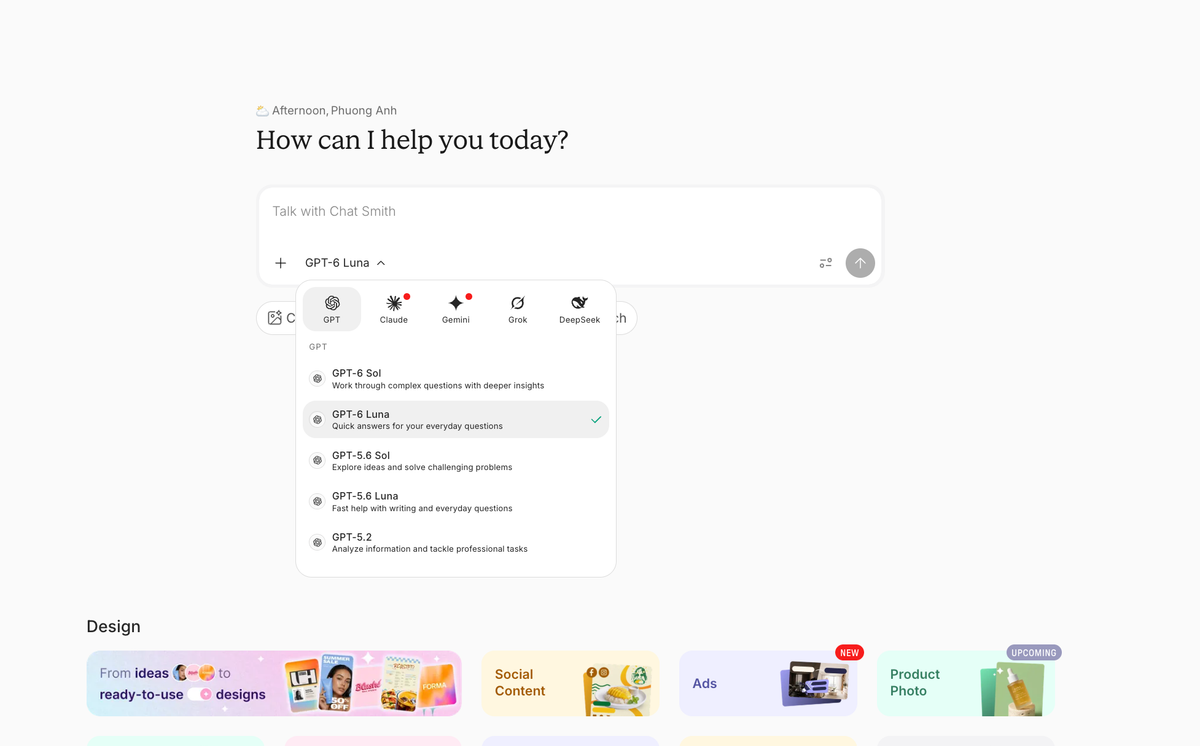
Chat Smith lets users select supported models from different AI providers. Examples include GPT-6 Sol and Astra, Claude Sonnet 5, Claude Haiku 4.5, Gemini 3.8 Flash, Grok 4.5 and DeepSeek V4.

Say you are writing a launch announcement. One model gives you a formal version. Another gives you a shorter, punchier one. Chat Smith makes that comparison easy without changing apps. Whether the second answer is actually better is still your call.

Chat Smith home page with multi-provider GPT Claude Gemini Grok and DeepSeek model picker
Chat Smith model picker shows several AI model providers

Claude: Fable 5.2, Opus 5.5, Sonnet 5.5 and Haiku 5.5

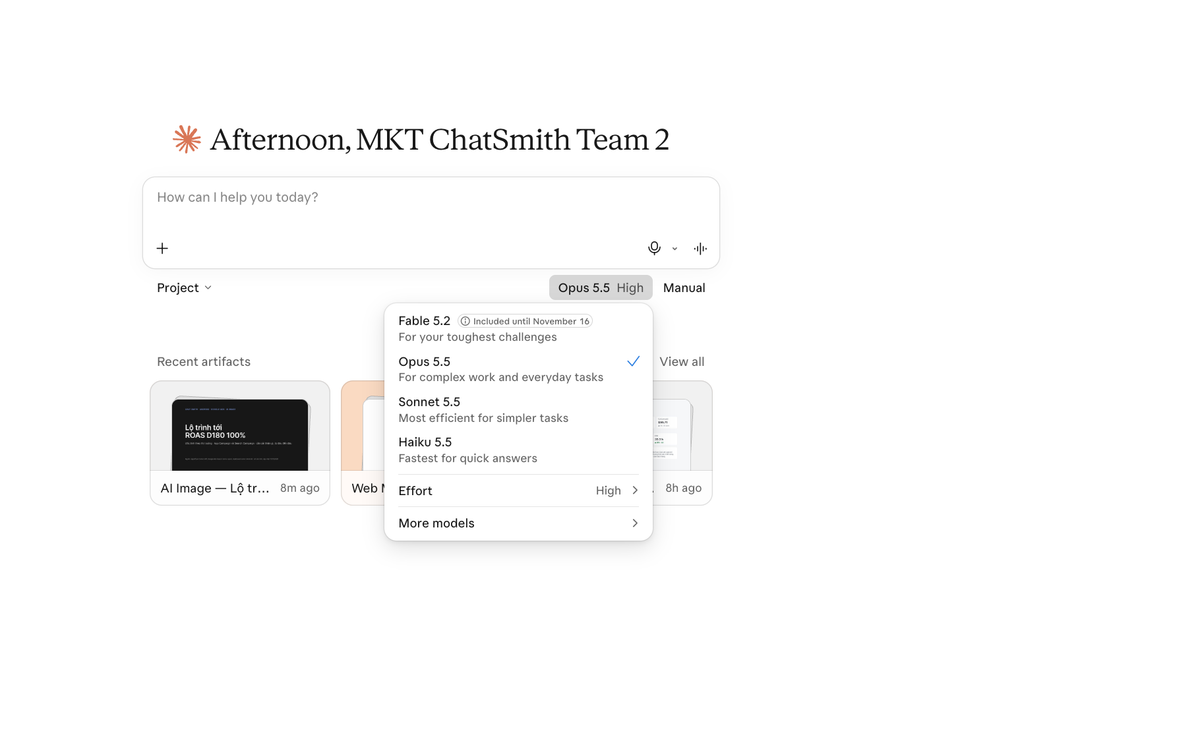
Claude takes the opposite route: one provider, several models tuned for different demands. Its Fable 5.2, Opus 5.5, Sonnet 5.5, and Haiku 5.5 lineup spans demanding reasoning, coding, everyday work, and faster tasks. The native ecosystem—not merely the model names—is a big part of the appeal.

One catch: model availability is not the same across Claude's API, chat plans, and connected products. Fable, for example, may require usage credits or specific access. Always check what your particular subscription includes.

Claude home page displaying Fable 5.2 Opus 5.5 Sonnet 5.5 and Haiku 5.5 model selection
Claude model picker showing current Anthropic model choices

So the choice is fairly simple. Chat Smith gives you a wider range of providers. Claude gives you a deeper native Anthropic experience. Using Claude through Chat Smith does not automatically unlock Claude Code or Cowork.

Chat Smith vs Claude: Feature-by-Feature Comparison

Here is where the difference becomes practical. For each task, we will look at the actual feature, what it helps you produce, and where the other assistant makes more sense.

1. AI Writing, Email and Content Creation

Chat Smith: The AI writing tool helps draft reports, articles, proposals and product descriptions. Its AI email writer offers a direct workflow for follow-ups, sales outreach and client communication. Users can also explore different text styles with supported model options.

Claude can write a client email just as readily. Where it becomes more interesting is after the draft: you can keep refining a longer piece in Claude Docs or bring supported connected information into the workflow. That matters when the writing is part of an ongoing project rather than a one-off message.

For a quick email or product description, Chat Smith's dedicated tools are an easy starting point. For a report that needs several rounds of edits, Claude Docs may be the better home. This is about workflow, not an unverified claim that one AI always writes better.

2. AI Image Generation, Posters and Design Studio

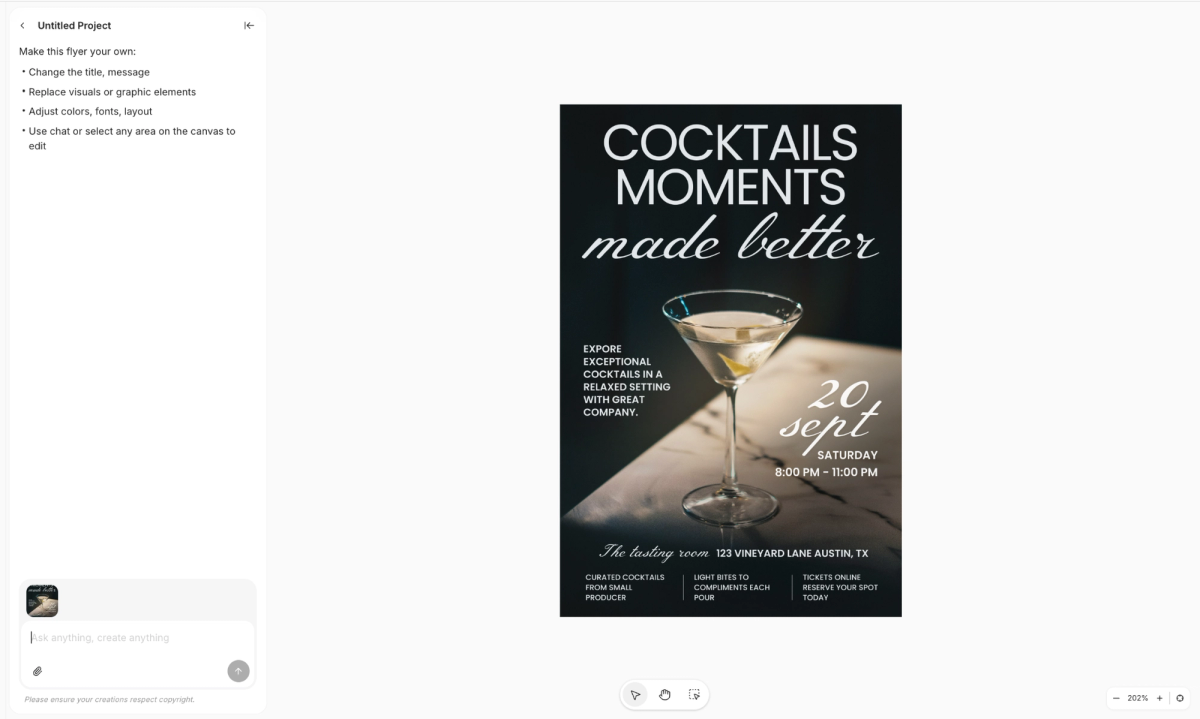
Chat Smith: Chat Smith includes dedicated image models such as GPT Image 2.5 Flare and Nano Banana Pro, depending on plan availability. Users can generate product-style concepts, illustrations, backgrounds and image variations. Design Studio provides dedicated workflows for logos, posters, ads, flyers, menus and business cards.

For example, a store owner can prepare a seasonal promotion with AI Poster Design, while a restaurant can explore a new AI Menu Design. This makes the tool useful for marketing teams, e-commerce sellers and local businesses.

Chat Smith Design Studio showing an editable cocktail flyer with design canvas and chat controls
Chat Smith Design Studio flyer example

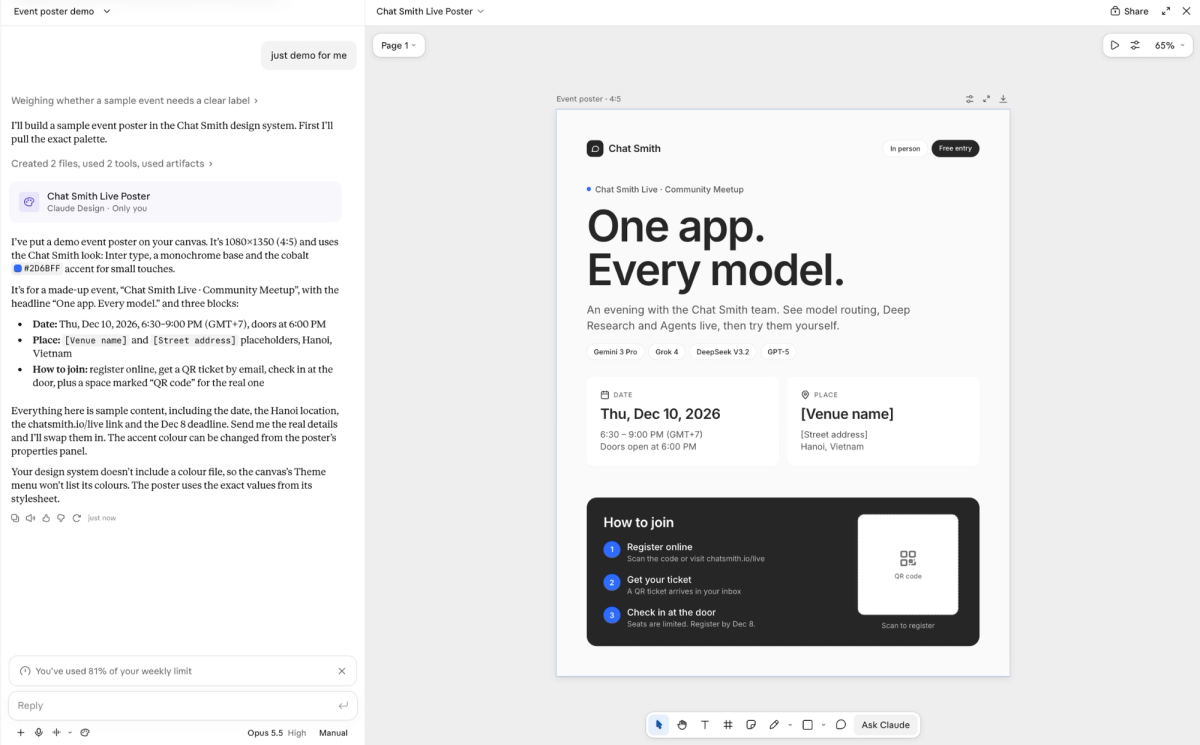
Claude is not limited to plain text. Claude Design and Artifacts can produce editable layouts, diagrams, prototypes, and visual content. The distinction is the output: Claude does not natively generate photos and illustrations in the way a dedicated image model does. That is an important difference for product ads and creative campaigns.

Claude Design workspace showing editable Chat Smith Live poster canvas and design controls
Claude Design example of an editable event poster

If you need a product image, Chat Smith has the more direct tool. If you need an editable one-pager or prototype that sits inside a larger project, Claude is a serious option. Both can help with marketing, but they solve different parts of the job.

3. Web Research, PDFs and File Analysis

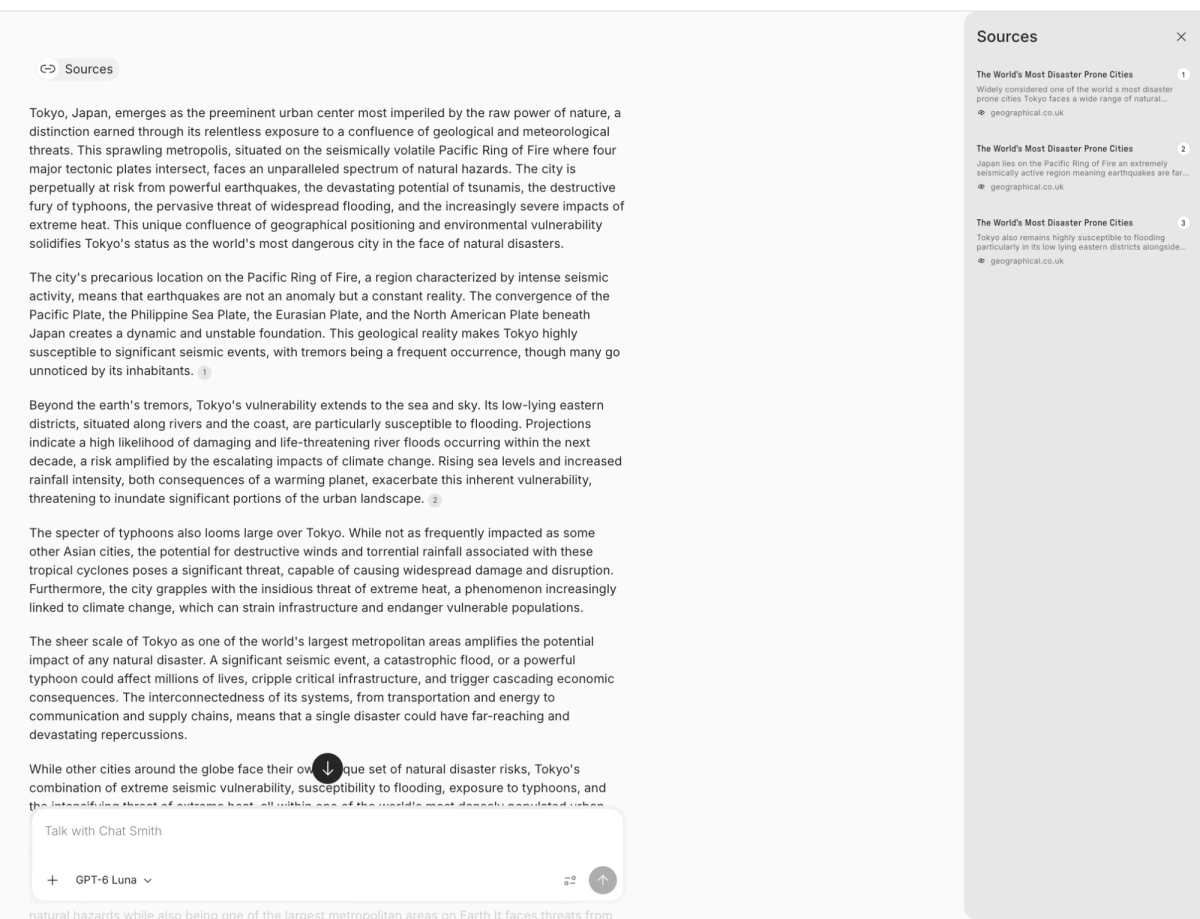
Chat Smith: Chat Smith provides Web Search, Deep Research and supported file Q&A. Its AI PDF summarizer helps turn long reports into summaries or action points. Comparing different AI models can provide alternative perspectives on a research question.

Chat Smith research response showing full answer and source sidebar
Chat Smith research answer with sources panel (illustrative example)

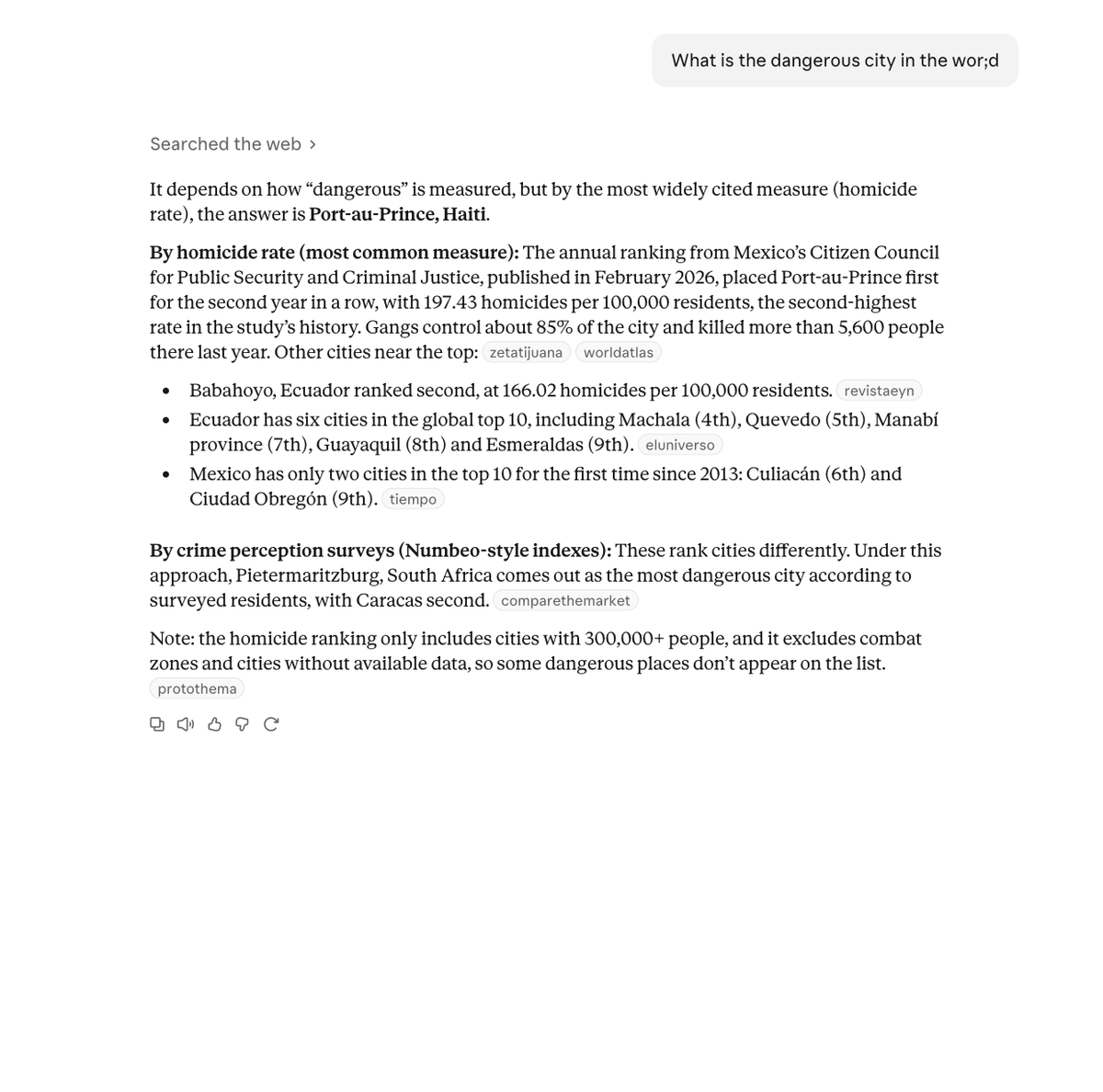
Claude is built for more than answering a question about a file. After the research, you can turn findings into an editable document, spreadsheet, or presentation. Connectors can also bring in approved information from business apps. That is useful when the report has to become a deliverable.

Claude web search response showing source citations and research explanation
Claude research response with inline web citations (illustrative example)

Use Chat Smith when the goal is to understand a PDF quickly or compare explanations from different models. Consider Claude when the source material lives across connected systems and the finished output needs continued editing. In both cases, check citations before relying on them.

4. Coding: Chat Assistance vs Claude Code

Need help understanding an error message or comparing two ways to write a function? Chat Smith can ask supported coding models for explanations and suggestions. That is a useful second opinion, especially for smaller tasks.

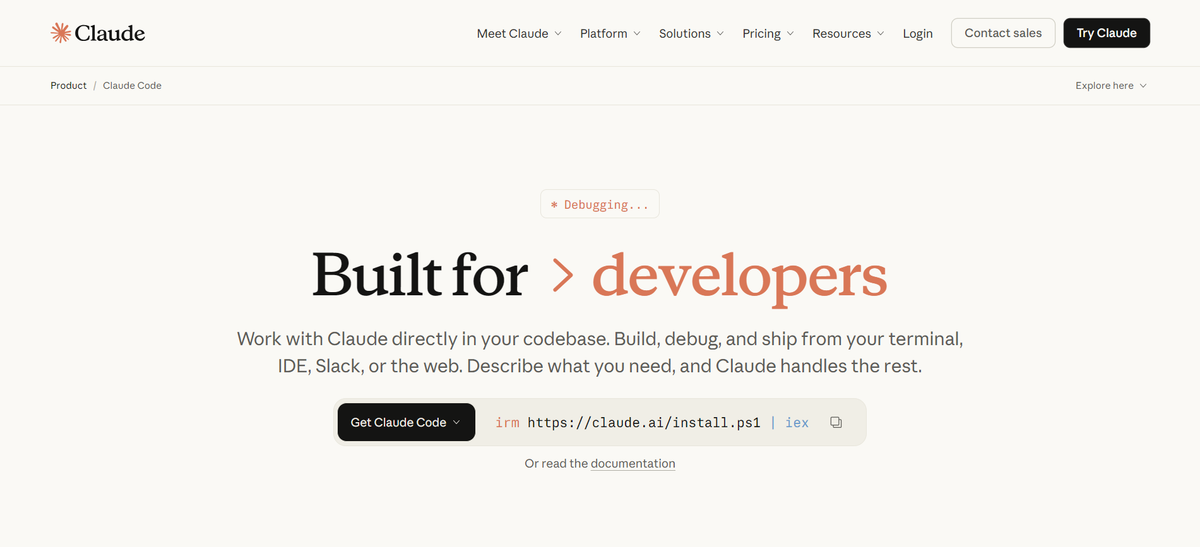
Now make the task harder: inspect a repository, update several files, and work through a fix. Claude Code is designed for that kind of engineering workflow. Its native developer tools are a bigger differentiator here than the writing style of an individual Claude model.

Claude Code development workspace for coding and debugging
Claude Code supports specialized coding workflows.

For codebase work, Claude has the clearer specialist tool. For learning, quick fixes, and comparing suggestions, Chat Smith remains useful. A Claude model inside Chat Smith is not a substitute for the Claude Code environment.

5. Presentations, Spreadsheets and Editable Documents

Chat Smith can help you get the substance ready: summarize a source document, outline a deck, draft speaker notes, or use a slide-related tool. Check the particular export and editing options if you need a file colleagues will keep working on.

Claude goes further into the file itself. Docs, Slides, and Design are built around editable outputs, and Claude can create downloadable Word, PowerPoint, PDF, and Excel files. Sheets and Whiteboards add further options where available. For a consultant handing work to a client, those details can be more important than the first draft.

Claude's Free plan already includes limited Docs, Slides, Design, and Artifacts functionality. Pro and Max mainly change access to more usage and additional tools; it would be misleading to label every file feature as paid-only.

If you just need the content, both can help. If you need a presentation or spreadsheet you can keep editing, Claude has the more developed native workspace.

6. Agents, Connected Apps and Calendar Tasks

Chat Smith helps with the small decisions that fill a workday: draft an agenda, turn notes into tasks, and use Calendar Agent on supported mobile experiences. It keeps those routines close to the same writing and creative tools.

Claude's advantage appears when one task touches several systems. Cowork, Projects, scheduling, and connectors can help carry a multi-step job through approved applications. The trade-off is setup: access depends on the plan, connected services, and permissions.

For personal planning and mixed day-to-day tasks, Chat Smith is straightforward. For more involved work across documents and apps, Claude's native integrations are worth evaluating.

7. Resumes, Cover Letters and Interview Practice

Chat Smith: The AI Resume Builder supports CV drafts and career details, while the Resume Checker helps review clarity and relevance. AI Interview Practice provides a dedicated way to rehearse questions, including supported voice experiences.

Claude can review a CV, tighten a cover letter, and act as an interviewer through conversation. It may also be useful when the final application needs to be polished as an editable document.

Choose Chat Smith if you like a guided tool for each career task. Choose Claude if you prefer to coach the application through an open conversation and keep editing the result. Neither assistant can promise an interview or job offer.

8. Voice, Images and Multimodal Work

Chat Smith's image-generation models are a meaningful difference when you need the AI to actually create a new visual. Other supported inputs and voice functions depend on the app and selected model.

Claude can analyze images, read documents, and create interactive charts or other visuals. It also offers voice in supported experiences. But analyzing an uploaded image is not the same as generating a photorealistic image from a creative brief.

Need to generate images? Start with Chat Smith. Need to work with documents, diagrams, or interactive artifacts? Claude may fit better. Check the capabilities in your specific app and plan.

Feature Matrix: Which AI Fits Your Task?

Your goalChat SmithClaudeStronger fit
Compare answers from multiple AI providers✓Anthropic models onlyChat Smith
Write emails and business copy✓ Dedicated tools✓ Chat and DocsDepends on workflow
Research a topic or summarize PDFs✓✓Both
Research across connected applicationsSelected tools✓ Connectors and CoworkClaude
Generate AI product-style images✓ Image modelsNo native equivalentChat Smith
Create posters, flyers and menus✓ Design Studio✓ DesignChat Smith for dedicated templates
Build editable slide decksSlide-related tools✓ Slides and file creationClaude
Create and edit spreadsheetsDepends on feature✓ Sheets and file exportsClaude
Work on a code repositoryCoding assistance✓ Claude CodeClaude
Complete long, multi-step tasksSelected agents✓ CoworkClaude
Draft resumes and cover letters✓ Dedicated tools✓ Via chatChat Smith for guided tools
Practice interviews✓ Dedicated practice✓ RoleplayBoth
Explore several writing styles and models✓ Multi-provider optionsClaude familyChat Smith
Make interactive charts or artifactsVaries by available tools✓ ArtifactsClaude

These recommendations are based on product capabilities and typical workflows, not timed tests or a controlled benchmark. A checkmark should never be read as a guarantee of better output quality.

Chat Smith vs Claude Pricing

The prices look easy to compare at first. The harder question is what you are paying for. Chat Smith PRO combines different model families and creative tools. Claude's paid plans add capacity for its native work environment. Here is how the individual plans stack up.

Individual Plans and Subscription Prices

PlanChat SmithClaude
Free$0$0
WeeklyPRO: $6.99/week (listed offer)No standard individual weekly plan
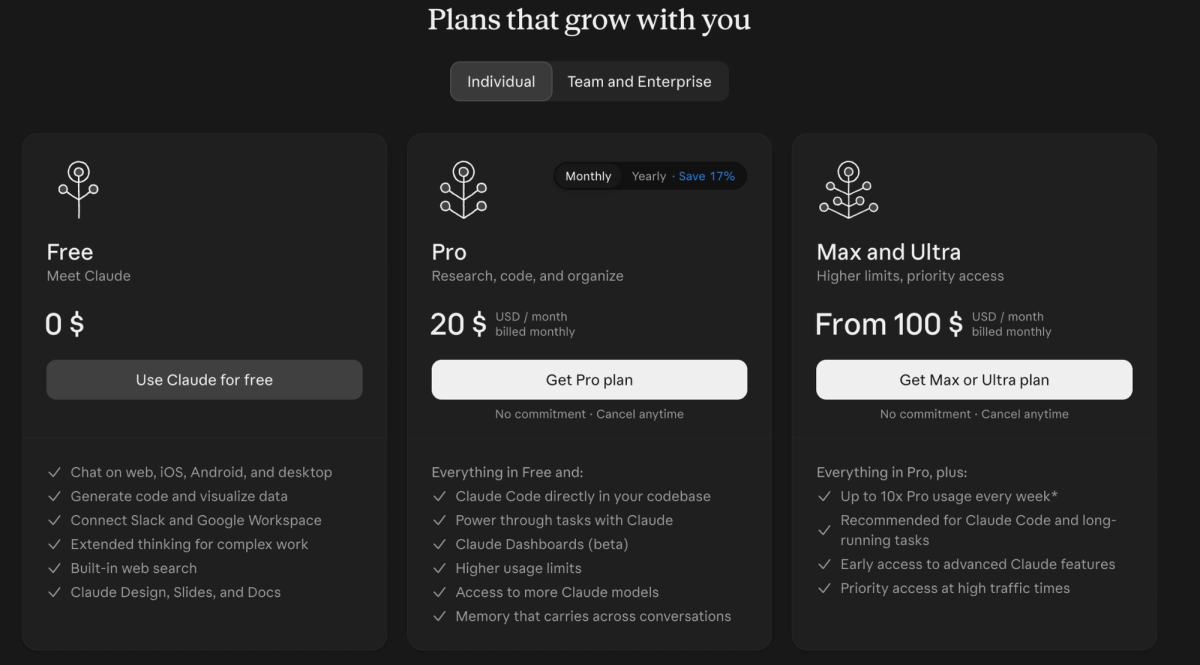
MonthlyPRO: $9.99/month (listed offer)Pro: $20/month
AnnualPRO: from $39.99/year (offer-dependent)Pro: $200/year, paid upfront
Higher usagePRO limits vary by offerMax 5x: $100/month
Highest listed individual tierCurrent offers may varyMax 20x: $200/month

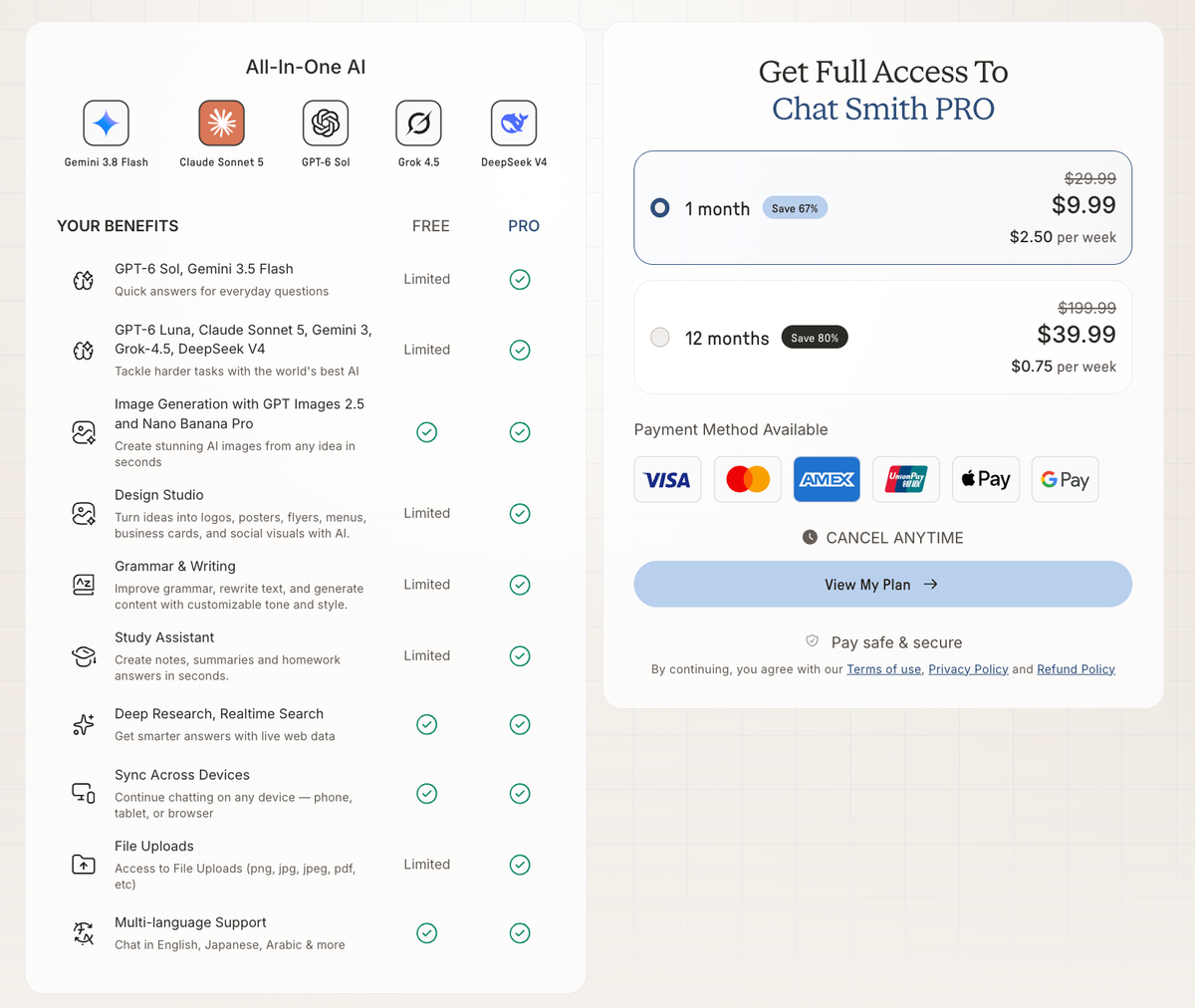
Chat Smith PRO — the screenshot below shows the Free/PRO feature comparison and subscription options.

Chat Smith PRO pricing screenshot with free versus paid features and monthly annual subscription options
Chat Smith PRO plans and benefits shown in the supplied screenshot

Claude — the screenshot below shows the Free, Pro and higher-usage plans.

Claude pricing page showing Free Pro and Max Ultra subscription options
Claude Free, Pro and Max/Ultra pricing shown in the supplied screenshot

The figures above are U.S. examples for November 2026, not permanent rates. Chat Smith prices can change with the offer, store, or region. Claude's published pricing may exclude tax, and higher usage or credits can carry their own rules. Check the final checkout terms before choosing.

What Do Free and Paid Plans Include?

FeatureChat Smith Free / PROClaude Free / Pro / Max
AI chatFree access; PRO adds access and limitsFree access; paid higher limits
ModelsMultiple providers; tier-dependent accessAnthropic models; tier-dependent access
AI image generationDedicated models; usage variesNo native photo-generation model
Poster, flyer and design toolsDesign Studio; tier-dependentClaude Design and Artifacts, including limited Free access
Writing and researchTools available with limitsChat, search and supported tools with limits
PDF and file supportSupported file tasksFile analysis and file creation
Docs and SlidesContent and slide-related toolsNative Docs and Slides, limited on Free
Spreadsheet workflowsDepends on toolSheets and editable files, with tier and rollout limits
Claude CodeNo native Claude CodeAvailable on eligible Pro / Max plans
Cowork and scheduled tasksDifferent daily task featuresEligible paid plans and rollouts
ConnectorsDepends on integrationsSupported connectors; permissions apply
Higher usagePRO allowances varyMax provides higher capacity than Pro

A plan can include a tool without including unlimited use of it. Likewise, “No native” means the named built-in feature is missing, not that another route is impossible.

Which Plan Offers Better Value?

Chat Smith PRO may be a better-value option when your tasks include creative images, posters, flyers, writing and several different model providers. Check the available Chat Smith PRO plans and actual model/image allowances before subscribing.

Claude Pro is a different purchase. If you regularly need Claude Code, editable deliverables, connected apps, or longer workflows, the higher monthly price may be worthwhile. Free users can already try a number of Claude's document and design features, within limits.

Max is for people who spend much more of their day inside Claude and need higher capacity. It is not a natural comparison to a standard creative-tool subscription simply because both have a monthly price.

Who Should Choose Chat Smith or Claude?

Marketers, Creators and Small Businesses

Choose Chat Smith when you regularly make advertising concepts, product imagery, posters, menus and social visuals. Its multi-provider models and Design Studio provide a clear route from copy to creative assets. Claude is still useful for editable brand work and connected project documents.

Developers and Technical Teams

If your day is spent in a repository, the decisive feature is Claude Code. Chat Smith can still explain code and suggest alternatives, but that is not the same workflow as making and reviewing changes across files.

Analysts and Office Professionals

A team that delivers reports and editable presentations may get more from Claude Docs, Slides, and connected tools. Chat Smith makes sense for quick research, PDF summaries, and a second model's perspective.

Job Seekers and Everyday AI Users

For resumes, interviews, and everyday writing, both can help. Chat Smith's dedicated career tools are easier to start with; Claude's open-ended chat and documents leave more room to shape a longer process.

Pros and Cons

PlatformAdvantagesLimitations
Chat SmithMulti-provider model choice; AI image generation; Design Studio; task-specific writing and career tools; flexible listed PRO billing optionsModel access and limits differ by plan; native Claude Code and Cowork are not included through Claude model access
ClaudeClaude Code; editable Docs, Slides and Sheets; Claude Design; Cowork and connectors; native Anthropic modelsNo comparable native photo-generation model; only Anthropic model family; high-usage plans can cost more

Accuracy, Privacy and Limitations

There is no shortcut around quality control. An AI can produce a convincing report with a wrong number, or a great-looking ad with a product detail that is not true. Review research, claims, citations, images, and code before you use them.

The privacy question matters too. Chat Smith can send a request to the provider behind your chosen model, while Claude may use connected apps you authorize. Check the relevant policies and workplace rules before uploading sensitive information.

And keep the product boundaries clear: using a Claude model through another app is not the same as getting Claude Code or Cowork. Claude Design can create visuals, but it is not a replacement for every kind of dedicated image generation.

Final Verdict: Chat Smith vs Claude

There is no single winner in Chat Smith vs Claude. The better choice depends on whether you want a broad toolkit for varied tasks or a deeper work environment for a specific kind of project.

Chat Smith is the easier fit for comparing providers, generating images, and preparing marketing or everyday creative assets. Claude is the stronger fit when native coding, editable documents, connected projects, and complex tasks are central to your work.

Need a poster or product image today? Look at Chat Smith first. Need to update a codebase or deliver an editable analysis deck? Look closely at Claude. If you regularly do both, the most useful answer may be to use each for the job it handles best.

Frequently Asked Questions

Claude is a single AI model and app built by Anthropic, while Chat Smith is a multi-model app that gives you access to Claude alongside several other leading AI models in one subscription. The choice often comes down to wanting one specific model versus flexibility to switch between several.

logo chat smith

Editorial Team

Managing Editor

The Chat Smith Editorial Team brings together AI enthusiasts, researchers, and creators to make AI accessible and practical. We share trends, tool reviews, and actionable guides that help individuals and businesses stay informed, boost productivity, and get more from AI.

Share this article

Related Articles