Comparison

Chat Smith vs Gemini: Which AI Should You Use for Images?

Editorial TeamEditorial Team・Nov 12, 2026・17 mins read
Chat Smith vs Gemini: Which AI Should You Use for Images?

A product photo for an ecommerce listing, a clean product cutout and a social media poster might all begin with an AI prompt. But creating a useful visual often takes more than one generation. That is why Chat Smith vs Gemini is worth comparing as an AI image generator comparison—not just a chatbot comparison.

Both products can generate and edit images, but the workflows are different. Chat Smith's all-in-one AI workspace combines supported GPT Image and Nano Banana options with practical creative tools. Google Gemini offers its native Nano Banana image editor, reference-based image generation and integrations with Google's ecosystem.

This comparison starts with a feature overview, then examines text-to-image, image-to-image, AI image resizing, background removal, background generation, poster and flyer design, image upscaling, and model availability. It also covers subscription pricing and a repeatable prompt test. The goal is to help you finish a real asset, not simply collect feature checkmarks.

chat smith pro

Chat Smith vs Gemini at a Glance

FeatureChat SmithGemini
PlatformMulti-model assistant and creative toolkitGoogle's native AI assistant
Image modelsGPT Image 2.5 Flare, Nano Banana Pro and supported optionsNano Banana 2 Lite, Nano Banana 2, Nano Banana Pro
Text-to-image✓✓
Upload and edit images✓ Supported workflows✓
Resize Image✓ Dedicated resize toolGenerative reframing; exact pixels must be checked
Remove Background✓ Dedicated remove background toolPrompt-based edits; check transparency
Generate Background✓ Dedicated tool plus image-to-image✓ Background replacement with prompts
Other design formatsLogo, menu, business card, ads and social stylesPrompt-based designs and templates
Reference-based editingModel- and plan-dependent✓ With supported Nano Banana models
Character or product consistencyDepends on chosen modelGoogle highlights it in Nano Banana 2/Pro
Local editsSupported by image-editing tools and models✓ Nano Banana 2 supports local edits
Text inside generated imagesModel-dependentImproved rendering in Nano Banana 2/Pro
Posters, flyers, menus and logos✓ Dedicated Design Studio✓ Create through prompts/templates
Separate design workflow✓ Design StudioNative Gemini Images and Library
Switch between AI providers✓— Native Google models
Google servicesSeparate app✓ Native integration
Other AI toolsWriting, research, PDF and multi-provider chatWriting, research, files and Google integrations
Free access✓ Limited✓ Limited
Paid plansChat Smith PROGoogle AI Plus, Pro and Ultra

A checkmark means a capability exists, not that it is unlimited. The absence of a matching named tool does not mean an app cannot generate the same type of graphic.

Image generation vs image editing: Text-to-image creates a new visual from words; image-to-image transforms a reference; background removal isolates a subject; background generation changes its setting; and resizing changes dimensions or composition. These closely related jobs require different controls. Comparing them separately makes the Chat Smith vs Gemini feature matrix more useful.

Chat Smith vs Gemini: Which Is Better for AI Images?

Choose Chat Smith when you want different image-model options in one app and need to turn creative ideas into posters, flyers, menus, logos, or advertising graphics.

Choose Gemini when you prefer Google's native Nano Banana 2 image workflow, its editing tools, templates, and Google ecosystem.

The key detail is that Chat Smith also offers Nano Banana Pro. It would be misleading to claim that only Gemini can use Nano Banana technology. The real differences are which versions are available, how you edit, what else you can create, and the subscription limits.

Image Models: GPT Image 2.5 Flare vs Nano Banana 2

Chat Smith: Image Models From More Than One Provider

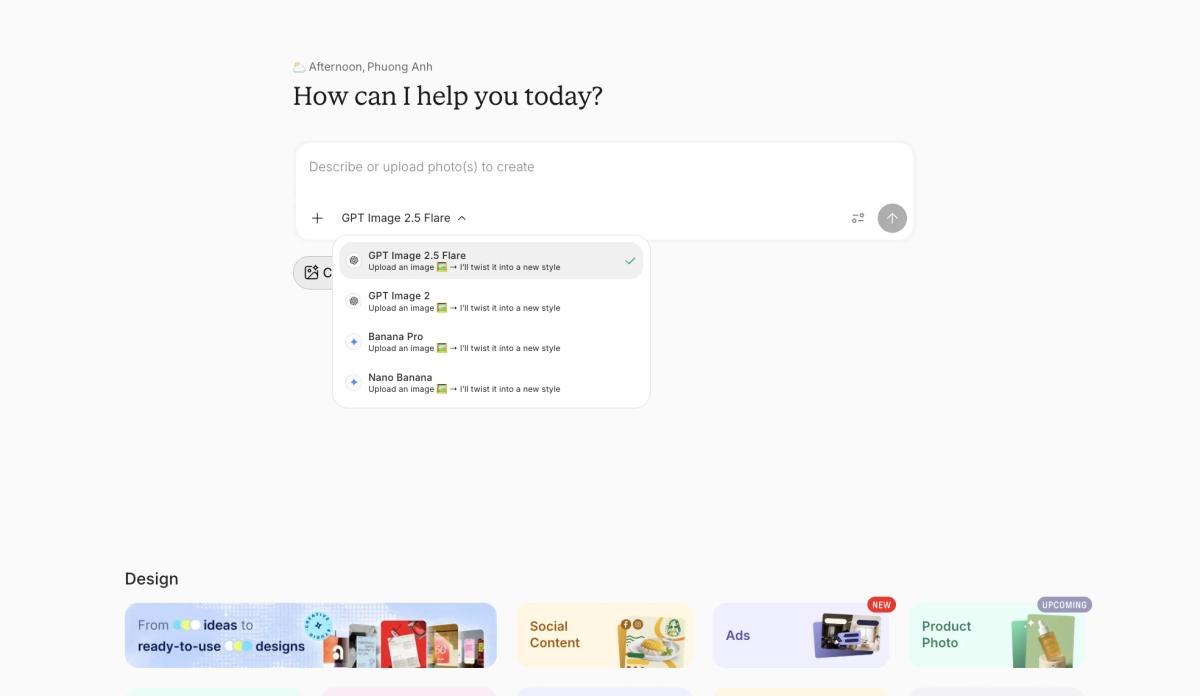
Chat Smith provides more than one option in its AI Image Generator, including GPT Image 2.5 Flare and Nano Banana Pro where available. This matters for creators who want to compare photorealistic AI images, artistic styles and prompt interpretation without leaving one app. Exact image models and generation limits depend on the plan.

Chat Smith image model selector with GPT Image 2.5 Flare, GPT Image 2, Banana Pro and Nano Banana.
Chat Smith image creation workspace and available image model options.

GPT Image 2.5 Flare was introduced to Chat Smith PRO in September 2026 for AI image generation and iterative editing. A practical use case is refining a product photo concept: adjust the lighting, camera angle, subject placement or background while checking that the brand details remain consistent across each iteration.

Nano Banana Pro adds another image-generation option for complex visual prompts, typography-heavy graphics and reference-guided scenes. Different AI image models may handle visual composition, readable text and product details differently; a second model is useful for exploring alternatives, not a guarantee of higher quality.

Chat Smith also includes supported GPT, Claude, Gemini, Grok and DeepSeek chat models for the work surrounding an image: drafting a creative brief, researching an audience, refining an advertising headline and preparing a prompt before generating the visual.

Gemini: Nano Banana 2 Lite, Nano Banana 2 and Pro

Google's Gemini image help page describes three relevant options:

Nano Banana 2 Lite is made for quick image requests and simple concepts, with more limited multi-reference and iterative-editing capabilities.

Nano Banana 2 balances speed and visual quality. Google highlights better instructions, text rendering, subject consistency, and local edits, with support for multiple reference pictures.

Nano Banana Pro is intended for more detailed regeneration and advanced text-heavy or complex visuals. It is available through eligible paid Google AI access, subject to usage limits.

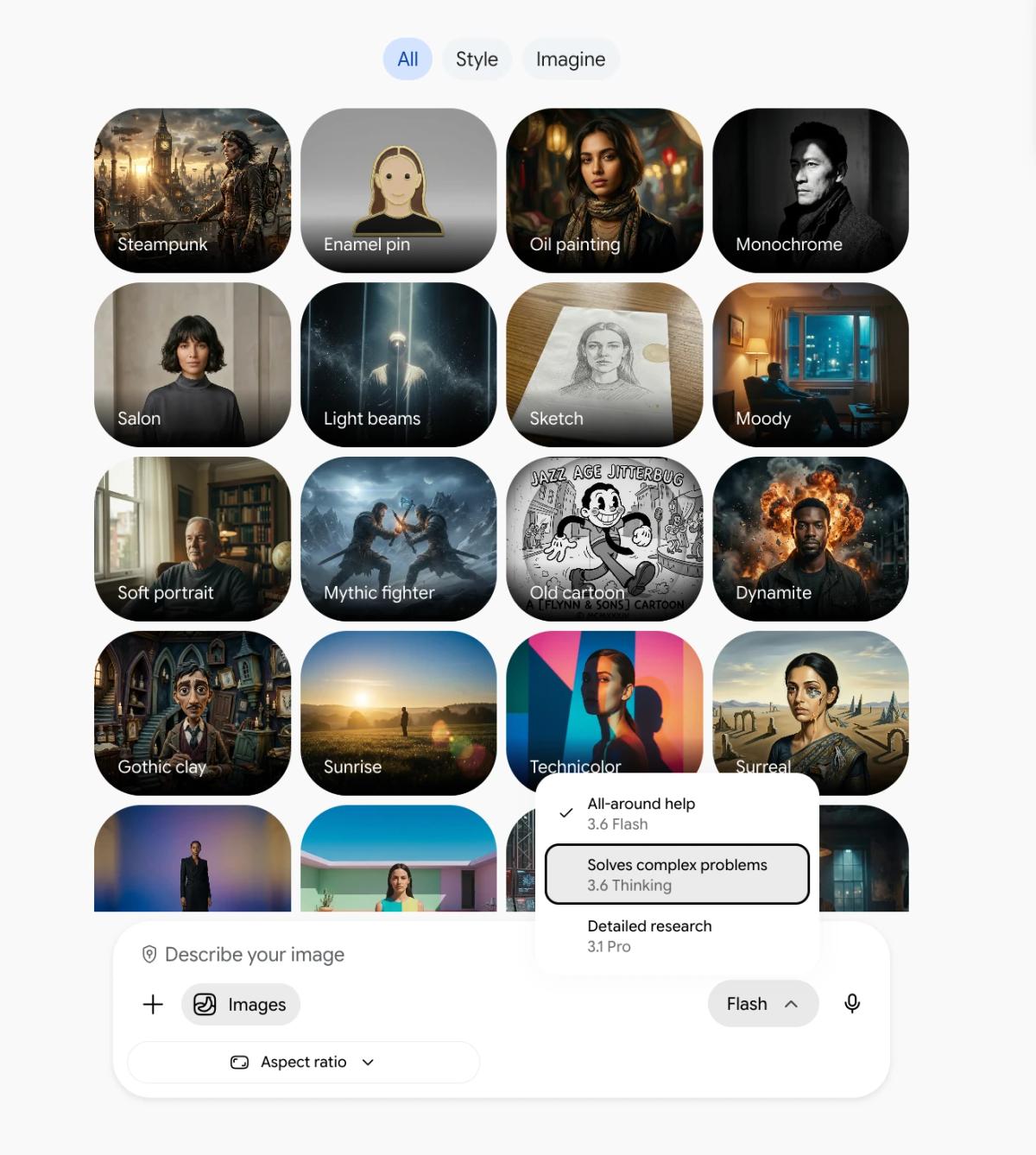
In the Gemini app, you can create images from the Images area, explore templates, and return to saved pictures in the Library for further edits. Supported Nano Banana 2 downloads can reach 2K with a Google AI plan and 1K without one, according to Google's help page.

Gemini Images style gallery with model selection menu showing Flash, Thinking and Pro choices.
Gemini image generation interface with creative style presets and model selector.

Model verdict: Gemini is the direct home for Google's newest native Nano Banana workflows. Chat Smith makes sense for users who want Nano Banana Pro as one of several creative model options, including GPT Image 2.5 Flare. Nano Banana Pro in Chat Smith does not automatically imply access to Nano Banana 2 or every native Gemini feature.

Image Features Compared: Generation, Backgrounds, Resize and Design

1. Generate Image: Text-to-Image

Chat Smith: Start with a description in the text-to-image AI generator. Include the subject, art style, lighting, composition and target aspect ratio—for example, “photorealistic iced coffee product photography, beige studio, soft side lighting, vertical 4:5.” The output can become a social ad, mockup or creative concept; inspect resolution and text before publishing.

Gemini: In Gemini Images, enter a detailed text prompt or use an available creative template. Google's Nano Banana models support image creation and conversational revisions. Prompt specificity, model access, aspect ratio and export resolution all affect whether the image is usable for an Instagram post or product listing.

Which is better? Both can create images from text. Choose the model and interface that suit your output, rather than declaring a winner based on unrelated sample images.

2. Resize Image: Exact Dimensions vs Creative Reframing

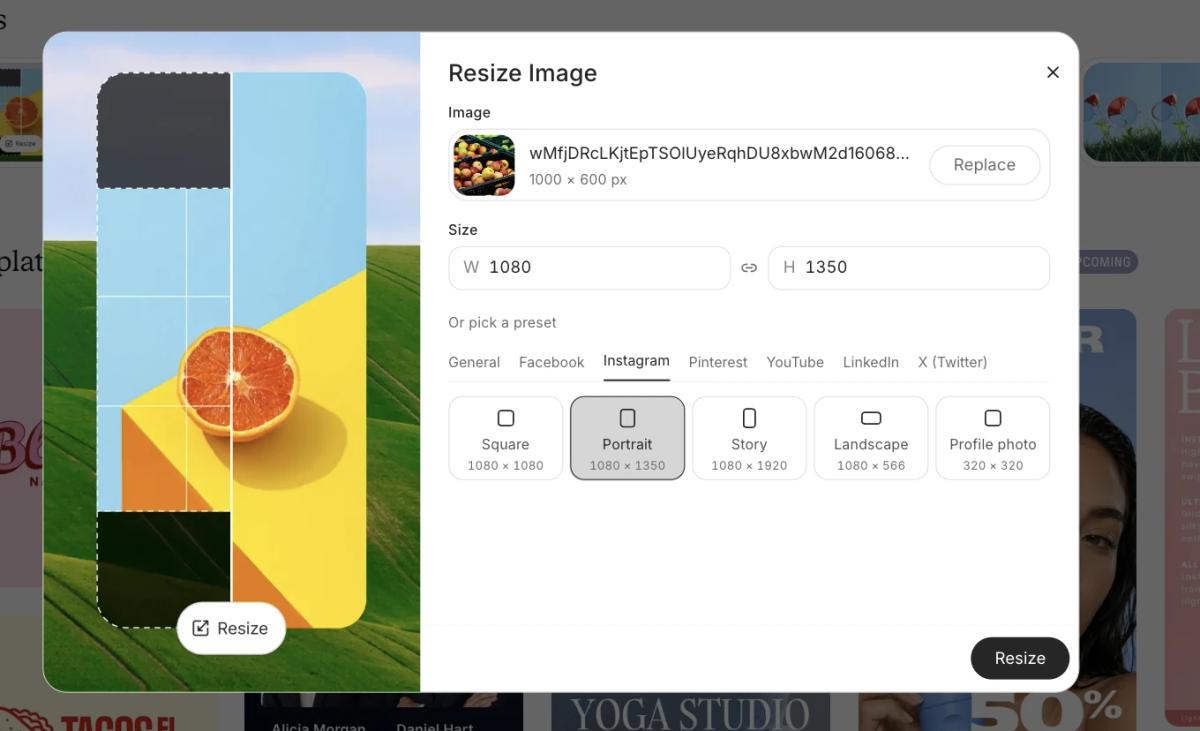
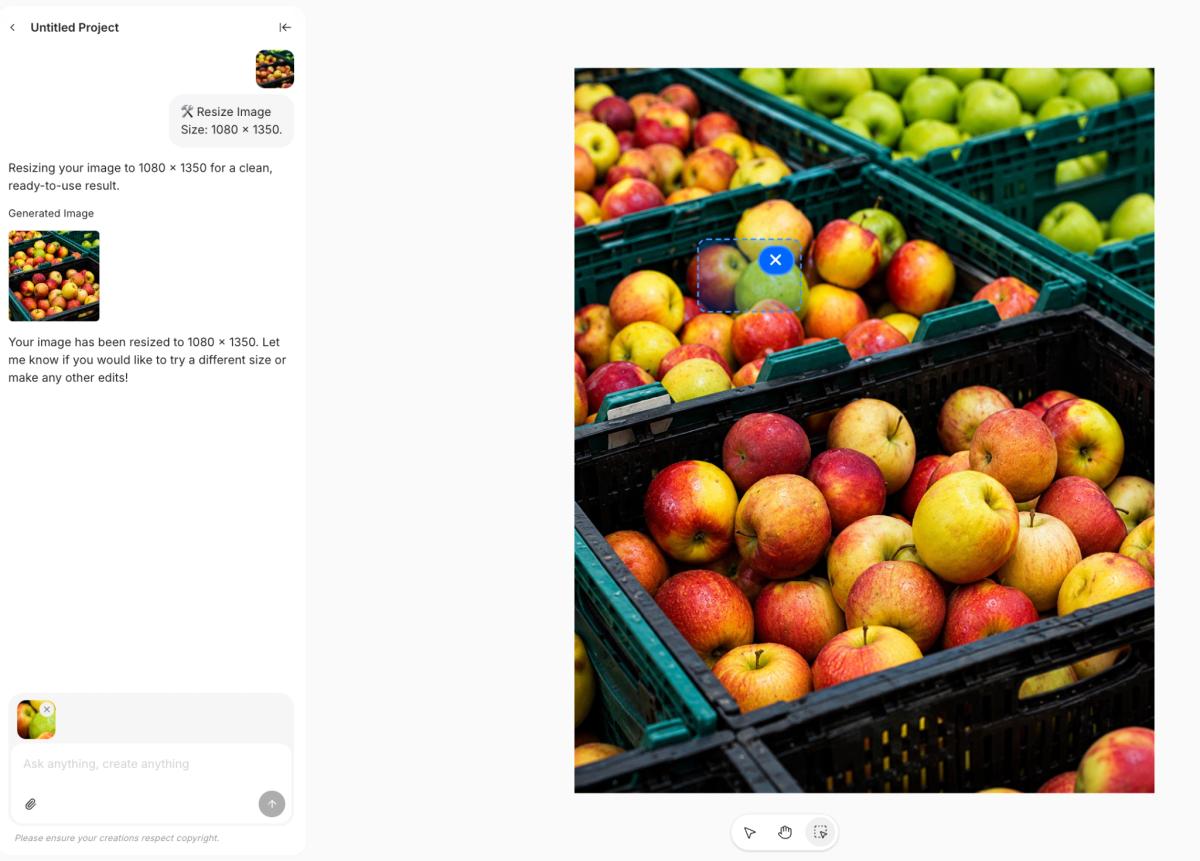
Chat Smith: Resize Image is a dedicated starting point for adapting marketing graphics to different formats. An AI image resizer may change pixel dimensions, crop a photo, expand its canvas or regenerate a new composition; those are different tasks. For a 1080 × 1350 Instagram post or a 9:16 story, check the actual exported width, height and crop before uploading.

Chat Smith Resize Image settings showing 1080 by 1350 pixel Instagram portrait preset.
Chat Smith Resize Image: Instagram portrait preset set to 1080 × 1350 pixels.
Chat Smith image resizing result showing an apple photo resized to 1080 by 1350 pixels.
Chat Smith Resize Image result: apple photo adapted to Instagram portrait size.

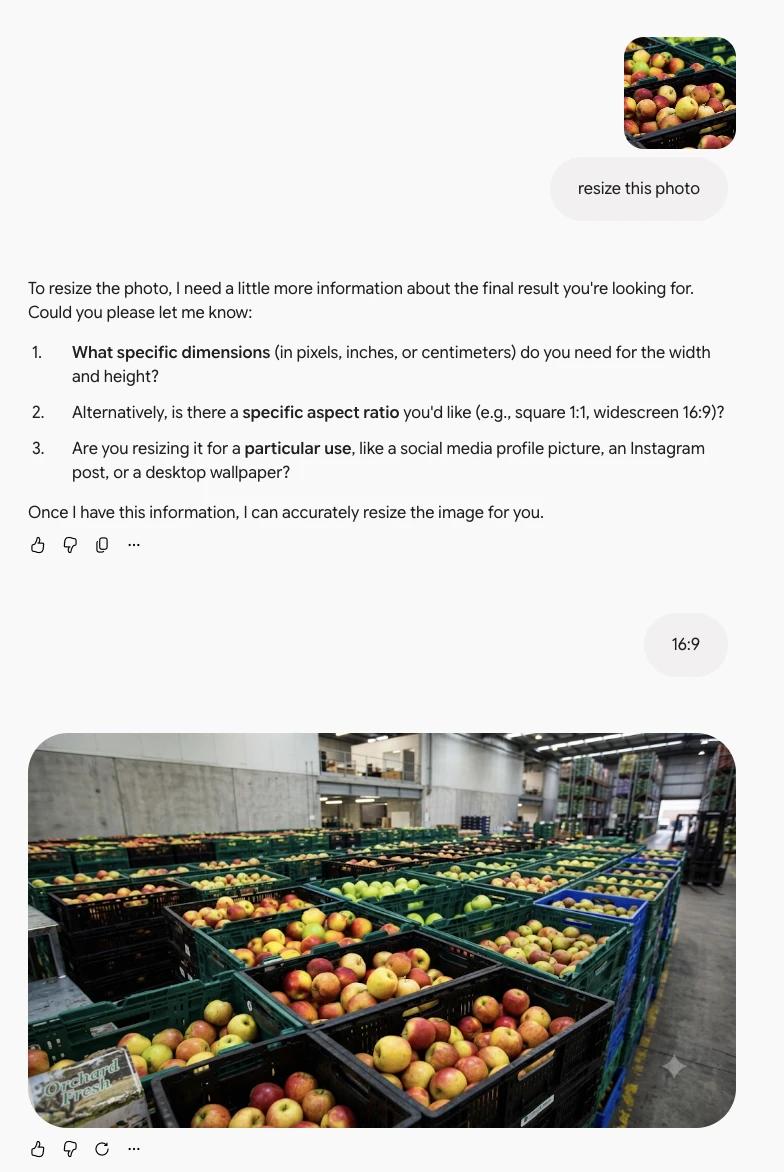
Gemini: You can request a new aspect ratio, crop or creative reframing through a prompt. This may be useful when converting a square visual to portrait, but a generative image edit is not the same as an exact-pixel resize. Confirm the downloaded file's dimensions, especially for app store, ad platform and print specifications.

Gemini conversation showing an apple image reframed into 16:9 landscape format.
Gemini image resizing example: apple photo converted to a 16:9 composition.

Verdict: Chat Smith provides a clearer task-specific starting point. Gemini is useful for generative reframing. The actual export, crop and preservation of existing text determine which workflow works better.

3. Remove Background: Clean Product and Subject Cutouts

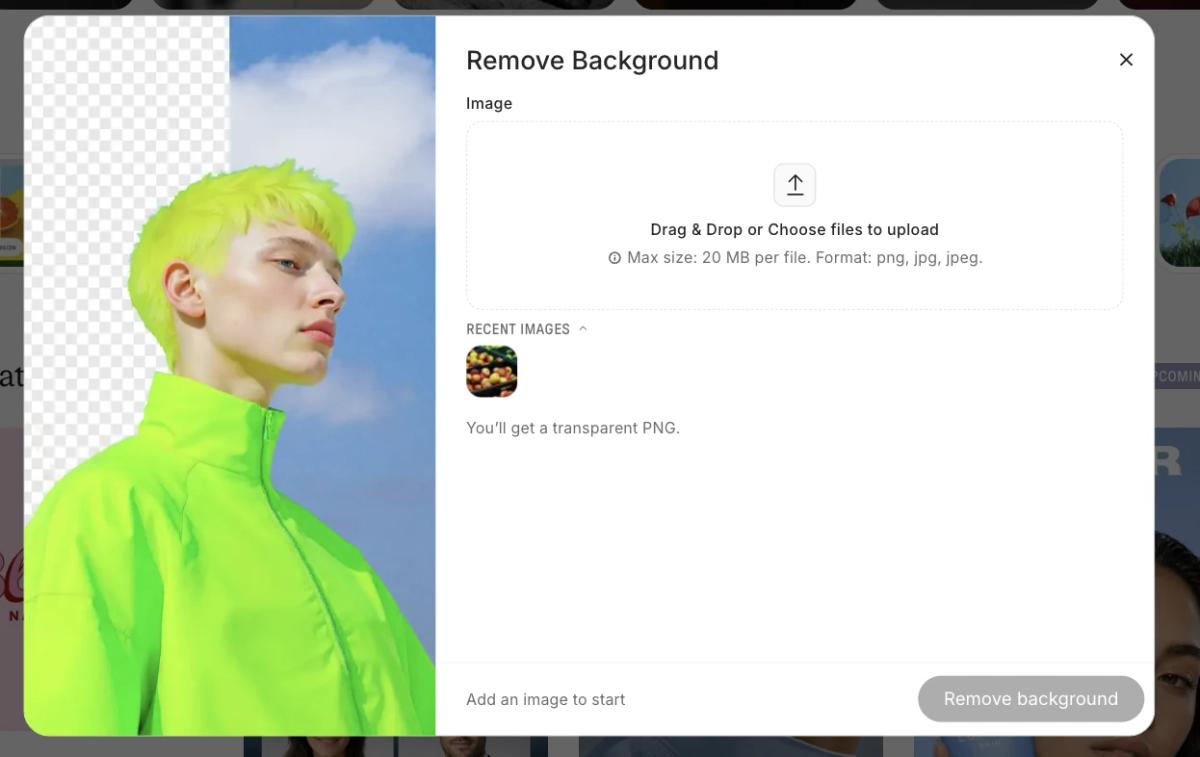
Chat Smith: A dedicated AI background remover is useful for isolating products, people or logos from distracting scenes. Ecommerce product photography often calls for a transparent PNG cutout that can be reused on a website, poster or catalog. Check hair, glass edges and packaging, and verify that the export contains genuine transparency rather than a white fill.

Chat Smith Remove Background interface displaying image upload area and transparent PNG output option.
Chat Smith Remove Background tool and transparent PNG export instructions.
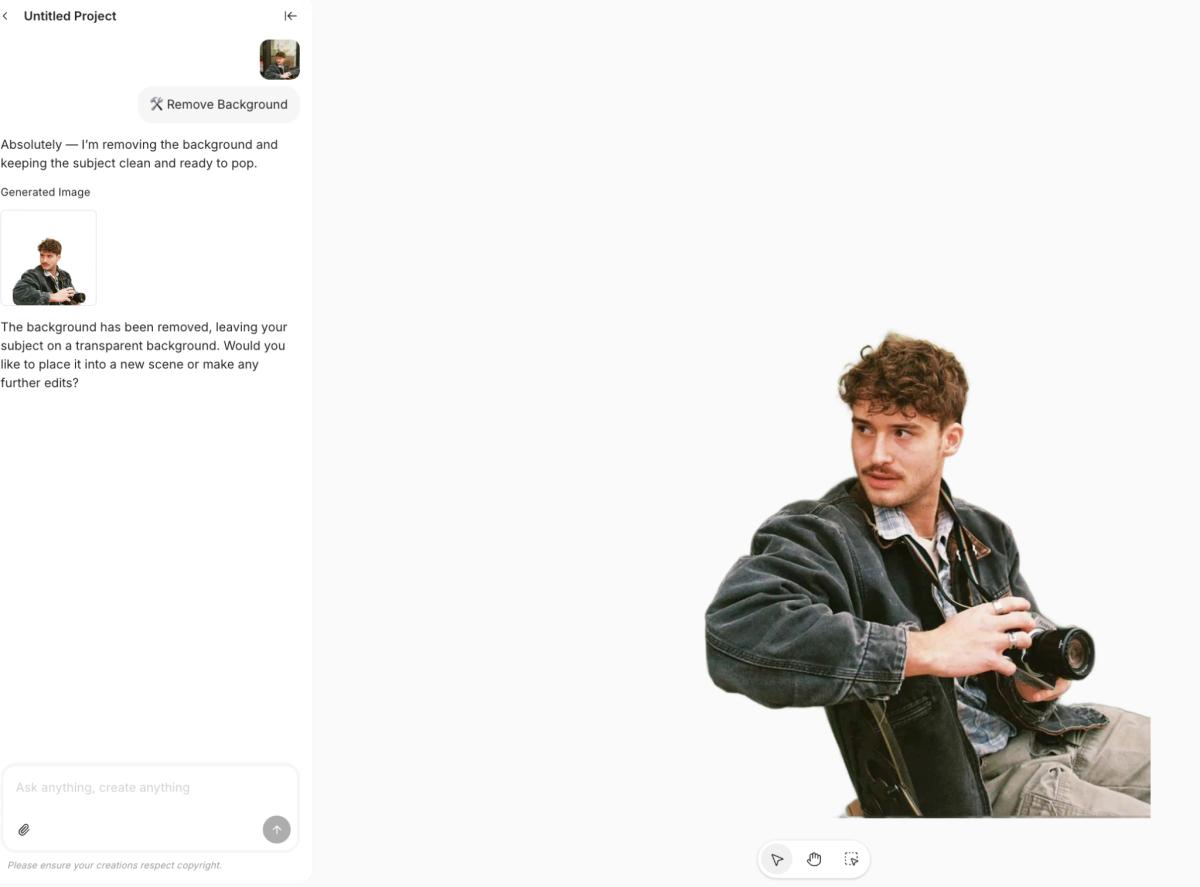
Chat Smith Remove Background output showing a photographer against a plain white-looking canvas.
Chat Smith background removal result with the photographer isolated from the original scene.

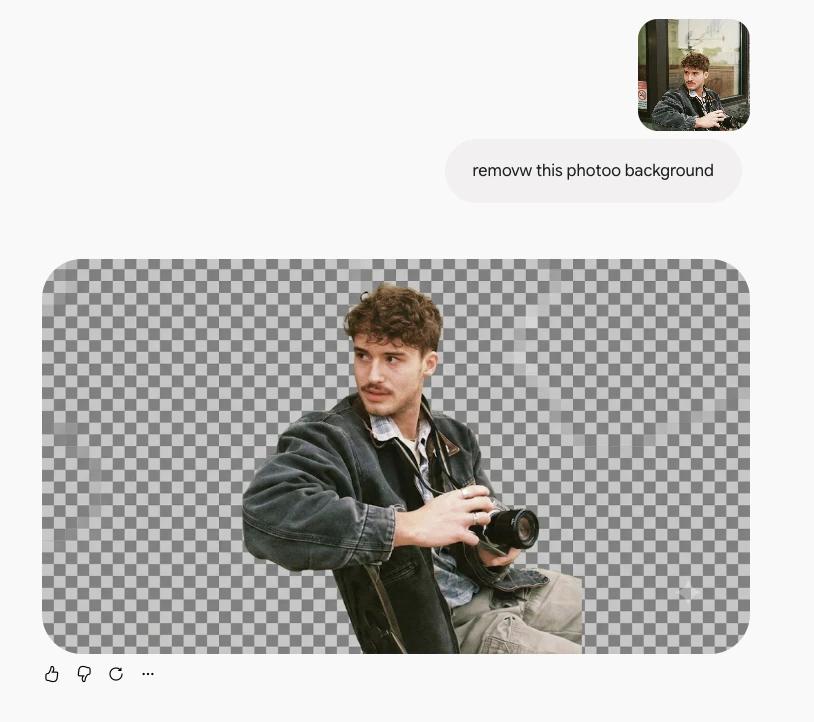
Gemini: You can ask its image editor to erase or replace the background of an uploaded photo. For a marketplace listing, however, a generated plain-white background may still be opaque. If the deliverable needs an alpha channel or pixel-perfect cutout, inspect the output rather than relying only on the visible preview.

Gemini image editor output showing a photographer isolated against a gray checkerboard background.
Gemini background removal result showing the isolated photographer.

Verdict: Chat Smith makes background removal easier to locate as a specific task. Gemini can edit the scene conversationally. In both cases, inspect product edges, labels and true transparency.

4. Generate Background: Product Photography Without a Studio

Chat Smith: Generate Background helps place a subject into a fresh setting, while the image-to-image AI editor offers reference-based style transfer and scene changes. Imagine keeping the same skincare bottle but replacing the original backdrop with a marble shelf, soft window light and matching shadows. This is particularly relevant to ecommerce product visuals and lifestyle ads.

Gemini: Upload a product reference and ask Nano Banana to replace the scene with a studio, café or outdoor setting. These background-replacement prompts can create attractive compositions, but packaging, label typography and product proportions should be checked against the source photo after every edit.

Verdict: Both can generate new settings. Judge product fidelity, lighting, original branding and number of revisions, not only how attractive the new backdrop looks.

5. Image-to-Image and Uploaded References

Chat Smith: Image-to-image generation starts with an existing image instead of a blank text prompt. Reference photos can guide a new look, such as watercolor illustration, cinematic product photography, a 3D-style render or a different color palette. Test how well the chosen model preserves the original subject, pose and composition.

Gemini: Nano Banana 2 supports editing uploaded or previously generated images, including local edits and multiple references in supported modes.

Which is better? Both offer useful image editing. Gemini provides Google's latest native image-editing flow; Chat Smith gives access to its supported image-model options and image-to-image tools. Always check whether the original product, logo, and text remain accurate.

6. Posters and Flyers: Marketing Graphics

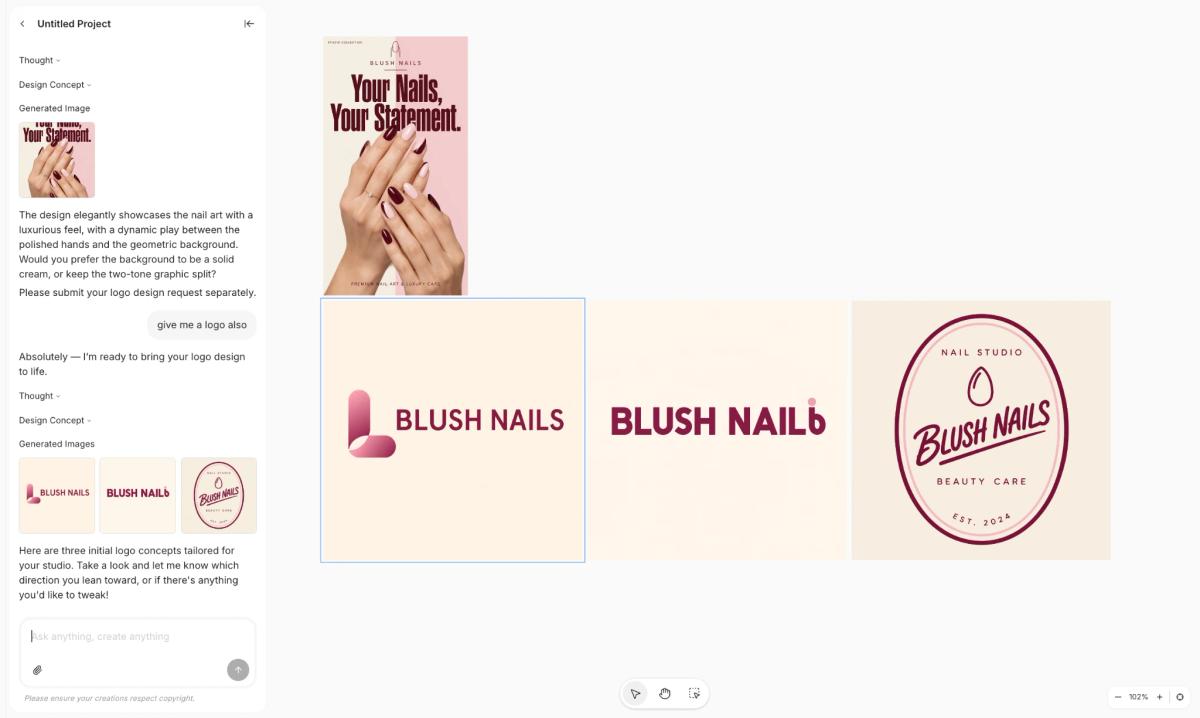
Chat Smith: Design Studio organizes visual work around recognizable business outcomes: posters, flyers, menus, logos, business cards and advertising creatives. Rather than writing a new design prompt from scratch, users can begin with the specific asset they need and refine the layout, color palette and copy in the available workflow.

Chat Smith Design Studio displaying Blush Nails promotional nail poster and three logo variations.
Chat Smith Design Studio creates a Blush Nails poster and matching logo concepts.

For example, a restaurant may need a seasonal menu and an A4 promotional flyer that share a matching visual identity. A good design workflow should keep the product image, brand colors, offer and typographic hierarchy coherent across the assets—rather than producing unrelated standalone pictures.

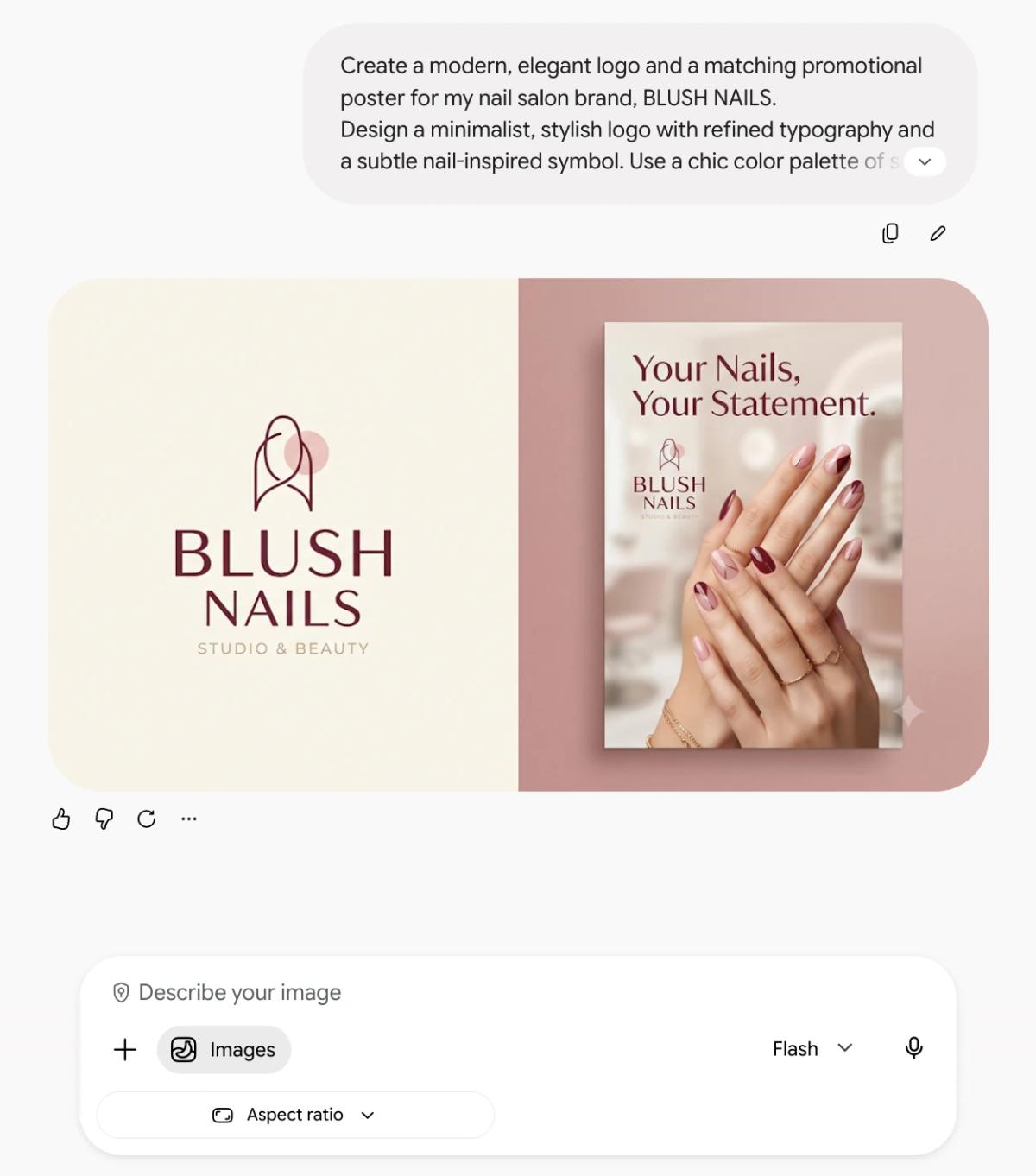
Gemini: Nano Banana 2 and Pro can produce text-bearing images, posters, infographics, and graphics from detailed instructions. Google's recent improvements target more reliable text and complex requests.

Gemini Images result with Blush Nails logo and pink nail salon promotional poster.
Gemini generates a Blush Nails logo and complementary promotional poster.

Which is better? Chat Smith offers a more direct entry point for recurring business assets. Gemini is capable of generating promotional graphics in its native image workflow. Neither should be trusted to reproduce prices, fine print, or brand marks without review.

7. Other Design Styles: Logo, Menu, Ads and Social Content

Chat Smith: Beyond poster and flyer design, the creative toolkit covers logo concepts, menu layouts, business cards, social media graphics, branded ads and other styles. A small business might build a consistent set of promotional materials from the same brief, adjusting composition and visual hierarchy for each format.

Gemini: Nano Banana can create infographics, poster-style images, visual concepts, icons and other graphic styles from prompts or references. The native Gemini Images workflow is less organized around the same named business-design categories, but it can still help create many of the same outputs. Evaluate typography and how easily each result can be revised.

Verdict: Chat Smith suits repeatable business-design categories. Gemini suits conversational image experiments and Google-native work. Always review typography, layout, pricing and logo originality before publishing.

8. Creative Styles, Character and Product Consistency

A brand campaign rarely needs just one good picture. It may require the same spokesperson, food item or product packaging in several scenes. Character consistency, product fidelity and reference-image preservation therefore matter more than visual appeal alone when selecting an AI image editing tool.

Chat Smith: Reference-based image generation can help retain the recognizable subject through edits, depending on the model. To assess brand consistency, compare a bottle's shape, cap, label, colors and reflections across three generated compositions. Even when the result looks polished, small packaging changes may make it unsuitable for paid advertising.

Gemini: Google explicitly highlights character consistency and multi-image composition in Nano Banana 2 and Pro. These features can help a user carry a character or reference subject across variations.

Which is better? Both have relevant capabilities. The real test is to submit the same reference and prompt to each model, request three variations, and inspect details such as facial features, packaging and logos.

9. Image Enhancement, Templates and Exports

Chat Smith: The AI Image Enhancer is relevant when an existing photo needs sharpening, noise reduction, photo restoration or image upscaling. These tasks differ from generating a completely new image. For a product catalog, judge whether the enhancement retains accurate textures and details instead of inventing features.

Gemini: Its native Images workflow supports conversational revisions, creative styles and an image library. Paid Google AI access may provide higher-resolution downloads for supported models. A regenerated higher-resolution scene is not always the same as a faithful upscale of the original image; inspect fine textures and typography before using it commercially.

Which is better? Gemini is straightforward when the deliverable is one picture that you want to refine. Chat Smith is appealing when the picture is part of a wider campaign or business design.

Practical Comparison: Which Tool for Which Image?

Your projectChat SmithGeminiWhat to evaluate
Product photography conceptGPT Image or Nano Banana optionNano Banana 2/ProProduct fidelity and lighting
Edit an uploaded photoSupported image edit workflowsNative Nano Banana editsLocal edits and subject preservation
Consistent character seriesReference-based model featuresNano Banana consistency toolsSame subject across three images
Text-heavy infographicImage models and design toolsNano Banana 2/ProSpelling, labels and factual accuracy
Instagram adImage model plus Design StudioGenerate and edit creativeBrand message and export
Restaurant menuDedicated Menu DesignImage-based menu promptLayout and editing workflow
Event flyerDedicated Flyer DesignPrompt-based poster or flyer graphicText readability and fit
Compare image providersMultiple supported optionsGoogle's Nano Banana familyModel choice versus native access

These recommendations are based on documented product workflows, not on a controlled benchmark of the outputs.

One Prompt, Two Image Results: A Fair Side-by-Side Test

Use exactly the same prompt, vertical 4:5 ratio and first output in each product. Record the model name, plan and date. This benchmark separates image quality from the differences in interface and subscription access.

One Copy-and-Paste Prompt for Both

Create a premium, photorealistic 4:5 Instagram advertising poster for a fictional matcha drink brand called “MELLOW MATCHA”. The main subject is a clear glass of iced matcha latte on a pale travertine pedestal, with visible ice, creamy milk swirls and realistic condensation. Use a minimal editorial look, soft morning light, a warm beige background and muted sage-green accents. Place the glass in the lower two-thirds and leave a clean area above. Render this exact large headline: “MATCHA MOMENT”. Below it, render the exact subheading: “Fresh. Smooth. Yours.” Put the exact price “$6.50” at the lower right. Realistic product photography, accurate glass and liquid details, polished visual hierarchy. No people, no extra drinks, no watermark, no existing logos and no extra text. High-resolution vertical 4:5 output.

Choose the Models and Save the First Outputs

Cross-provider test: use GPT Image 2.5 Flare in Chat Smith and Nano Banana 2 in Gemini. This tests different models and different apps together; it does not isolate the application as the cause of any difference.

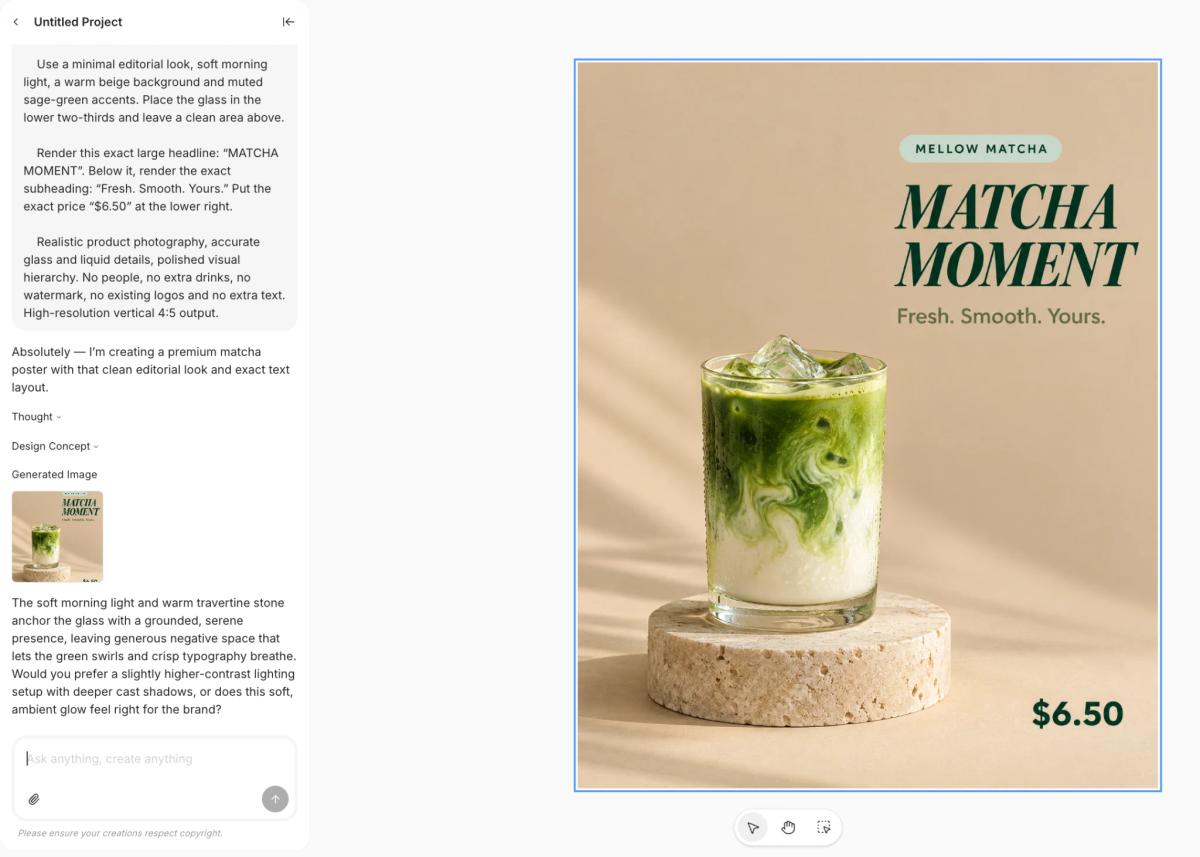
Chat Smith MELLOW MATCHA product advertising poster with iced matcha latte, MATCHA MOMENT heading and $6.50 price.
Image generation test: Chat Smith's first MELLOW MATCHA advertising poster output.
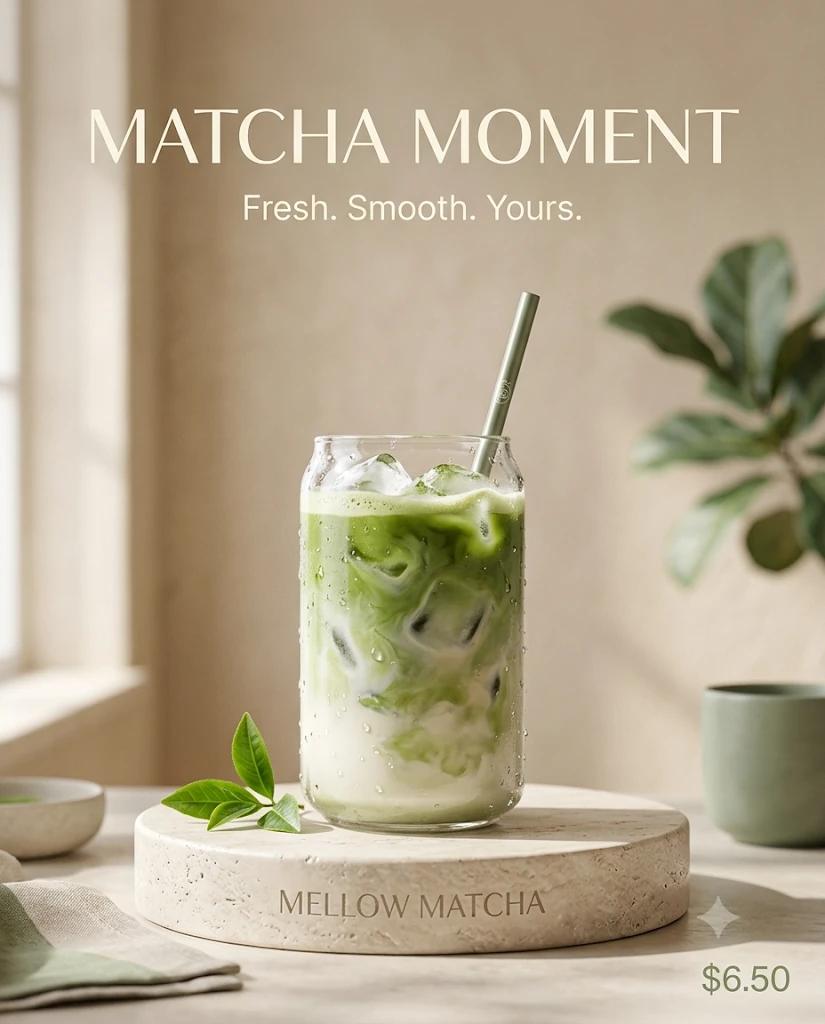
Gemini MATCHA MOMENT advertising poster featuring iced matcha latte, slogan and $6.50 price.
Image generation test: Gemini's MELLOW MATCHA advertising poster output.

Optional matched-family test: choose Nano Banana Pro in both apps if it is available, keep the same prompt and record the exact settings. Shared branding of the model does not guarantee completely identical deployment or results.

These are the actual first-pass image results supplied for the MELLOW MATCHA test. Both render the requested “MATCHA MOMENT” headline, “Fresh. Smooth. Yours.” slogan and $6.50 price. The Chat Smith poster uses a clean studio composition with the glass on a pedestal and prominent right-aligned typography. The Gemini output uses a different, more lifestyle-oriented composition, with decorative greenery and additional background objects. The two results illustrate differences in composition; they do not by themselves establish that one image model is consistently better. For a fair assessment, compare prompt fidelity, text spelling, product realism, image dimensions and later editing effort.

Benchmark method: For a fair comparison, keep the original prompt and reference images identical, capture the exact model label and generation date, and save the first-pass results. Track prompt adherence, photorealism, typography, subject consistency, output format, and number of edits needed before choosing a practical winner.

Other Features Beyond Image Generation

Chat Smith: Alongside image creation, the app offers supported GPT, Claude, Gemini, Grok and DeepSeek chat models, plus an AI writing assistant, email tools, research and PDF questions. This can be convenient when a marketing team needs to develop a campaign concept, write ad copy, summarize a brief and generate the image in one workspace.

Gemini also supports writing, research, uploaded documents and multimodal assistance. For users already working in Google's services, supported integrations may be a meaningful reason to choose it beyond the image models.

Verdict: Chat Smith provides model variety and task-specific creative entry points. Gemini offers the native Google image and productivity ecosystem. These other features matter, but they should not overshadow the core image comparison.

Chat Smith vs Gemini Pricing for Image Creation

The cheapest image-generation subscription is not necessarily the least expensive way to finish a commercial asset. Compare free AI image generator limits, premium model access, export resolution, allowed edits and cost per usable image. Repeating a failed generation five times may matter more than the difference between two monthly prices.

Individual Plan Prices

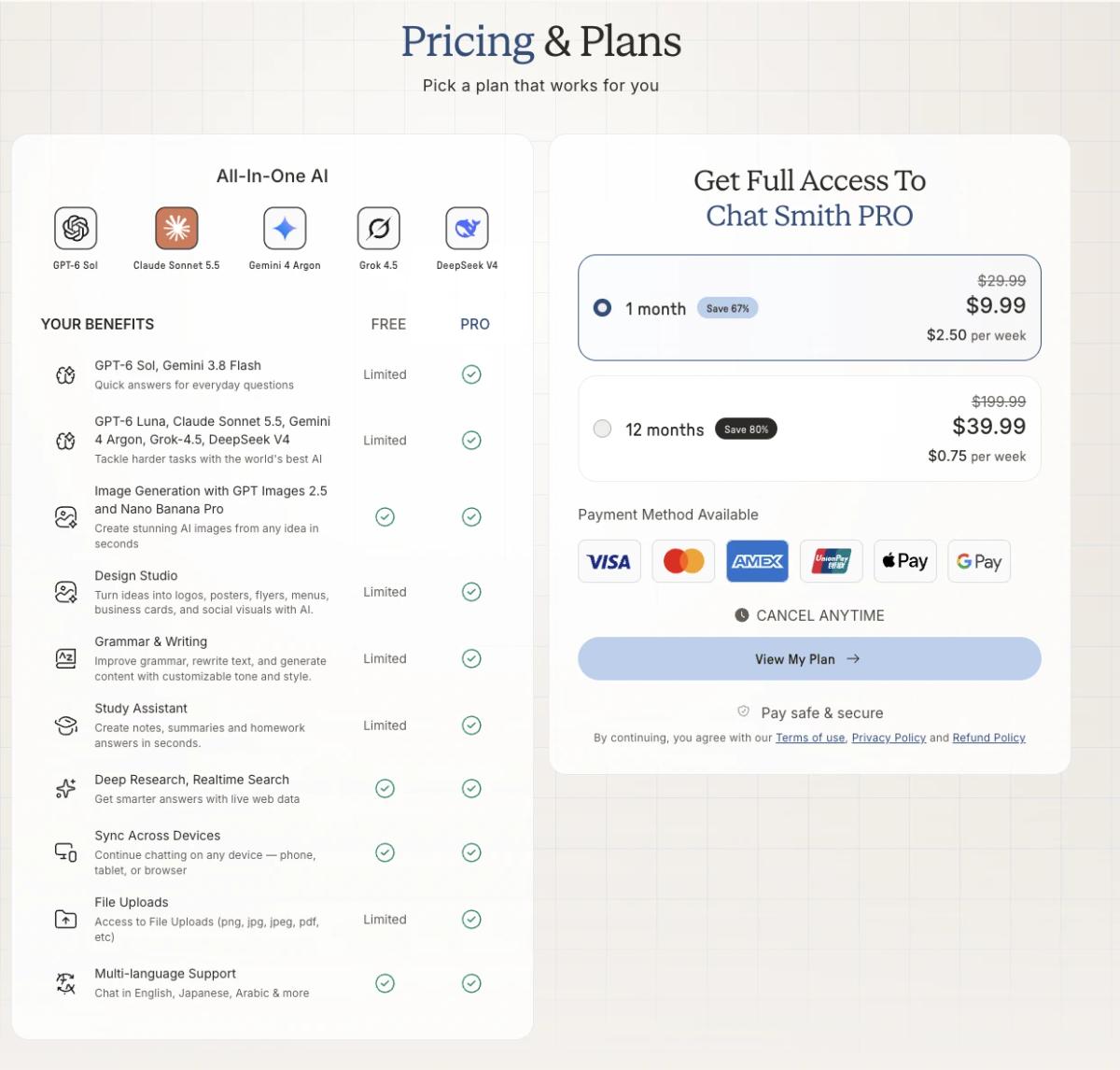
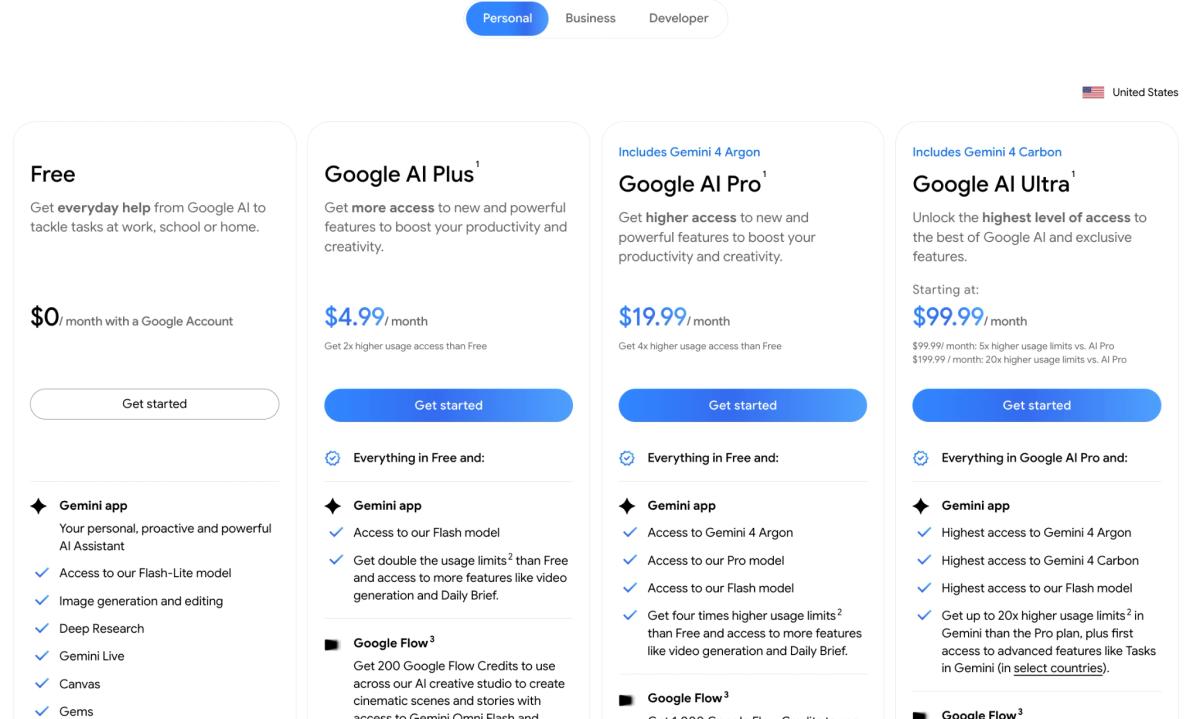
SubscriptionChat SmithGemini / Google AI
Free$0; limited access$0; standard usage limits
WeeklyPRO: $6.99/week, where offeredNo standard individual weekly plan
MonthlyPRO: $9.99/month, listed offerAI Plus: $4.99/month (U.S., current listed price)
Standard higher tierCurrent PRO offers varyAI Pro: $19.99/month
AnnualPRO: from $39.99/year, listed offerGoogle AI Pro: check current annual checkout
Higher usageDepends on PRO model quotasAI Ultra 5x: $99.99/month
Highest individual tierCheck current checkoutAI Ultra 20x: $199.99/month
Chat Smith subscription pricing showing Free and PRO benefits with monthly $9.99 and yearly $39.99 options.
Chat Smith PRO price comparison with Free features and monthly or annual subscriptions.
Google AI subscription pricing comparing Free, AI Plus $4.99, AI Pro $19.99 and AI Ultra plans.
Gemini subscription pricing: Google AI Free, Plus, Pro and Ultra plans.

Prices are representative U.S. offers in November 2026. Google's current U.S. page lists AI Plus at $4.99/month and AI Pro at $19.99/month. Chat Smith prices vary by platform, promotion and region. Confirm all prices, billing terms, model quotas and the final checkout. Google plans may bundle storage and other services.

Image Features Included With Each Plan

FeatureChat Smith Free / PROGemini Free / Google AI plans
Basic image generationSupported with limitsAvailable with standard limits
Image model selectionGPT Image 2.5 Flare, Nano Banana Pro where includedNano Banana 2 Lite/2 and paid Pro access
Resize ImageDedicated tool; verify output dimensionsPrompt-based reframing
Remove BackgroundDedicated tool; check transparencyPrompt-based background editing
Generate BackgroundDedicated tool and image-to-image✓ Edit and replace background with prompts
Edit generated or uploaded imagesSelected models and toolsNative conversational image edits
More detailed regenerationDepends on model and quotaNano Banana Pro on eligible paid access
Higher-resolution outputModel- and export-dependentNano Banana 2: up to 2K with AI plan, 1K without
Dedicated poster and menu toolsDesign StudioGenerate designs via prompts and templates
Other model providers for chatMultiple supported providersNative Gemini family
Google integrationSeparate applicationNative Google ecosystem

For exact model access and subscription conditions, check the Chat Smith PRO plans alongside Google's current AI plans and usage limits. These subscriptions bundle different services; the price table alone does not tell you the number of image generations or high-resolution exports included.

Value verdict: Chat Smith may be appealing for an agency or small business that repeatedly generates product shots, removes backgrounds and designs posters and flyers. Gemini may offer better overall value for someone who mainly uses Nano Banana image editing and already benefits from Google's bundled storage or tools. Compare real image quotas, revision counts and finished creative outputs—not only the headline price.

Commercial-use checklist: Before publishing AI-generated marketing assets, review product accuracy, brand marks, consent and usage rights, text rendering and any disclosure required by the distribution platform. A realistic AI product photo is not automatically an accurate representation of the product being sold.

Advantages and Limitations

ProductImage-generation advantagesLimitations to check
Chat SmithGPT Image 2.5 Flare and Nano Banana Pro options; multi-model workspace; poster, flyer and menu workflowsModel access and usage limits vary; Chat Smith's Nano Banana Pro access is not necessarily the same as every new Gemini-native mode
GeminiDirect Nano Banana 2/2 Lite; paid Pro option; image editing, library and templates; Google ecosystemPrimarily Google's model family; some advanced image models and output limits require paid access

Who Should Choose Chat Smith?

Chat Smith is worth considering if your work includes marketing visuals, ecommerce product photos, social media ads, product mockups or recurring posters and menus. Its AI Photo Generator provides a dedicated starting point for realistic image concepts, while Design Studio supports common branded graphics.

For example, a growth marketing team can brainstorm an offer, try several image concepts, and create a campaign poster without starting a different workflow from scratch each time.

Who Should Choose Gemini?

Gemini is a good fit for people who want Google's native Nano Banana 2 workflow, conversational image editing, templates, and a gallery of generated work. It also makes sense for people already using Google services who prefer to keep their AI work in that ecosystem.

If your main task is to upload a personal photo and remix it, or generate a few new pictures, Gemini's native image experience may be sufficient without a separate design suite.

Final Verdict: Chat Smith or Gemini for AI Images?

Both Chat Smith and Gemini can generate and edit images. The main difference is how the capabilities are packaged.

Choose Chat Smith if you want multiple image-model providers and practical workflows for product photos, background editing, photo enhancement and marketing design. Choose Gemini if you prefer the native Nano Banana image generator and Google's own integrations. Both can generate images; the best fit depends on the required asset, editing control and plan limits.

The better tool is the one that lets you turn your own prompt into an accurate, usable asset at a cost and workflow that suit you.

Sources and Update Notes

This comparison uses official information from Google's Gemini image-generation guide together with documented Chat Smith creative tools. It describes supported capabilities and a repeatable prompt rather than claiming an unperformed head-to-head benchmark. Model availability, resolution limits, subscriptions and commercial-use terms may change.

Frequently Asked Questions

Gemini is a single AI model built by Google and integrated across its apps, while Chat Smith is a multi-model app that gives you access to Gemini alongside several other leading AI models in one subscription. The choice often comes down to wanting one specific model versus flexibility to switch between several.

logo chat smith

Editorial Team

Managing Editor

The Chat Smith Editorial Team brings together AI enthusiasts, researchers, and creators to make AI accessible and practical. We share trends, tool reviews, and actionable guides that help individuals and businesses stay informed, boost productivity, and get more from AI.

Share this article

Related Articles