Comparison

Chat Smith vs Grok: Which AI Is Better for Social Media Marketing?

Editorial TeamEditorial Team・Nov 13, 2026・13 mins read
Chat Smith vs Grok: Which AI Is Better for Social Media Marketing?

Creating your next Instagram ad, product photo or short social video? Both Chat Smith and Grok can help—but their creative workflows are different.

Grok combines X-aware trend research with Grok Imagine image and video tools. Chat Smith brings several supported AI models together with Design Studio for social graphics, posters, flyers and ads.

We'll compare social media image generation and editing first, then look at their overall features, pricing, and which AI fits the way you work.

chat smith pro

Chat Smith vs Grok: Quick Verdict

Choose Grok if you depend on X trends, want Grok Imagine image editing, or need native image-to-video for Reels and Stories. Imagine Image 2.0 also offers Smart Resize, transparent background removal and local editing, not just basic image generation.

Choose Chat Smith if your main goal is a series of still-image marketing assets—product photos, Instagram ads, posters, flyers, logos and related campaign copy—supported by multiple AI models and task-specific Design Studio workflows.

Key limitation: Chat Smith publicly lists Grok 4.5, but that does not automatically include Grok's entire native X Search, Imagine video, voice, Grok Bot or Cursor subscription ecosystem.

Chat Smith vs Grok at a Glance

ComparisonChat SmithGrok
Core productMulti-model AI assistant and specialized toolsxAI's native assistant and connected ecosystem
Model choiceGPT, Claude, Gemini, Grok, DeepSeek optionsNative Grok family and specialist xAI models
Current Grok versionGrok 4.5 publicly announcedxAI docs list Grok 4.7; app choices may differ
Real-time web researchWeb Search and Deep ResearchWeb Search and native X Search
Social graphicsDesign Studio and supported AI image modelsImagine Image 2.0
Posters, flyers, adsDedicated design tasksPrompt-led graphic creation
Transparent background removalDedicated toolsImage 2.0 transparent cutouts
Smart resize / reframingResize and image editing workflowsImage 2.0 Smart Resize
Image-to-videoNo matching native video tool confirmedImagine Video 1.5
X posts and threadsNo equivalent native X interface confirmedX-aware search and discussion context
AI imagesGPT Image / Nano Banana optionsGrok Imagine image generation and editing
AI video generationNo equivalent native Imagine Video tool confirmedGrok Imagine video workflows
Poster, flyer and logo designDesign Studio categoriesGenerate designs with image prompts
Writing and researchDedicated tools and supported modelsNative Grok chat and research
CodingAI-assisted coding questionsGrok plus eligible Cursor/agent products
File analysisPDF and file Q&AUpload and analyze supported files
Paid plansChat Smith PROGrok/SuperGrok or The X Subscription

A note about these features: Both apps support image creation and editing. Grok Imagine Image 2.0 can remove backgrounds and smart-resize visuals, while Chat Smith has image-editing workflows and dedicated design categories. Availability, quotas and exact exports should always be verified.

What Is Chat Smith?

Chat Smith's multi-model AI workspace lets users select supported GPT, Claude, Gemini, Grok and DeepSeek models for different tasks. It also offers dedicated AI writing, file Q&A, web research, image-generation and design tools. A marketer could prepare a campaign brief, write an email, generate a product image and design a flyer inside one app.

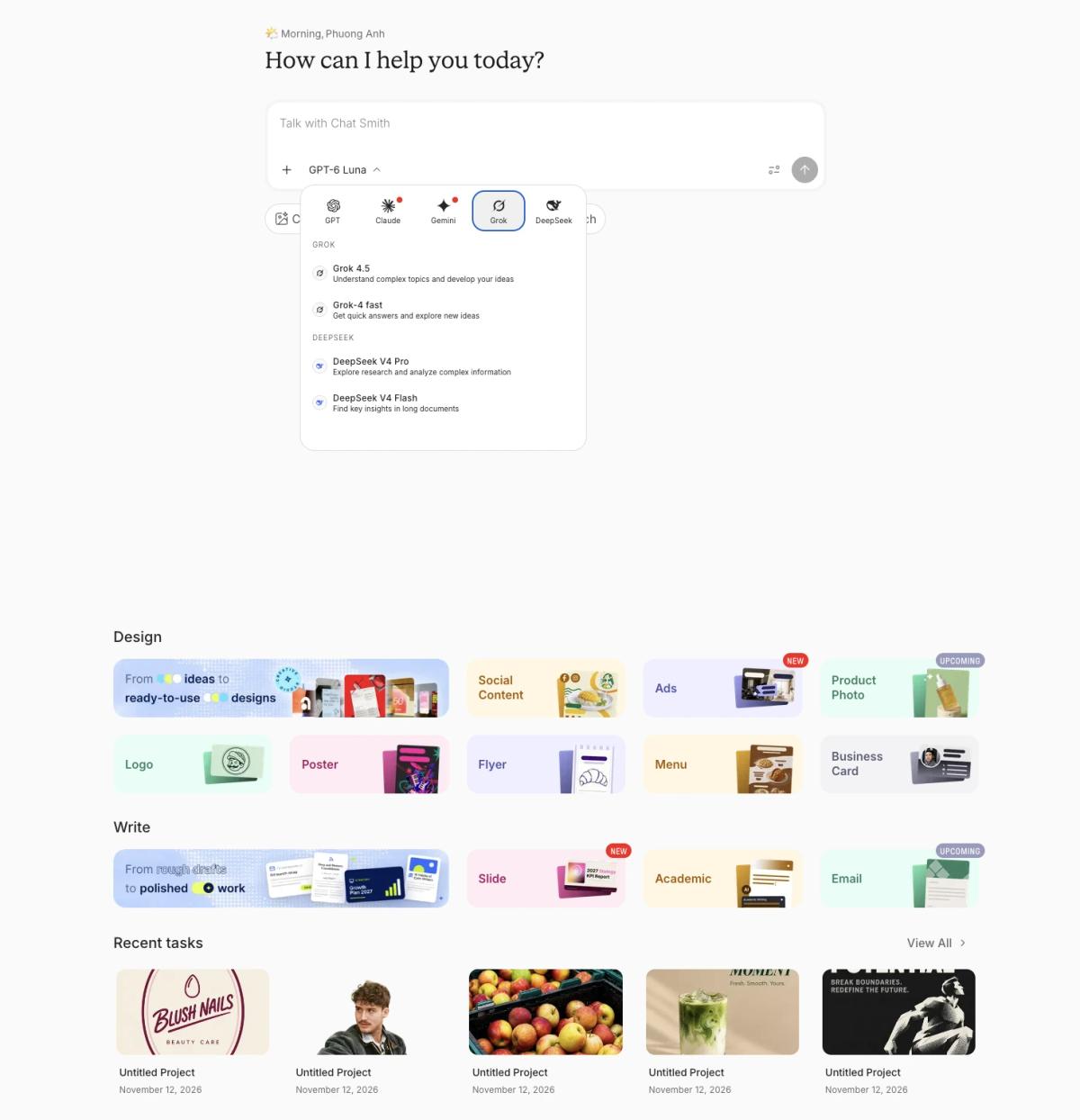
Chat Smith model selector showing Grok 4.5, Grok-4 Fast and other AI providers
Chat Smith interface displaying the Grok 4.5 model and multi-model selection for marketing workflows.

That multi-provider access can save context switching, but it does not grant the full native products of each model provider. Chat Smith's published Grok integration is Grok 4.5 for eligible PRO users.

What Is Grok?

Grok is xAI's native assistant, available through its own products and on X. Alongside conversation, reasoning and coding help, Grok supports live web and X search when the relevant tools are enabled. It also includes image/video creation through Grok Imagine, voice and supported file or connected-app workflows.

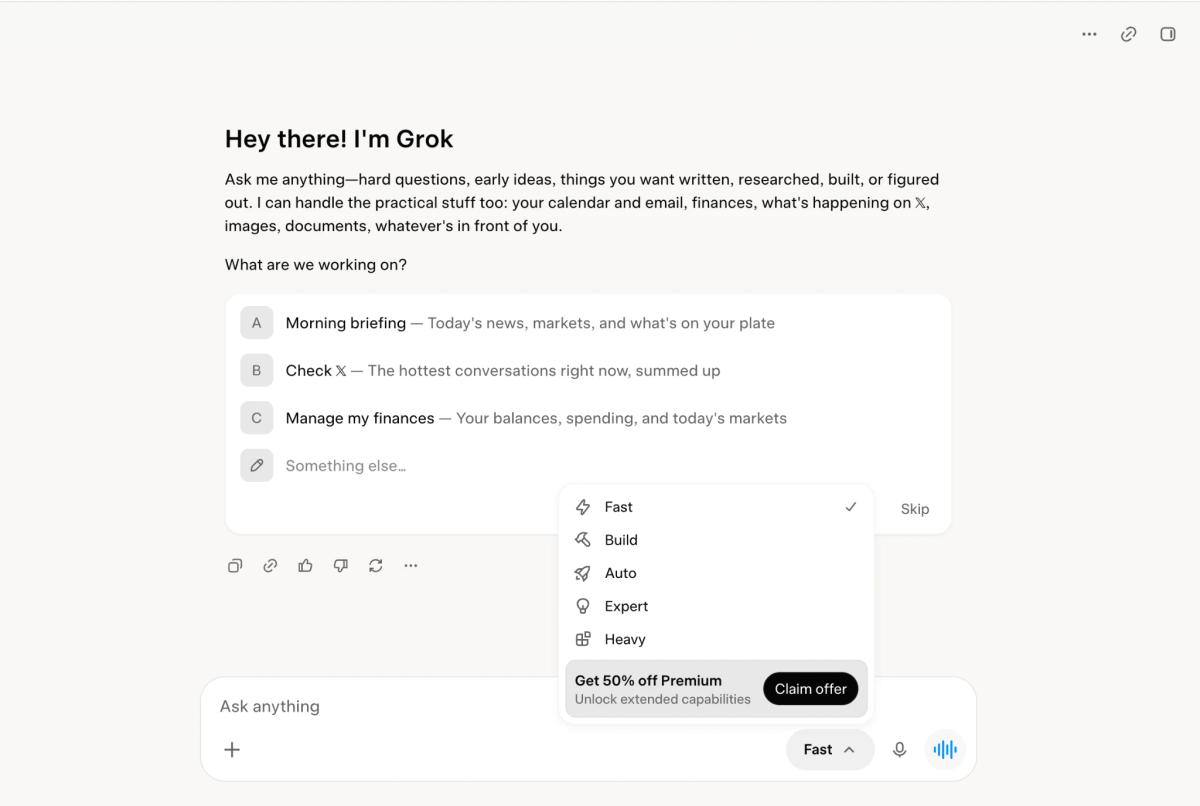
Grok native assistant interface with Fast, Build, Auto, Expert and Heavy modes
Grok native workspace with several assistant modes and suggested tasks.

xAI's current developer documentation names Grok 4.7 for code and general knowledge, Grok Imagine Image 2.0 for visuals, and Grok Imagine Video 1.5 for video. API names and specifications do not guarantee identical access in every consumer subscription.

What Do People Actually Use Grok For?

Research on public X use offers a useful window into behavior: a May 2026 study analyzed 169,137 posts invoking Grok and found that requests frequently sought information or verification within conversations. This is evidence about Grok use *on X*, not a measure of how every Grok app user spends time.

Common taskWhy users consider GrokComparable Chat Smith task
Explain a viral X postNative social context and discussionWeb research, without native X context
Track breaking newsCurrent web and X informationWeb Search and Deep Research
Fact-check a claimFind relevant posts and sourcesCheck primary sources and synthesize reports
Create an AI imageGrok Imagine image creationAI Image Generator
Animate a still imageGrok Imagine video creationNo matching native video workflow confirmed
Write social captionsContextual X posts and conversational draftsAI Writing and model choice
Solve code problemsGrok models and eligible agent toolsModel-assisted coding explanations
Ask about filesPDF and document analysisFile/PDF Q&A

The key distinction is between a measured behavior (information requests on X) and a documented product capability (video, voice, coding or other tools). The latter does not tell us what percentage of users actually performs the task.

AI Image Creation for Social Media: Chat Smith vs Grok

A typical social media campaign needs more than one attractive image: a product photo, readable promotional copy, multiple aspect ratios and sometimes a short video. Chat Smith emphasizes multi-model images and task-specific design workflows, while Grok Imagine combines prompt-led generation, targeted edits, Smart Resize and native video tools. The useful comparison is how reliably each product delivers an accurate asset, not which gallery looks prettier.

Creative taskChat SmithGrok Imagine
Text-to-image Instagram postSupported GPT Image / Nano Banana modelsImagine Image 2.0
Product photographyAI Image and reference editsImage 2.0 product image and edits
Poster and flyerDedicated Design Studio workflowsPrompt-led posters, templates
Social ads and branded graphicsDesign Studio Social Content and AdsGenerate visual ads and edit layouts
Remove backgroundDedicated removal workflowTransparent cutout in Image 2.0
Replace backgroundImage-to-Image/background toolsTargeted edits, references
Resize to 9:16Resize/recompose; verify export pixelsSmart Resize; verify export pixels
Multiple campaign variantsImage references and supported modelsLocalized, multi-reference editing
AI Reels / image-to-videoNo matching native video tool confirmedImagine Video 1.5

1. Generate Instagram Posts and Product Photos

Chat Smith: Create feed posts, lifestyle imagery or product concepts with a text-to-image AI generator. Supported GPT Image and Nano Banana options offer different interpretations of a brief. Specify the product, camera angle, visual style, lighting and aspect ratio. Record the model actually used when assessing the output.

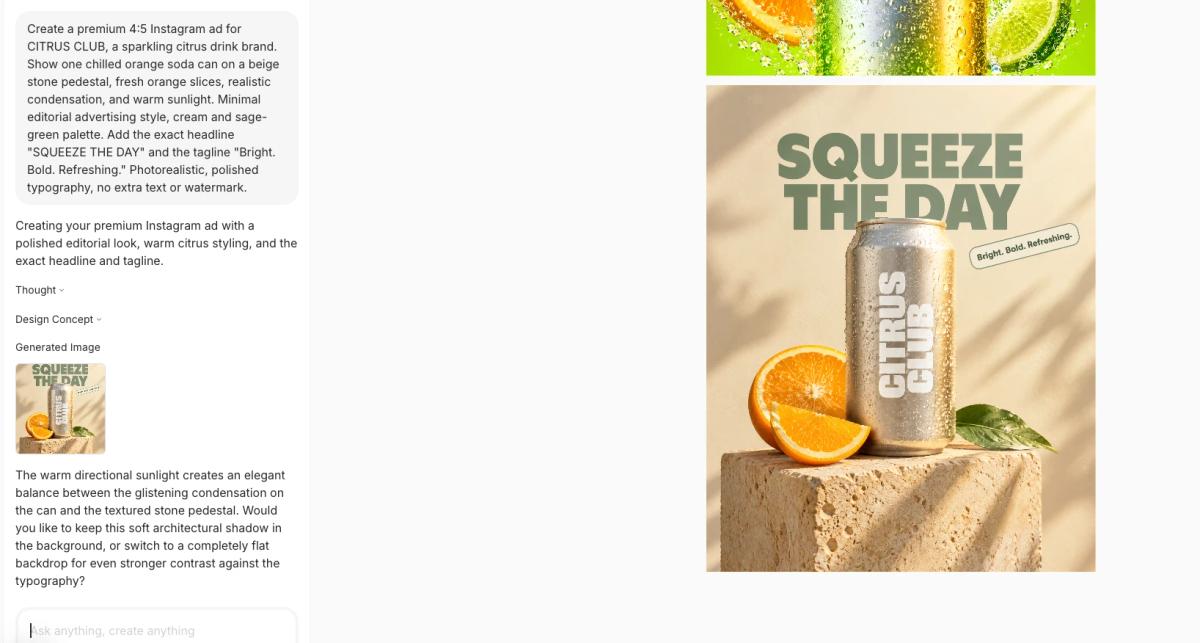
Chat Smith AI-generated CITRUS CLUB Instagram ad with SQUEEZE THE DAY headline and soda can
Chat Smith generates a promotional product photo for CITRUS CLUB with an Instagram advertising headline.

Grok: Imagine Image 2.0 supports AI image generation and edits, with xAI highlighting accurate typography, layout and product-focused visual workflows. Use a precise prompt for a 4:5 product ad and revise details without assuming every first output will be publication-ready.

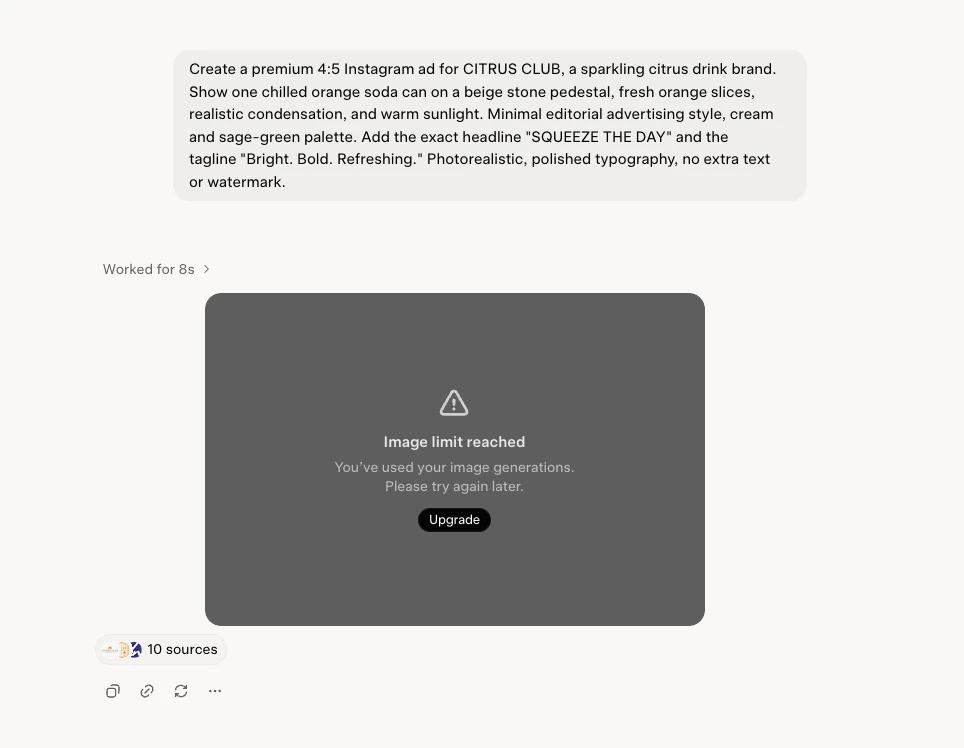
Grok image generation attempt for CITRUS CLUB showing Image limit reached
Grok returned an image generation quota notice in this session instead of an image; this does not measure output quality.

In the Grok session shown above, image generation reached its usage limit before producing the requested CITRUS CLUB ad. This is evidence of the quota encountered in that session, not a test of Grok Imagine's image quality. An image-quality comparison would require a successful Grok output from the same prompt.

Compare: Product realism, shadows, background quality, correct labels, the spelling of promotional text and revisions needed to reach a usable graphic.

2. Create Posters, Flyers and Social Ad Designs

Chat Smith: Design Studio offers Social Content, Ads, Poster, Flyer, Logo and Menu categories. A marketer can start with a specific task—for example, a nail salon opening poster with a headline, brand colors and offer—rather than building a generic creative workflow from scratch.

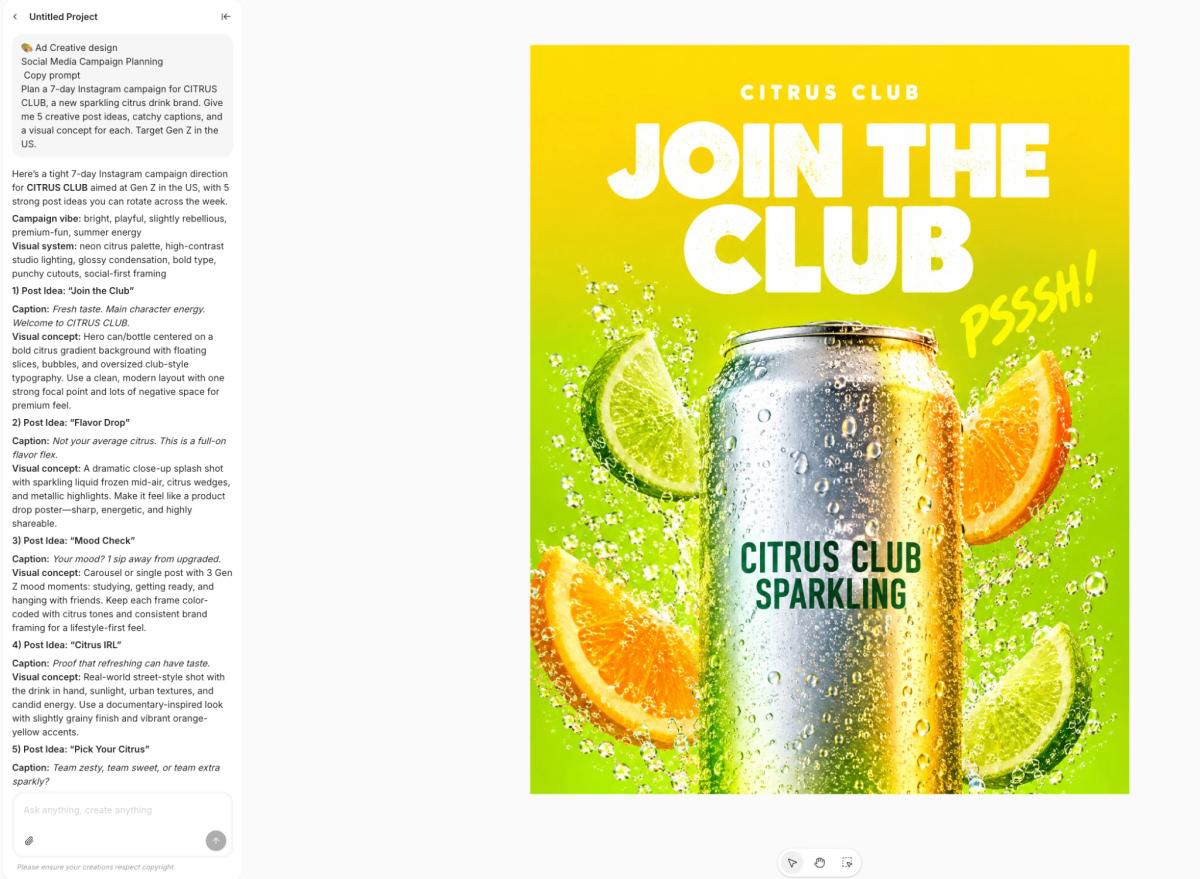
Chat Smith Design Studio CITRUS CLUB social media ad with JOIN THE CLUB headline
Chat Smith creates a colorful citrus soda campaign design with bold typography and a product mockup.

Grok: Grok Imagine Image 2.0 can generate promotional posters and complex text-bearing layouts through prompts and templates. However, a generated visual is not automatically an editable layered design file; verify which editing controls are available in the native experience.

Compare: Text hierarchy, exact price/date, CTA visibility, typography and the effort needed to fix one element without unexpectedly changing the whole composition.

3. Remove Background and Create New Product Scenes

Chat Smith: Background removal and the Image-to-Image editor can isolate a subject, change visual style and generate new settings around a reference. For ecommerce-style social ads, check the cutout edges and whether transparent exports really contain an alpha channel.

Grok: Imagine Image 2.0 also supports transparent background removal and precise local editing, including selected regions of an image. These are real native Grok capabilities, not exclusive to Chat Smith.

Compare: Cutout transparency, product proportions, label legibility, realistic lighting and whether a replacement background changes the product itself.

4. Resize for Instagram Feed, TikTok and Stories

Chat Smith: A dedicated Resize Image or image-editing workflow can help move a social asset between square, portrait and vertical placements. Cropping, exact-pixel resize and generative reframing are different operations; always verify the downloaded dimensions.

Grok: Image 2.0 includes Smart Resize, which can recompose a scene for different aspect ratios such as square and vertical formats by extending the visual. The output still needs checks for crop, text fidelity and the required ad platform pixel size.

Compare: One ad in 1:1, 4:5 and 9:16; keep key text within safe zones and make sure the product remains visible across all crops.

5. Maintain Product and Brand Consistency

Chat Smith: Reference-based image-to-image work allows you to request several campaign visual styles from the same product photo. Keep the packaging shape, color system and brand name consistent across outputs and record which image model produced each variation.

Grok: Grok Imagine provides reference-image support and localized editing. You can attempt to keep a product unchanged while modifying its setting or campaign style; verify details carefully rather than assuming perfect preservation.

Compare: Three variations of one product, checking the same logo, label, proportions, lighting and number of corrections required.

6. A Practical Creative Workflow Checklist

Start with the audience, offer and required format. Generate a 4:5 image, inspect spelling and product fidelity, edit or replace the background, then adapt it to 1:1 or 9:16. Check export dimensions and commercial-use rights before publishing. Cost per usable asset and number of revisions are often more useful decision factors than the first result's visual appeal.

Other Features: Research, Writing, Models and Productivity

1. Real-Time Search and X Trends

Grok: Native X Search can search posts, authors and threads as well as relevant web results. That matters to journalists and social marketers tracking a breaking story, reactions to a launch or discussion around an industry event. Immediate reactions can be useful, but they are not automatically accurate.

Chat Smith: Its web search and research tools support more general online questions and structured briefs. They are not the same as Grok's native X search capabilities.

Verdict: Start with Grok for X-specific context and with the relevant Chat Smith research workflow for broader source-based reporting. Check official documents or primary evidence before repeating a viral claim.

2. Research, Fact-Checking and Citations

Grok: A good research question asks for original documents, dates and links, not just what people believe on X. Grok can pull social discussion into the story, but an X post is a source about a person's claim or opinion, not necessarily proof of the underlying fact.

Chat Smith: Deep Research and supported document analysis help compare sources, organize findings and prepare a client-ready summary. A marketing analyst might combine industry reporting with a supplied PDF and ask for a concise briefing.

Verdict: Judge the links, evidence and uncertainty in the answer. The reference articles' broad claims about one chatbot always being more accurate should not be reused without a controlled, current test.

3. Turn Social Insights into Creative Briefs

Grok: Social marketers can explore public X posts and threads about a product launch, then use that context to draft campaign concepts and social captions. X posts are signals from a subset of users, not proof of a claim or a representative measure of all customers.

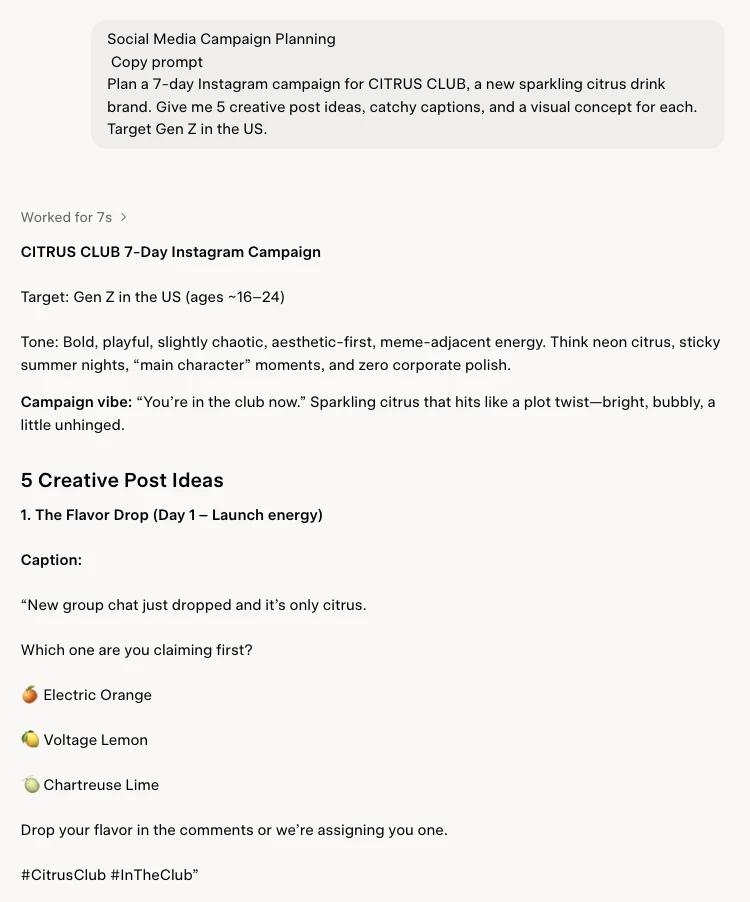
Grok response planning a seven-day CITRUS CLUB Instagram campaign for Gen Z
Grok drafts a seven-day Instagram campaign with creative post ideas, captions and visual concepts.

Chat Smith: A marketer can use web research and writing tools to develop a campaign brief, then move into the AI Image Generator or Design Studio to create visuals. This workflow does not imply access to Grok's native X Search.

Verdict: Grok is a natural starting point for X-specific insights; Chat Smith may be convenient for turning research into a broader collection of content assets. Either way, validate trends and brand claims before posting.

4. Writing Captions, Emails and Social Copy

Grok: Use it to brainstorm X posts, summarize a social conversation, generate punchy hooks or explore different conversational tones. Fast-moving posts often benefit from fresh context, but the suggested copy still requires fact-checking and brand review.

Chat Smith: Its writing and email tools support professional messages, ad concepts, social captions, long-form drafts and rewriting. Choosing among supported model providers gives writers alternative styles or structures without leaving the workspace.

Verdict: Grok is a logical starting point when writing reacts to X discussion. Chat Smith suits a broader content-production workflow that also includes email, research, images and design.

5. Model Choice and Reasoning

Grok native: xAI's current model documentation lists Grok 4.7, with coding and general-work capabilities. Other native products may use distinct image, video, voice or agent systems. The model available in a particular consumer plan may be different from the developer API listing.

Chat Smith: Grok 4.5 was publicly added to its model lineup, alongside other supported AI model providers. A user can compare writing and reasoning outputs across providers, but Chat Smith access to Grok 4.5 does not by itself mean access to Grok 4.7 or xAI's complete agent toolset.

Verdict: Check Grok directly when the latest xAI native model or agent workflow matters. Choose Chat Smith when switching among supported AI providers is the more valuable feature. Neither automatically wins coding benchmarks.

6. Coding and AI Agents

Grok ecosystem: xAI's newer subscriptions can bundle Grok with Cursor and Grok Bot, depending on the plan. These products may connect to repositories or help with sustained tasks; they are not equivalent to a chatbot writing a short code snippet.

Chat Smith: Supported models can explain errors, draft functions, review small code examples or troubleshoot a script. That can cover occasional technical questions for marketers, analysts and other non-developers.

Verdict: Developers requiring integrated coding agents should compare the actual native Cursor/Grok subscription. For ad hoc coding assistance beside other AI tasks, Chat Smith may be enough.

7. Files, Voice and Integrations

Grok: Native Grok supports file uploads, voice interactions and connected tools, subject to availability. That can be useful when discussing a spreadsheet, summarizing a document or working with a supported account.

Chat Smith: Users can work with PDFs and supported files, write summaries, ask research questions and continue with other AI tools. Its integrations should not be assumed identical to Grok's.

Verdict: Verify the exact connector, file type and limit before subscribing. For an ordinary PDF summary, test both and compare accuracy.

Which AI Should You Use for Each Task?

Your goalBetter starting pointWhat to verify
Follow a trending X conversationGrokWhether sources are primary and current
Instagram product adEitherTest prompt accuracy and branding
Social poster or event flyerChat Smith Design StudioDedicated design workflows
Remove a product backgroundEitherConfirm transparent exports
Make a 9:16 Story from a postEitherCheck smart reframing and pixels
Animate a static ad into a ReelGrok ImagineNative image-to-video
Create a research reportEitherCitations, dates and unsupported claims
Make an AI video from a photoGrok ImagineOutput controls and plan allowance
Create a flyer or menuChat Smith Design StudioBrand accuracy and layout
Generate a product imageEitherModel, reference fidelity and text
Write an email campaignEitherTone, structure and editing
Switch across AI providersChat SmithSupported model versions and quotas
Use a coding agent in a repoGrok/Cursor ecosystemRepository integration and plan
Analyze an uploaded PDFEitherFile access and answer quality

Chat Smith vs Grok Pricing for Social Media Marketers

Subscription names matter. xAI introduced The X Subscription in October 2026, bundling Grok, Cursor and X features for eligible new customers. Its site still also lists separate SuperGrok plans. A legacy SuperGrok price should not be presented as the only price available to everyone.

Individual Subscription Comparison

PlanListed U.S. priceKey consideration
Chat Smith Free$0Limited AI models and tools
Chat Smith PRO monthly$9.99/month exampleMulti-model and creative access
Chat Smith PRO annualFrom $39.99/year exampleCheck current checkout
The X Subscription Free$0Limited Grok and connected benefits
The X Subscription Plus$8/monthBase shared usage pool
The X Subscription Premium$30/month4x Plus included usage
The X Subscription Super$100/month15x Plus usage
The X Subscription Ultra$200/month50x Plus usage

xAI's separate Grok pricing page lists SuperGrok at $30/month and SuperGrok Plus at $100/month. These are distinct offers, not necessarily the same package as The X Subscription. Region, billing period, app store, tax and existing-account status can affect the actual plan shown.

What Does the Subscription Really Buy?

Chat Smith PRO may be cost-effective for someone who wants several supported AI providers and recurring writing or creative deliverables. Grok/X can be valuable when native X, video, coding-agent tools or bundled X/Cursor access are the point of purchase.

Chat Smith PRO may be valuable for recurring still-image marketing assets, multi-model writing and design workflows. Grok/X may be valuable if you also use X-specific research, Imagine video or native bundled tools. Compare the full creative workflow, not just the monthly headline price.

Pros, Cons and Limitations

ToolStrengthsTrade-offs
Chat SmithMulti-model access, writing, file Q&A, image tools, Design StudioGrok model access does not include every native Grok feature; plan limits apply
GrokX-aware search, Imagine images/video, native voice and eligible coding/agent productsNative features vary by subscription; social posts can be wrong; usage limits apply

For factual or client-facing research, review primary sources. For AI-generated media, check consent, accurate branding, licensing and the finished output.

Who Should Choose Grok?

Use Grok when social marketing depends heavily on X listening, Grok Imagine's native image editing, or short-form AI videos for Stories and Reels. Grok Imagine Image 2.0 supports Smart Resize and background removal, while Video 1.5 provides motion-oriented workflows subject to plan limits.

Who Should Choose Chat Smith?

Choose Chat Smith when you regularly create Instagram posts, product visuals, social ads, posters, flyers, logos and campaign copy. Its Design Studio starts from the marketing asset you need, while supported image models offer multiple visual styles.

Final Verdict: Chat Smith or Grok?

For social media marketing, Chat Smith is worth considering for a coordinated set of branded still-image assets and copy; Grok is worth considering when native X insights, Imagine editing and AI video are essential. Both can create striking visuals; compare brand accuracy, typography, the ability to revise and export formats before deciding.

Sources and Update Notes

For current visual-creation capabilities, see xAI's Imagine Image 2.0 announcement (Smart Resize, transparent background removal, localized edits) and Imagine Video documentation (image-to-video, short-form formats). Developer API capabilities are not necessarily identical to the consumer app or its subscription limits.

Chat Smith's named creative workflows are described on Design Studio and its image generation/editing pages. For wider Grok functionality, model and subscription access, refer to official xAI product and pricing pages. The two creative tests in this article are suggested methods; no actual generated outputs have been scored.

Frequently Asked Questions

Grok is a single AI model built by xAI and tied closely to the X platform, while Chat Smith is a multi-model app that gives you access to Grok alongside several other leading AI models in one subscription. The choice often comes down to wanting one specific model versus flexibility to switch between several.

logo chat smith

Editorial Team

Managing Editor

The Chat Smith Editorial Team brings together AI enthusiasts, researchers, and creators to make AI accessible and practical. We share trends, tool reviews, and actionable guides that help individuals and businesses stay informed, boost productivity, and get more from AI.

Share this article

Related Articles